For restaurant brands and F&B distributors planning a self-service ordering kiosk rollout, payment is rarely the first thing that fails — the hardware architecture around it usually is. This guide explains how to plan a payment kiosk deployment from the hardware layer up, so that display, computing platform, and payment integration work as one system instead of three separate purchases negotiated with three separate vendors.
Before getting into hardware architecture, it's worth understanding why this category has moved from "innovative pilot" to "standard operating equipment" for restaurant chains in just a few years. The shift toward self-service ordering kiosks is not a short-term trend — it reflects a structural change in how restaurant groups manage labor costs, order accuracy, and throughput during peak hours. Industry research from firms such as Fortune Business Insights and Statista points to consistent double-digit annual growth in the global self-service kiosk market over the past several years, with quick-service restaurants and food retail identified as two of the fastest-adopting sectors.
This growth is not evenly distributed. It is concentrated among multi-location brands that have the operational scale to justify a hardware investment — which is exactly the segment where hardware planning mistakes are the most expensive to correct after the fact. A single-location restaurant can absorb a hardware mismatch by simply replacing one unit. A 300-store chain cannot; a design flaw discovered after mass production means 300 retrofits, 300 site visits, or 300 units running with a workaround.
Deployment scale figures based on aggregated project data across restaurant and beverage chain rollouts; market growth trend referenced from Fortune Business Insights and Statista self-service kiosk market reports.
For brand owners and distributors, the practical takeaway is that hardware consistency and supply chain reliability become more important — not less — as deployment scale increases. A pilot batch can tolerate hardware variation between units; a 500-unit rollout across multiple countries cannot, because inconsistency at that scale turns into a support and maintenance problem that follows the brand for years. This is the lens the rest of this guide is written through.
Many restaurant groups treat payment as a single add-on module — a card reader bolted onto an existing terminal late in the project timeline. In real-world commercial deployment, that approach rarely scales past a handful of pilot units. A payment kiosk is not one device; it is a stack of interdependent components, and a change at any layer of that stack tends to ripple through the others in ways that are hard to predict until you've actually built and tested the unit.
A typical self-service ordering kiosk architecture looks like this: the interactive display captures the order and guides the customer through the menu, the embedded computing platform runs the ordering software and manages input/output between components, the payment module authorizes and completes the transaction, the transaction data is pushed to the restaurant's POS system, and finally everything is synced with the backend for inventory tracking, sales reporting, and multi-store management. If the payment module is selected only after the enclosure and motherboard have already been finalized, integration issues tend to surface late — connector mismatches, insufficient power budget for the payment module, certification gaps that block a market launch — and these are, without exception, the most expensive problems to fix once tooling and production lines are already committed.
As a hardware manufacturer working directly with restaurant chains, beverage brands, and F&B distributors on self-ordering kiosk projects across multiple markets, we've seen this pattern repeat with enough regularity that it's become one of the first things we check on a new project brief: has the payment method been confirmed before the enclosure design is locked? Projects that answer "yes" tend to move from sampling to mass production in a predictable timeline. Projects that answer "no" almost always need at least one structural revision mid-project. This is the core idea behind this guide — payment integration succeeds when it is planned during hardware design, not layered on afterward.
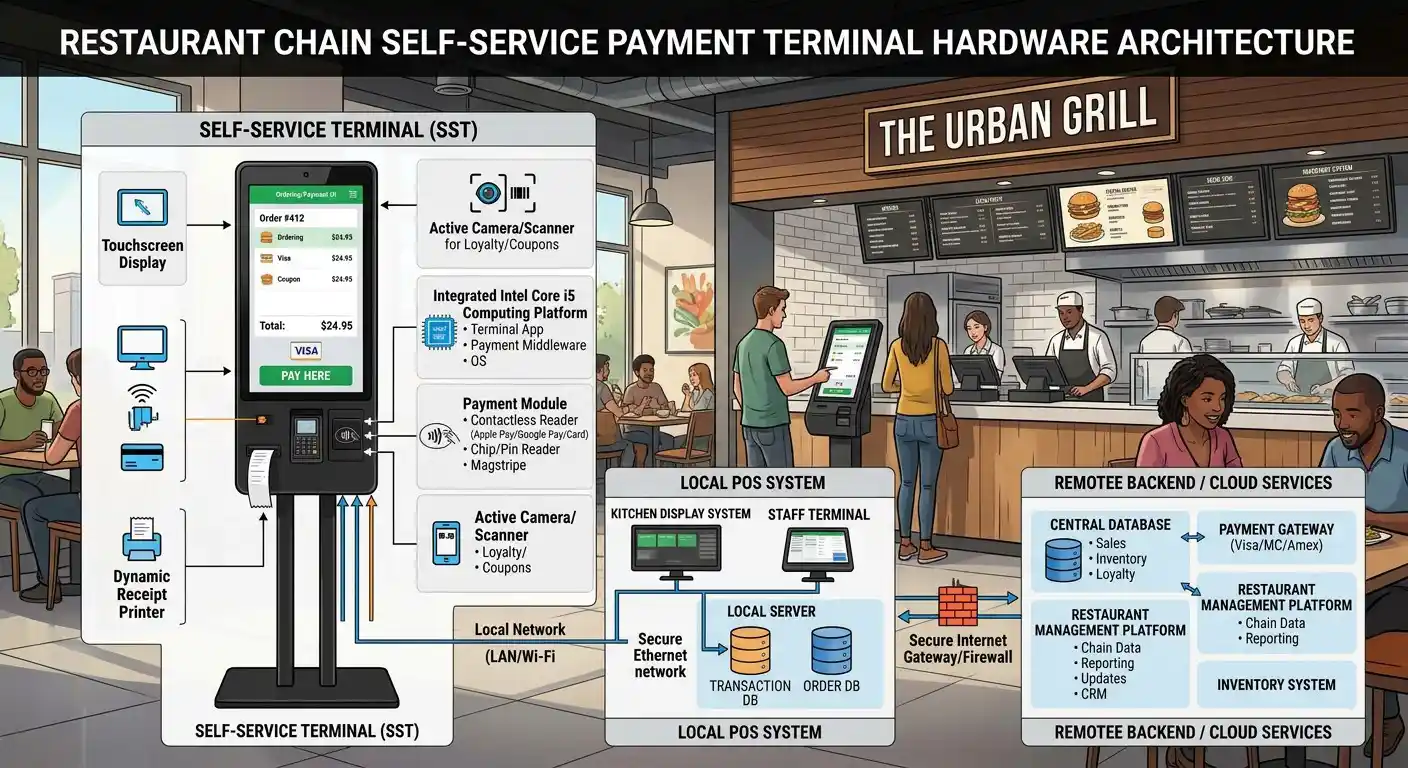
Payment kiosk hardware architecture: display, computing platform, payment module, POS, and backend working as one system.
The choice of payment module has a direct, physical impact on enclosure design, motherboard interface layout, power supply sizing, and internal cable management inside a self-service ordering kiosk. This is easy to underestimate from a software or procurement perspective, but it's the first thing our structural engineers check against any new payment module datasheet. Common integration paths for restaurant kiosk hardware include RS232 and USB-HID connections for standalone external card readers, Ethernet or serial links for semi-integrated payment terminals that need to communicate independently with a payment gateway, and dedicated mounting cutouts with reinforced brackets for fully embedded payment modules that sit inside the kiosk housing itself.
Each of these paths has trade-offs that matter at the project-planning stage. A standalone external reader is the fastest to integrate and the easiest to swap out later, but it adds a visible cable run and a secondary point of failure. A fully embedded module produces a cleaner customer-facing unit and better tamper resistance, but it commits the enclosure design to that specific payment module's dimensions and mounting pattern — meaning a supplier change later in the product lifecycle can require re-tooling the housing, not just re-flashing the software.
A countertop payment kiosk built for a quick-service restaurant needs a compact structure that still leaves room for an external payment terminal and its cabling, since counter space is usually shared with other equipment and staff need to be able to service the unit without dismantling the whole kiosk. A floor-standing self-ordering terminal, by contrast, usually needs the payment module permanently fixed inside a tamper-resistant, vandal-proof housing with reinforced screws and concealed cable routing — a materially different mechanical and structural requirement, even though the underlying payment logic and certification requirements may be nearly identical between the two form factors.
This is why hardware planning and payment integration should happen together rather than sequentially, ideally starting with a joint review between the brand's payment/IT team and the hardware engineering team before the industrial design phase begins. Brands that lock in an enclosure design before confirming the payment module often end up retrofitting mid-project — cutting new openings into an already-tooled housing, redesigning brackets, or in the worst cases, scrapping an initial production run — all of which increases cost and delays rollout timelines across stores that were counting on a fixed opening date.
Android and Windows are the two dominant computing platforms for restaurant self-service kiosks, and this decision affects deployment cost, ongoing maintenance workload, and — critically — how smoothly the kiosk fits into an existing POS ecosystem that may have been built years before the kiosk project started.
| Comparison Factor | Android-based Kiosk | Windows-based Kiosk |
|---|---|---|
| Hardware & deployment cost | Generally lower per unit, well suited to large multi-store rollouts where budget per terminal matters | Higher unit cost, usually justified when deep POS/ERP integration outweighs the price difference |
| Multi-store replication | Strong — simplified app packaging, faster provisioning, and OTA update tools built for fleet deployment | Possible, but typically requires more IT resource and configuration time per site |
| Integration with complex POS/ERP systems | Adequate for standard ordering and payment workflows; can require middleware for legacy enterprise systems | Stronger native compatibility with enterprise POS/ERP software already common in large restaurant groups |
| Long-term OS maintenance & security updates | Depends heavily on the chipset vendor's long-term support roadmap — worth confirming before committing to a platform | Longer, more predictable OS support lifecycle backed by enterprise support channels |
| Third-party development ecosystem | Large mobile-first developer pool, faster iteration on customer-facing UI | Mature enterprise software ecosystem with broader legacy tool and driver support |
| Typical brand profile | Fast-growing regional chains prioritizing speed of rollout and lower per-unit cost | Larger enterprise groups with an established, complex existing POS environment |
In practice, the right answer depends less on brand preference and more on what the existing POS stack already requires. We typically ask for a copy of the brand's current POS integration documentation before recommending a platform — this single step avoids a large share of the compatibility issues that would otherwise only surface during on-site testing after the first units have shipped.
Expansion into a new market almost always changes payment requirements, and this is one of the most common reasons a brand comes to us mid-lifecycle rather than at the start of a project. A European restaurant brand entering Southeast Asia, for example, typically needs to add QR-based mobile payment on top of an existing card-payment setup, because card penetration and QR/e-wallet adoption differ significantly between regions. The practical hardware question is: can the same kiosk platform switch or add a payment module without redesigning the motherboard or the enclosure from scratch?
A well-planned self-ordering kiosk hardware platform allows a QR scanner or NFC module to be added, or an existing card reader swapped, without altering the core structure of the unit — keeping the standardized platform intact while adapting to local payment ecosystems, local currencies, and country-specific regulatory or certification requirements market by market. This usually means designing in spare mounting positions, spare power budget, and spare interface headers from day one, even if they aren't populated in the first production run — a small additional cost upfront that avoids a full redesign later.
A rollout of 100+ kiosks is not really a one-time hardware purchase — it's effectively a multi-year maintenance commitment, whether or not that's how it's framed in the initial RFQ. Brands and distributors evaluating a payment kiosk supplier should be asking about several things beyond the unit price: component availability over the expected product lifecycle (can this exact board and payment module still be sourced in year three, or will a mid-life hardware revision be forced on you), remote device management capability for firmware updates, diagnostics, and troubleshooting without a technician physically visiting every store, and hardware consistency across production batches, so that a unit purchased in year one and a unit purchased in year three behave identically in the field and can run the same software image without exceptions.
This is also where component sourcing strategy matters more than it might appear. A manufacturer that relies on a single-source component for a critical part of the payment path (a specific touch controller, a specific payment module variant) introduces a supply risk that only becomes visible when that component goes end-of-life mid-rollout. Asking a prospective supplier directly about second-source options for key components is a reasonable, and increasingly common, question at the RFQ stage.
Chain brands typically need two things that pull in opposite directions at once: a consistent look and hardware platform across every store for brand identity and staff training purposes, and enough flexibility to adapt payment modules, interface layouts, and specifications for different markets or POS environments. This is where OEM/ODM manufacturing capability becomes a genuine differentiator rather than a marketing phrase — a manufacturer that can hold a standardized core platform (motherboard, chassis, display module) constant, while adjusting payment interfaces, branding elements, and regional certifications on top of it, without re-engineering the entire unit for every new market or store format.
In practice, this usually plays out as a "platform + variant" approach: one validated core hardware platform, with a defined set of approved variations (payment module type, enclosure color/branding, regional certification package) that can be selected per order without triggering a new full design cycle each time. Brands that ask for this structure explicitly during supplier selection tend to have a much easier time scaling from a 20-unit pilot to a 300-unit regional rollout later.
As a hardware manufacturer, our role goes beyond producing a self-service ordering kiosk — it covers the full project cycle from early-stage planning through after-sales support, which is where most of the real risk in a large kiosk rollout actually lives.
Hardware architecture planning, payment module compatibility review, and platform recommendations (Android/Windows) based on your existing POS environment before any tooling begins.
Enclosure design, mounting and interface layout, branding, and payment module integration adapted to your specific project and store format, from countertop to floor-standing units.
Production processes aligned with CE, FCC, and RoHS requirements, plus supporting documentation to help with target-market compliance and import requirements.
In-house SMT production line and assembly, batch testing, and burn-in testing before shipment to maintain hardware consistency across large, multi-batch orders.
Export packaging designed for kiosk-sized units, consolidated shipment coordination, and documentation assistance for international, multi-country delivery schedules.
Spare parts availability, remote troubleshooting guidance, and warranty support structured for multi-store and multi-country deployments rather than single-unit repairs.
The right kiosk hardware configuration depends heavily on the deployment environment, not just the brand's general requirements. Below are four scenarios we see most frequently, along with the hardware details that tend to get overlooked in each one.
Quick-service chains are typically running high transaction volume across dozens or hundreds of locations, with standardized hardware and centralized device management as non-negotiable priorities — every store needs to look and function the same way, and head office IT needs to be able to see and manage the whole fleet from one dashboard. A floor-standing self-service ordering kiosk is the common form factor here, combining a large touchscreen, an integrated payment module, and a durable structure built for continuous daily use across long operating hours in high-traffic locations.
The detail most often overlooked in this scenario is thermal management inside a sealed floor-standing enclosure. Once a payment module, motherboard, and display driver board are packed tightly into a vandal-resistant housing with limited ventilation openings (openings are deliberately minimized for security reasons), heat dissipation becomes a real engineering constraint rather than an afterthought — and a unit that runs fine on a test bench can still overheat during a lunch rush in a poorly ventilated store corner. This is typically addressed with internal airflow channels and component placement planning during the enclosure design phase, not fixed after the fact with a bigger fan.
Beverage brands typically prioritize speed of replication over feature complexity — new stores need to open fast, often on a schedule set by lease agreements and marketing launches, with minimal installation effort required from store staff who are not hardware technicians. A compact countertop ordering kiosk fits this model well, supporting mobile and QR payment methods within a small footprint that doesn't compete with existing counter equipment.
The commonly missed detail here is cable routing and mounting bracket design that allows the unit to be installed correctly by non-technical store staff, without a dedicated installation team traveling to every new location. This means color-coded or keyed connectors, a mounting bracket that only fits one way, and a setup process that can realistically be completed in under 20 minutes by store staff following a printed guide — details that matter far more at store-opening speed than any single spec on a datasheet.
Food court environments often run multiple brands and multiple back-end ordering systems side by side, sometimes managed by a mall operator rather than a single restaurant brand. Flexible integration matters more than hardware uniformity here — the kiosk platform needs to support several different software systems and payment configurations without requiring a different hardware SKU for every tenant, which would be operationally unmanageable for the mall's facilities team.
The detail most projects underestimate in this scenario is durability requirements shaped by shared-space use: higher foot traffic than a single-brand store, more frequent cleaning with commercial-grade disinfectants (which can degrade certain screen coatings and plastics over time), and a higher expectation of tamper resistance since the unit isn't under constant staff supervision the way a counter unit in a smaller store would be.
Hotels and similar hospitality deployments are a growing use case for the same underlying kiosk hardware platform, typically for self-check-in with an integrated payment step, or for in-lobby food and beverage ordering during off-peak restaurant hours. The operating profile is different from a restaurant counter: these units often run 24/7 rather than during defined service hours, and the design language usually needs to be more neutral and premium-looking than a typical fast-food kiosk, since it sits in a hotel lobby rather than a QSR counter.
The detail that matters most here is uptime and remote diagnostics. A kiosk that goes down at 11pm in an unstaffed hotel lobby needs to be identifiable and, ideally, remotely resettable without a technician being dispatched overnight — which pushes the hardware requirement toward remote management capability and redundant components (such as dual storage) more than it does in a restaurant setting where staff are present to notice and report an issue immediately.
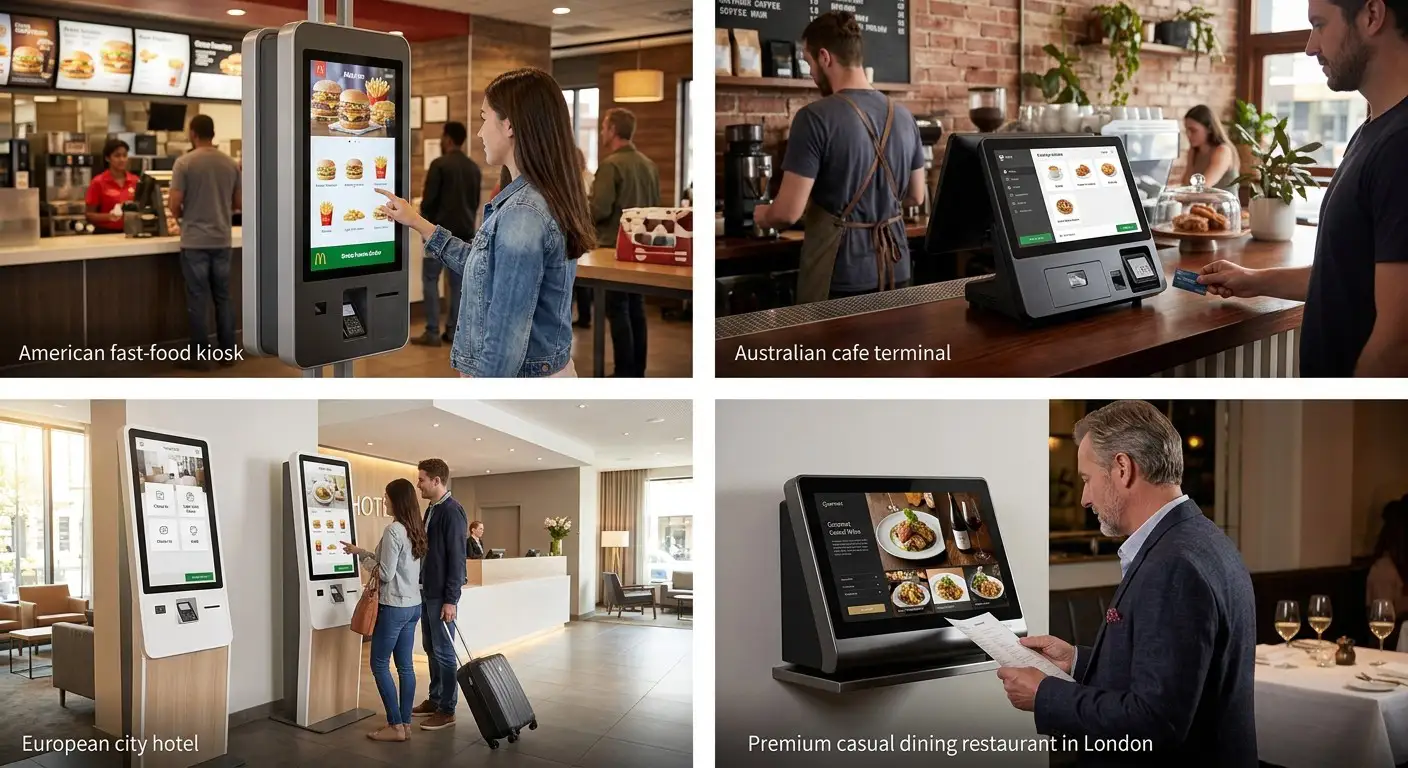
Different kiosk form factors suit different restaurant and hospitality deployment scenarios, from quick-service chains to hotel lobbies.
A fast-growing regional beverage brand, operating across several Southeast Asian markets, was preparing to roll out self-service ordering kiosks across multiple store locations as part of a broader digitalization strategy aimed at reducing counter queues during peak hours and freeing up staff for drink preparation rather than order-taking. The brand's requirement looked straightforward on paper — support local QR payment methods, connect to an existing cloud-based ordering platform, and keep hardware consistent across all stores — but the rollout timeline was tight, tied to a marketing campaign launch date, and store openings could not be delayed for hardware issues without significant cost to the brand's franchise partners.
Beyond the mounting bracket revision, the second technical issue surfaced during real-store testing rather than in the lab: the initial QR payment module, when placed close to the kiosk's WiFi antenna in the compact countertop enclosure, showed intermittent scan failures during high-traffic testing at one pilot store. This was traced to signal interference between the two components in the tight internal layout and resolved by relocating the antenna and adding shielding, rather than by changing the payment module itself — a fix that was folded into the production design before the main rollout began, avoiding the same issue recurring across the full order.
An Android-based countertop payment kiosk platform was supplied with a customized enclosure sized for the brand's typical counter footprint, an integrated QR/card payment module repositioned to solve both the access and interference issues identified during sampling, and pre-configured connectivity for the brand's existing cloud ordering software, allowing each store to complete installation without specialized technical staff on-site.
Over 80 kiosks were deployed across multiple store locations in the initial rollout phase, with a second phase already planned for additional markets. The unified hardware architecture simplified staff training since every unit behaved identically regardless of store, reduced per-store installation time to under 30 minutes on average, and gave the brand a consistent maintenance process it could hand to a single regional service partner instead of managing repairs store-by-store as it continued expanding into new regions.
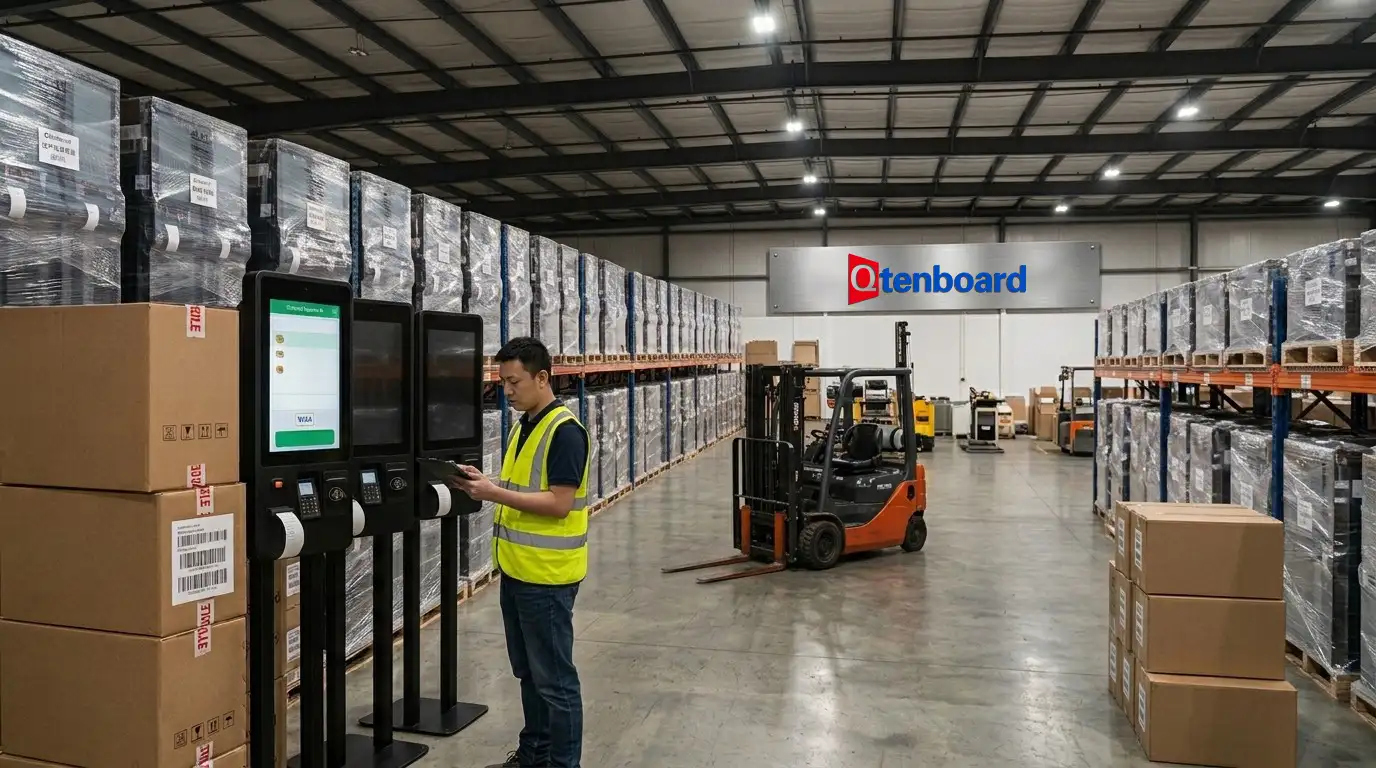
In-house SMT production line and assembly process supporting consistent quality across large-volume kiosk orders.
Can your kiosk hardware integrate with third-party payment terminals?
Yes. Our self-service ordering kiosk platforms are designed with standard RS232, USB-HID, and Ethernet interfaces, which allows integration with most third-party card readers, QR scanners, and semi-integrated payment terminals without redesigning the core hardware, provided the payment method is confirmed during the initial design review.
If our stores need to support both card payment and local mobile wallet QR codes, what hardware changes are required?
In most cases, this only requires adding a QR scanning module alongside the existing card reader mount, using reserved interface headers and power budget planned into the original design. If the platform wasn't designed with spare capacity for this, it may require a mounting bracket revision — which is why we recommend planning for multi-payment support at the initial hardware design stage rather than retrofitting later, as our Southeast Asia case study above illustrates.
Can you customize kiosk dimensions and payment module placement?
Yes. Our OEM/ODM process covers mechanical structure design, interface layout, branding, and payment module positioning, adapted to your store format, whether that's a floor-standing terminal, a countertop unit, or a hybrid design for shared spaces like food courts.
Should our restaurant chain choose an Android or Windows kiosk?
It depends primarily on your existing POS or ERP environment. Android generally suits fast, cost-efficient multi-store rollouts, while Windows tends to fit brands with more complex, established enterprise POS integrations. We typically review your current backend system before recommending a platform, since the wrong choice here is the hardest and most expensive one to reverse later.
Can one kiosk hardware design support different countries with different payment ecosystems?
Yes. We standardize the core hardware platform — chassis, display, motherboard — and adapt the payment module and regional certifications for each target market, so brands can keep a consistent kiosk appearance globally while meeting local payment and compliance requirements market by market.
What certifications does your payment kiosk hardware carry?
Our production processes are aligned with CE, FCC, and RoHS requirements, and we support additional target-market certification documentation as needed for specific country deployments, which we typically confirm during the pre-production sign-off stage of a project.
How long does a typical kiosk hardware project take from order to delivery?
Timelines vary by customization level and order volume, but based on comparable projects, sampling and design revision typically take several weeks, followed by a mass production and quality testing period before staggered shipment. Projects requiring payment module changes mid-sampling, as in the case study above, should plan additional buffer time before store opening commitments are finalized.
If you're planning a self-service ordering kiosk rollout — whether it's a pilot for a single store format or a multi-country deployment — send us your store count, preferred payment methods, and existing POS environment. Our engineering team will review your requirements and get back to you with an initial hardware configuration recommendation.
Contact Our Team
CEO | Interactive Display & Collaboration Solution Expert
I am the founder of Qtenboard, bringing over 17 years of hands-on expertise to the touch display industry. Drawing on the global management perspective gained through my EMBA studies at ShenZhen University, I lead my team in optimizing every stage of our operations—from product definition to high-efficiency supply chain management—ensuring our manufacturing capabilities remain at the forefront of the industry.
As the leader of Qtenboard, I specialize in providing tailored OEM/ODM solutions for interactive whiteboards, LCD video walls, digital signage, and industrial-grade touch terminals. Backed by our 330,000 m² modern industrial park in Shenzhen, we maintain full-lifecycle control over industrial design, precision manufacturing, and rigorous performance testing.
With nearly two decades of project experience, Qtenboard’s display solutions are now deployed in over 120 countries and regions, earned the trust of more than 15,000 enterprise customers worldwide. If you are seeking a responsive partner with a deep manufacturing foundation for your customized touch display projects, my team and I are ready to support your vision with professional excellence.

 EN
EN
 pt
pt  spa
spa  th
th  vie
vie  aze
aze  bel
bel  est
est  lav
lav  ukr
ukr  ru
ru