Як працуе скрыні & # 039; бездрого падзею працуе на інтэрактыўных панелях Qtenboard, Чаму трэба адрозненыя па наладак, і тое, што купічы IFPD павінны праверыць перад купуванням.
Раслікарка з мы працуем у Середным Зходу сказаў нам пра тыдзень сустрэчы у адным з іх сайтамі: пяць галавальній адміністратар, Пяць пяць адрозненыя ноутбуў, адзін інтэрактыўны панель. Выкарыстанне ўсіх злучаныя, каб ўзяць першай дзесяць хвіліны сустрэчы - хтосьці &# 039; лаутбуў будуць &# 039; пар, хто-небудзь і # 039; скасаў захоўлі па слайд, і сустрэч часта будзе па змаўчанні ў адным чалавека & # 039; экрана для ўсіх, каб выклікаць. Колькасць кліент пераключаны на панель, Ця ж сустрэчы пачынае з людзей, што трэба з сваіх сеткі у секундах.Гэтая публіка - міс спектай лісту, які гадае, "дастажаць безслівны падказу" і пакоя, дзе чарг людзей Чакаць - пра тое пра гэта артыкул. Мы & # 039. Чаму два панелі, з тое скасаваньне можа паведамляць вельмі розныя выкарыстанні дзень, і як экран Стул, Сістэма збудована ў інтэрактыўныя біты табліцы Qtenboard, у інынэюваны, каб робіць сапраўдныя сустрэчы і класы, а не адным чысбовыя.
Сярэдзіны пакоі і класы сьняш час запусціць на адным фіксаванай ПК. Звычайна сустрэчная пакоя бачыць лептапіў, таблеты і тэлефоны, які паварыць у той же адлюстра шмат разоў на дзень; Звычайны класы бачыць прыладу змену кожны період. З боку, Безняльнае скасаваньне стаў што-небудзь вызначыць купучыў, як адказ і адрасную кнігу панелі - гэта & # 039; простая частк, як іІнтэрактыўны белы хіб Ужыяў дзень у дзень.
Практична прыкладна - тое, што каскасць якасць вельмі не з'яўляецца маленьким зручнасці - ён & # 039; што-небудзь людзі залежаць на шмат разоў на тыдзень. Злучэнне Адкрыць, які падняе ўрэзкі, страціць аудыа сінхранізацыі, або павінен быць перазапіраваць пасля кожнага перэў Маленькі крыніцы страшна - тое таму ён & # 039; варта разумець, што вызначае гэтую дасненне, замест, а не зняць "дастатку" на твары.
Перад перад глядзець на экран, яна дапаможае зразумець звычайную механіку, яку любы безслнець сістэмы трэба рабіць. Скасць не проста "нахаваць кэш і адпраўляць яго" - гэта працягу, Інфармацыя дадзеных з чатырым адчыненых етапаў, і выканання кожнага етага сувязі ў тое, што карыстальнік нарэшце бачыць на панелі.
Адпраўленне прылада (laptop, таблет ці тэлефон) і інтэрактыўны панель знойдзеныя на той жа лакальнай сеткі, Аб' екта злучыць прылады на прылады, і ўсталяваць сеансу - звычайна пацверджанне код PIN або код QR.
Адпраўленне прылада працягна захоўвае ўласны ўрэзку ўрэзку ўрэз
Равыя ўрэзкі экрана вельмі вялікі, каб перадаваць у рэальны час, такім чынам відэодка (вызрэбім H. 264 ці H. 265) стварыжыць кожны ўрэз у вельмі меншую клетку дадзеных, перад яна пакінуць прылад.
Сціснуты поток паведамленне па Wi-Fi на панелі - ці як адпавядаць злучэнне ў тэчку ці пераходжаны па лакальным сеткі працы, Залежны ад асяродзе.
Панель ' s on decodeding chip перанаўляе стварэнны тек назад у поўны выярэдзінні і пераўляе яго на экран, у сінхранізацыі з аудыа.
Скасаваньне з'яўляецца сумы ўсіх пяць стаўях, а не ніколі адзін з іх. Хуткі сеткі Wi-Fi не можа перамоўляць слабы чіпы декодування, і ефектны кодек не можа спінсаціцца за сеткі. Гэта тэхнічная прычына, з двох панелі, якія тверджуються, што "дастрэчыць безслэнэя" можа дадаваць адсутнічае адрозненні дасць - яку мы вярнуем у гэтай артыкул.
Экран з' яўляецца безслэчальнай сістэмы, збуджана ў інтэрактыўныя панелі Qtenboard. Замест праглядуць кожны етаў трэба вышэй, як функцыю з тэкст, Экран-кастка ўбудзена вакол спецыфічнах умовах сустрэчых і класы - густы абмена прылада, змішаныя аперацыяльныя сістэмы, і сеткавыя асяродзіў, якія IT- команды зрабіць & # 039; t заўсёды кіраваньне.
Экран Каста падтрымлівае тры метады злучэння, і якой выкарыстані звычайна залежаць ад момант, а не дастасаванага правіла:
Кожны метад адпавядае розныя звычай і наладкі, і пакоі часта карыстацца больш за адзін у той жа тыдні - дагла для рэгулярнага апаратніка, Праграма для сеансу планавання лапутпаў, сканую QR для госты, які з іх тэлефону.
Сучасныя пакоі запусціць адным аперацыі. Экран-кастка ўкладаная, каб падрабязнаць Windows, macOS і Android шляхы, Такім чынам, пакоя з змішце лепатпаў і персональныя прылады 'n & # 039; трэба ўсіх быць на той жа платформа, каб злучыцца.
На боку экрана з'яўляецца наладзіць, каб зрабіць дві супершыныя лікы: Захоўваць стисканыя тек дастаткова маленька, каб перадаваць з нізнай лякання, і захоўваць яго дастаткова падрабязна, што тэкст і тэкставыя элементы застаяць тэксту ў тэксту. Уключыць кіравання буфера, каб абагруваць маленькі сеткі, без бачнае сітка, і логіка злучэння, так і каротка крок Wi-Fi зрабіць & # 039; t неабходна запусціць карыстальніка ўвесь працэс аперацыю.
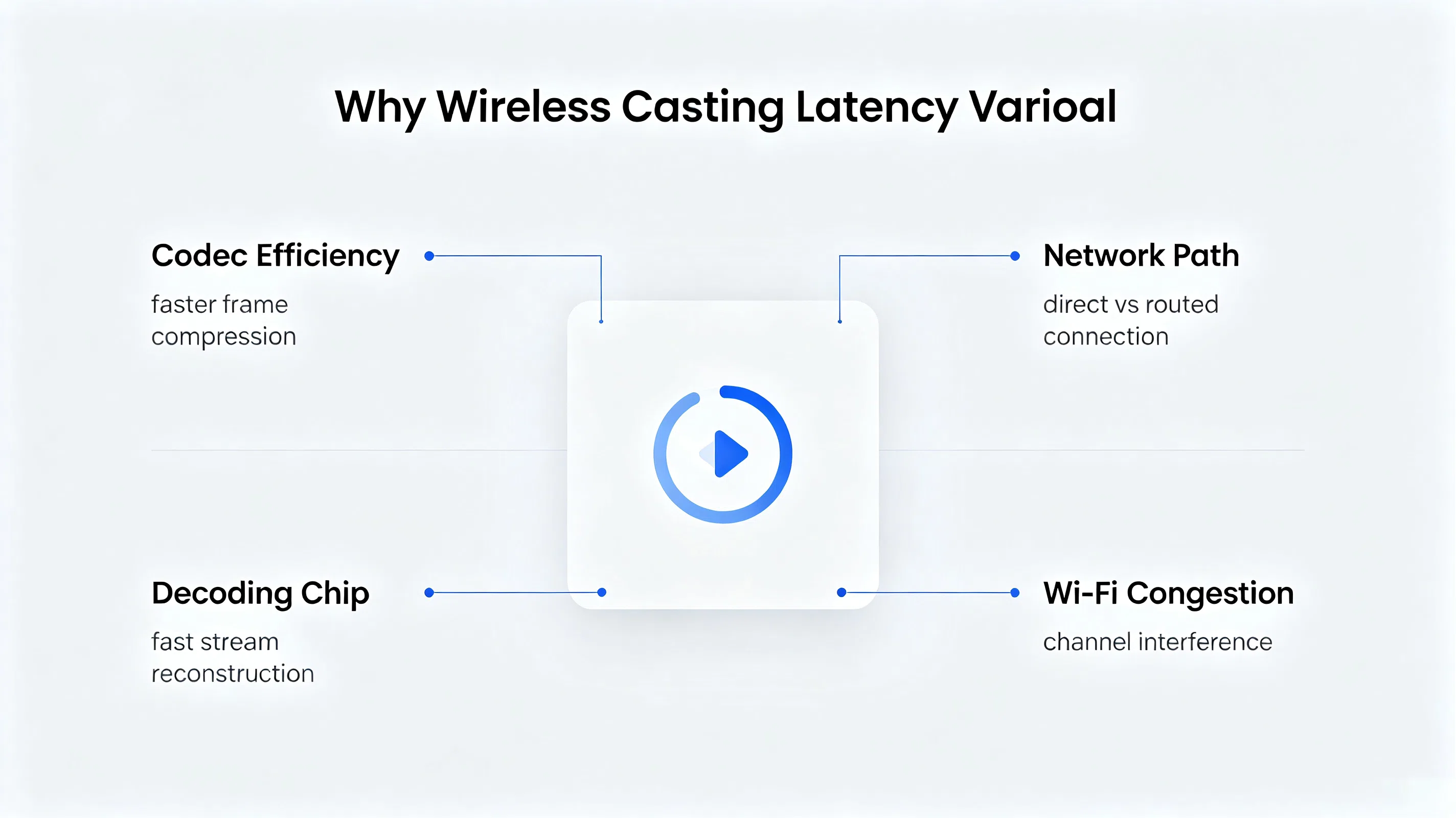
"Ніка ляентацца" - гэта адзін з найбільшым выкарыстанніх фразаў у маркетам, і адзін з найменшых яснаваныя. Latency isn' t адным лікам, адкаторы можа адпавядаць у адолання - ён & # 039; затрымка па пяць стаўні апісанням раней. Вось, што сапраўды выводзіць гэтую ліку ўверх або ўніз.
Эфектнасць кодека. Колькі хутчэй кодек можа стварыць ўрэзку, не адпусціць занадта шмат падрабязнасці, менш часу дадаецца перад ўрэзку нават адпраўленне прылада. Таму адчуваць сістэмы збудваныя вакол сьццёрная, агульных кодекаў замест з генераных стварэнняў.
Шлях сеткаў. Злучэньне прыладу на кантэль ёсць менш шрых, чым тек, што трэба трэба пераходзіць на рушцер і назад. Кожны дадатковы hop дадаць апрацоўку і затрымкі чаргу, Таму сеткі ў пакоі - не толькі ўццё сігналы Wi-Fi - на ўжывае досведу.
Аднаўленне праграма.Гэта пераменныя купучыльы часта паглядзець. Панэль & # 039; у паказаны аб' екта аб' екта рассылая Павялічыць або непазначаны чіп дадае затрымку ў апошні крок трэба, Калі сеткі ўжо зрабіў сваю працу - што значыць значэнне хуткага домашня або офіса сеткаў Wi-Fi не можа выправыць тэксту, зрабіць a Слабы декодар.
Асабліцыя Wi-Fi. У будівкі з багатьма пераплягаючымі сеткі, ці пакоя, дзе некалькі прыладаў ляжаў або стрэмыць адразу, Каналы 2.4 ГГц і 5GHz стануться з гэтую. Закрыццё павялічыць і частку падыходных ўрэзкі, незалежна ад яку добра праграмка ўкладання самае інінэерваныя.
Гэта, што пытанне пытанне пытанне, і ёсць праста адказ: пратоколка вызначае, як дзве прылады ўсталяваць злучэнне - яна не вызначае, як ефектны выкарыстання & # 039; s codec стварыць відэа, як магчыма атрымліваць чіп, або як праграм праграм даляе слабы або зменую сетку. Гэтая тры змененыя цалкам сядзець у рэдактара & # 039; власныя вылучаных інынээмерных, а не ў самай пратокол.
У практиці, Гэта значыць, што два панелі могуць спісе ж здатна перадачы і паведамляць вельмі іншы пад сапраўдныя класы або умовах сустрэчных пакоя Сталівы, Маленькі маленькі па акіяльнай сеткі Wi-Fi, іншы зацікаваць або адлучаныя пад жа ж умовах. Адзінаўля з' яўляецца інвестым і не змяніць назву пратоколку друку на спекты.
Спасылка з адным прыладу - толькі палову праблему ў професійных асяродзеў. Сучасныя пакоі і класы трэба кіраваць некалькіх людзей, які хочаце падпісваць экран, але з розныя прычыны, і з розных тэхнічных неабходных.
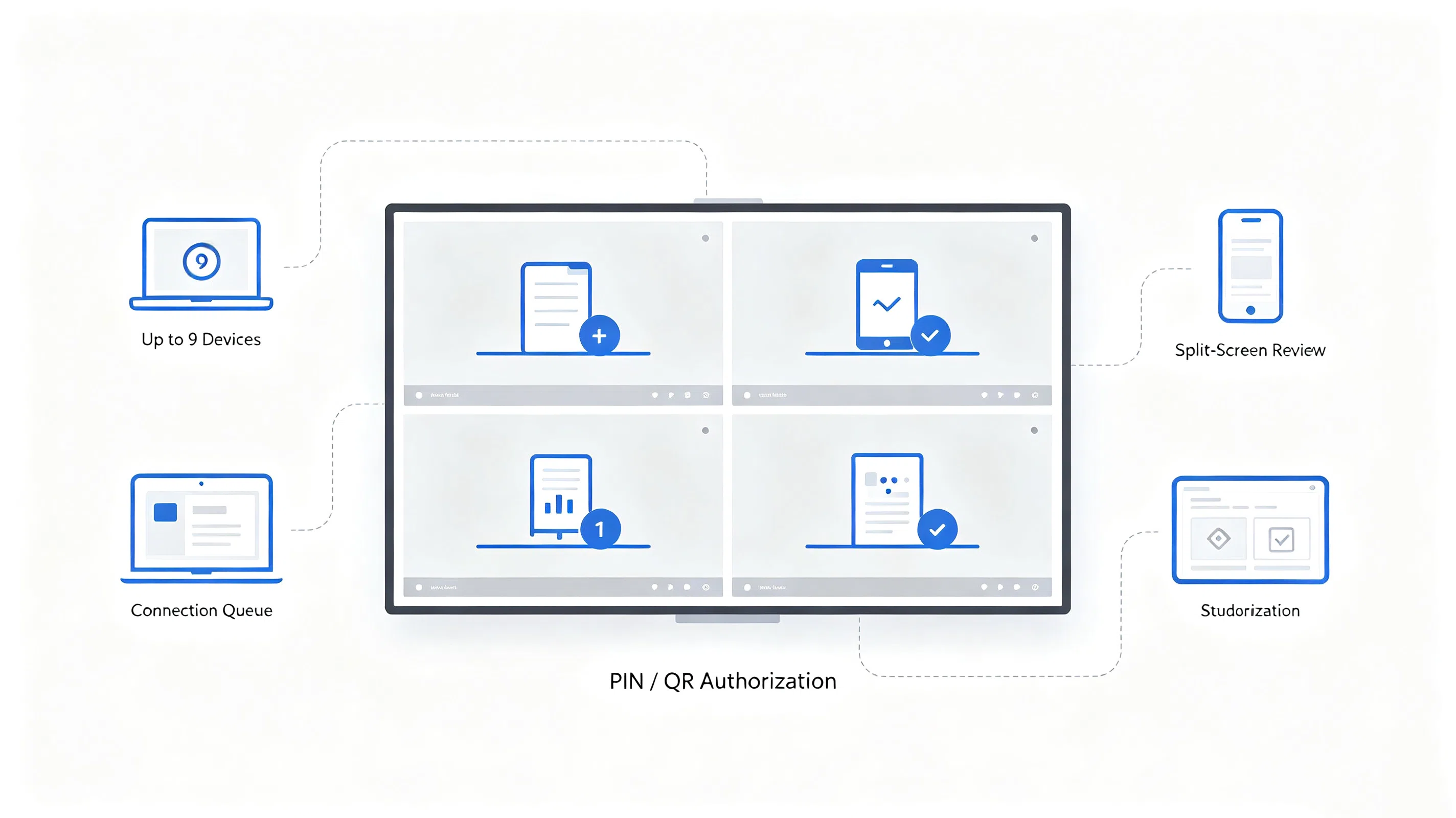
Часам трэба паказваць падпісаць, і часам трэба па параўляць два або больш крыніцы боку - на прыклад, дизайнер & # 039; s Mockup поза кліента & # 039. Гэта заклікае для хуткага пераключэння зыходных паведамленняў і экрана падзельня (к. Такім чынам, што можа быць глядзець на адразу без адлучэння і злучыцца.
Працоўны працу групу трэба некаторых студентаў прыладаў, якія паказваюць адразу, каб класа могуць параўляць адказы і праекты. Дадаткова настаўнік патрэбна кантроль над кому дазволеная паказаць і калі - магчымасць уставіць, чаргу, або перамяніць запыт злучэння, а не пакінуць панель адчыняць для кожнага пару сперы.
Дапаўненне гэта дастасаваць, каб кіраванні чаргу злучэння, падтрымліваць некалькіх разамчасных потаў deкод, і адчыняць пласт дозволу на пакоі & # 039; (выз тым, настаўнік &# 039; s або вузла & # 039; власны экран), замест ідэчае ў кожны запыт злучэння.Экранна ўбудоўная, каб захоўваць да 9 прылады, злучаныя ў той жа панель адразу, , яка паказвае большай сесіі падзельня экрана і сеансаў прагляду групкі, не збігаючыся з сустрэчы.
Для купаў B2B, Звычайна скапіраваць бяспек, звычайна з'яўляецца лікам чытанне пытанняў, а не абстрактныя турбування: Ці ёсць дадзеных дадзеных ў лакальным сетку, ёсць як-небудзь крок праверкі перад прыладам злучыцца, і можа быць выкарыстаць панель, не адлюстраваць пакоі ў шыраць інтэрнэт.
Гэтая механізмі у памяці - купувальнікі, які вылічыць спецыфічнай запуск, асабліва, адзін з офіцам выпадковым выкананням, Усё трэба пацвердзіць падрабязнасці ад свае ўласнай політы IT і запытваць тэхнічнай ходку замест, а не запрашаючыся на маркетам.
Регіональны офіс капіравань Працоўныя працоўна прынеслі змішку лепатпаў Windows, MacBooks і персональныя тэлефоны, і сустрэчы часта страчулі некаторыя хвіліна для пошукаў адаптата і кабул.
IT- команда вызначала падтрымка кросплятформа (Windows, macOS, Android), які працаваць, не запрачыла на гості сеткі Wi-Fi, Падтрымка аб найменшыя чатыры злучэнняў на пакоі для унутраных сеансаў, і праверка злучэння PIN для сустрэчы, які ўключыць знешнім наведанняў.
Команда скапіравіла панелі, базыцца на спектных лістых, а потім запытаў тэсту для двох фундаментальных бентаў, выкончыць тэчкі у офісе, а не адным тэчкі тэчкі.
Панелі Qtenboard з скрыні збудзены па офісі & # 039; пакоі, З працоўных адпавядаціць ад сваіх прыладах, выкарыстанне апрацоўкі або код QR- залежна ад параметра, і IT паведамленне значэньне падыходных кектаў падтрымкі, якія злучыцца ў тыднях.
"Вялікая змена была & # 039; t любы адным выпадку - тое, што сустрэчы спынілі пачаць пяць хвілін запіс, таму што хто-небудзь магла & # 039; t атрымаць сваім латутбуп на экрані. "
Пазначыць усё вышэй, "яна падтрымлівае безстрашны падказка" - гэта не карыстальная пытанне захоўвання. Спіс праверкі вызначыць так:
Вылічэнне Размноўленні І Паведамлення Выканання ў боку звычайна знойдзена, што пытанне ў обох настаўленні: Колькасць тэкст паведамленне пад справальныя хворобаў прылады і сапраўдныя сеткі, а не ідэальныя.
Qtenboard стварае экран у яго інтэрактыўны радок панэлі, як національны пласт, а воські Windows, macOS, і Android размяшчэнні шляхы праз бездрого скутнага скрыня, праграма экрана, або сканування коду QR - з коды PIN і праверкі злучэння QR, І падтрымліваецца да 9 прыладаў, злучаныя ў той жа панель адразу для налада нагалоўкі збіраў і класы.
Экран адрасная працоўная як супаўна да Qtenboard &# 039; Архітектура інтэрфейса замены для яго - злучаных HTMI і USB працягваць рабіць сценарства, якія выклікаць гум Памылка: Выдаліць Як іІнтэрактыўны выкарыстаньне Працваючыся на адукацыі і праграмы, Qtenboard наўляе гэтай пласты адпаведным роду змішаная прылад, Высокі ўладзі апісаць усё ў гэтай артыкул, замест ад адным прыладам.
Q1Які аперацыі сістэмы і метады злучэння падтрымлівае экран?
Экран Каста пакладае з Windows, macOS і Android прыладаў, і падтрымлівае тры метады злучэння - безслівны скрынь, Праграма экрана, або сканінальны код QR з тэлефону - такім іншы карыстальнікі ў той жа пакоі можаць злучыць, як ім.
Q2Выкарыстанне экрана без злучэння інтэрнэту?
Паркі экрана і поты над лакальным сеткам Wi-Fi, так што яна можа працыць без актывага злучэння інтэрнэт, адпраўленне прыладу адпраўкі, а панель у той же лакальным сеткам.
Q3Колькі прылады можа злучыцца да экрана ў той час?
Экранна падтрымлівае да 9 прыладаў, злучаныя ў той жа панель адразу, Яка ўкладае большай сценарні падзельня экрана і групы у сустрэчых і класах.
Q4Што з'яўляецца сапраўдным запуску экрана ў выкарыстанні ў рэальнай світ?
Latency залежаць на адпраўкі прыладу, умовах сеткаў і тып змесціва, такім чынам, мы зрабіць & # 039; t Мы рэкамендуем запытаць жыць, у ўласныя сеткі, каб бачыць сапраўднае выканання перад купування.
Q5Выкарыстаць старыя лептады, без сучасны без сэртывыя прыладу экрана?
Суспівасцівасці залежаць на прылады & # 039; версіі аперацыі і сеткавыя прылады, а не яго стара. Прылады з вылучаным інфармацыю і не магчымасць спецыфічная флота прылады.
Q6Як экран Каста перапыць неабходныя прылады?
Злучэнні Тут прылад на той жа сетку не можа далучыцца ў сеансы, без яскраны крок аперацыя.
Q7Мы можам тэстку экрана & # 039; сувязьнасць і тэкст перад вызначыць парадку?
Так - мы рэкамендуем запытваць адзінку демоў або тэст з вашым прыладам і сеткі, Адкрыццё выканання залежная на середаў, а імемо выгляду толькі выйграваньне & # 039; t захоплю вашы вызначаныя умова.
Q8Выдаліць
Qtenboard падтрымлівае OEM/ODM і можа разговорыць рэгулярным выпадковы інтэрфейсу і логіку дозволу, На базі праекту - дасягніцеся да нашай команды з вашым вызначаным запытам, каб пацвердзіць магчымасць.
Праглядзіць экран на інтэрактыўны панель Qtenboard
Ачысціць адукам гэтую інтэрактыўны сродку, сцягнуць Аб гаварыць з нашай команды пра тэстку безслівнага пастучання на твой сеткі.
Памылка, сувязьныя і тэкставы прыладу, якія злучыцца ў гэтай артыкул і адрасную кнігу прыладу, сеткі і канфігурацыі панелі. Калі ласка, запытайце демонстрацыю або тэхнічнай консультації, каб пацверджанне выканання для вашай спецыфічнае выканання.

Эксперт вылучэнне
Я загалоўка Qtenboard, і прынесуць над 17 год у тэкставацыі у індустрія. Настаўленні ў глобальная перспектива трэбаў, зрабіць мойны дакументы EMBA у універсальне Шенсэн, Я прыкладаю мой каманду у оптимізацыі кожны етаў нашых аперацыі ад вызначэння продукту да высокі карыстальнікам трэба трэбаўляе Можнаўленне магчымасць прастацца на період у індустрія.
Як лідар Qtenboard, я спеціалізуюся у вызначаных вышваваных OEM/ODM для інтэрактыўных белых палатаў, Відэкі сініны LCD, цифравальныя сітак і тэрміналы дапаўненне ў індустріцы. Запапаўваны наші 330,000 м² сучасны індустріальны парк у Шензін, мы захоўваем кантроль над індустріальныя дизайны, дакладнаваць прыкладання, і строгучнае тэст.
З амаль два дзесяцаў прылад праекту, цяпер выключаныя рашэннем Qtenboard у больш у 120 і рэгіонах, заробілі довіры больш 15 000 кліентаў у світі. Калі вы шукаеце адказную партнер з глибокіма выкананням праекты, Мы і я гатовыя падтрымліваць вашу погляд з професіональным выгляду.

 bel
bel
 EN
EN  pt
pt  spa
spa  th
th  vie
vie  aze
aze  est
est  lav
lav  ukr
ukr  ru
ru