การหล่อแบบไร้สายของ Screen Cast ทำงานอย่างไรบนแผงจอแบนแบบโต้ตอบของ qtenboard ทำไมเวลาแฝงแตกต่างจากการตั้งค่าและสิ่งที่ผู้ซื้อ IPD ควรตรวจสอบก่อนซื้อ
ผู้จัดจำหน่ายที่เราทำงานร่วมกับในตะวันออกกลางบอกเราเกี่ยวกับการประชุมการจัดการรายสัปดาห์ในหนึ่งในเว็บไซต์ลูกค้าของพวกเขา: ห้าหัวแผนกห้าแล็ปท็อปที่แตกต่างกันหนึ่งแผงแบนแบบโต้ตอบทำให้ทุกคนเชื่อมต่อคุ้นเคยกับการใช้เวลาสิบนาทีแรกของการประชุม-แล็ปท็อปของใครบางคนจะไม่จับคู่คนอื่นและการประชุมมักจะเริ่มต้นกลับไปที่หน้าจอคนหนึ่งสำหรับทุกคนที่จะเหล่หลังจากที่ลูกค้าเปลี่ยนไปใช้แผงหน้าจอที่วิ่งโยนการประชุมเดียวกันตอนนี้เริ่มต้นด้วยคนที่หล่อจากที่นั่งของตัวเองภายในไม่กี่วินาทีของการนั่งช่องว่างระหว่างแผ่นข้อมูลจำเพาะที่กล่าวว่า "รองรับการหล่อแบบไร้สาย" และห้องที่การหล่อจริงทำงานในแบบที่ผู้คนคาดหวัง-เป็นสิ่งที่บทความนี้เกี่ยวกับเราจะเดินผ่านวิธีการหล่อไร้สายทำงานในระดับทางเทคนิคทำไมสองแผงที่มีการเรียกร้องหล่อเดียวกันสามารถทำงานแตกต่างกันมากในการใช้ชีวิตประจำวันและวิธีการโยนหน้าจอ, ระบบการหล่อที่สร้างขึ้นในกระดานไวท์บอร์ดแบบโต้ตอบของ qtenboard ได้รับการออกแบบมาเพื่อจัดการกับห้องประชุมและห้องเรียนที่แท้จริงแทนที่จะใช้การตั้งค่าสาธิตที่สะอาดเพียงครั้งเดียว
ห้องประชุมและห้องเรียนในปัจจุบันไม่ค่อยทำงานบนพีซีแบบตายตัวเครื่องเดียวห้องประชุมขององค์กรทั่วไปเห็นแล็ปท็อปแท็บเล็ตและโทรศัพท์ที่หมุนผ่านจอแสดงผลเดียวกันหลายครั้งต่อวันเพราะการหล่อแบบไร้สายได้กลายเป็นสิ่งที่ผู้ซื้อตรวจสอบเป็นประจำเช่นการตอบสนองต่อการสัมผัสหรือความละเอียดของแผง-มันเป็นเพียงส่วนหนึ่งของวิธีการกระดานอัจฉริยะแบบโต้ตอบได้ คุ้นเคยต่อวัน
ผลที่ตามมาในทางปฏิบัติคือคุณภาพการหล่อไม่ใช่ความสะดวกสบายเล็กน้อยอีกต่อไป-เป็นสิ่งที่ผู้คนพึ่งพาหลายครั้งต่อสัปดาห์การเชื่อมต่อการหล่อที่ทำงานในไม่กี่วินาทีและถือภาพที่มีเสถียรภาพช่วยประหยัดเวลาจริงในสัปดาห์ของการประชุมหรือชั้นเรียนหนึ่งที่ลดลงเฟรมสูญเสียการซิงค์เสียงหรือต้องจับคู่ใหม่หลังจากที่ทุกช่วงเวลาที่ไม่ได้ใช้งานเพิ่มขึ้นถึงมั่นคง, แหล่งที่มาของแรงเสียดทานระดับต่ำ-ซึ่งเป็นเหตุผลว่าทำไมจึงควรเข้าใจสิ่งที่กำหนดประสบการณ์นั้นจริงแทนที่จะใช้ "สนับสนุน" ที่มูลค่าใบหน้า
ก่อนที่จะมองไปที่ Screen Cast โดยเฉพาะจะช่วยให้เข้าใจกลไกทั่วไปที่ระบบหล่อแบบไร้สายใดๆต้องแก้ปัญหาการหล่อไม่ได้เป็นเพียง "การถ่ายภาพหน้าจอและส่งมันมากกว่า"-มันเป็นอย่างต่อเนื่องเรียลไทม์ท่อข้อมูลที่มีสี่ขั้นตอนที่แตกต่างกัน, และประสิทธิภาพของสารประกอบแต่ละขั้นตอนในสิ่งที่ผู้ใช้เห็นบนแผงในที่สุด
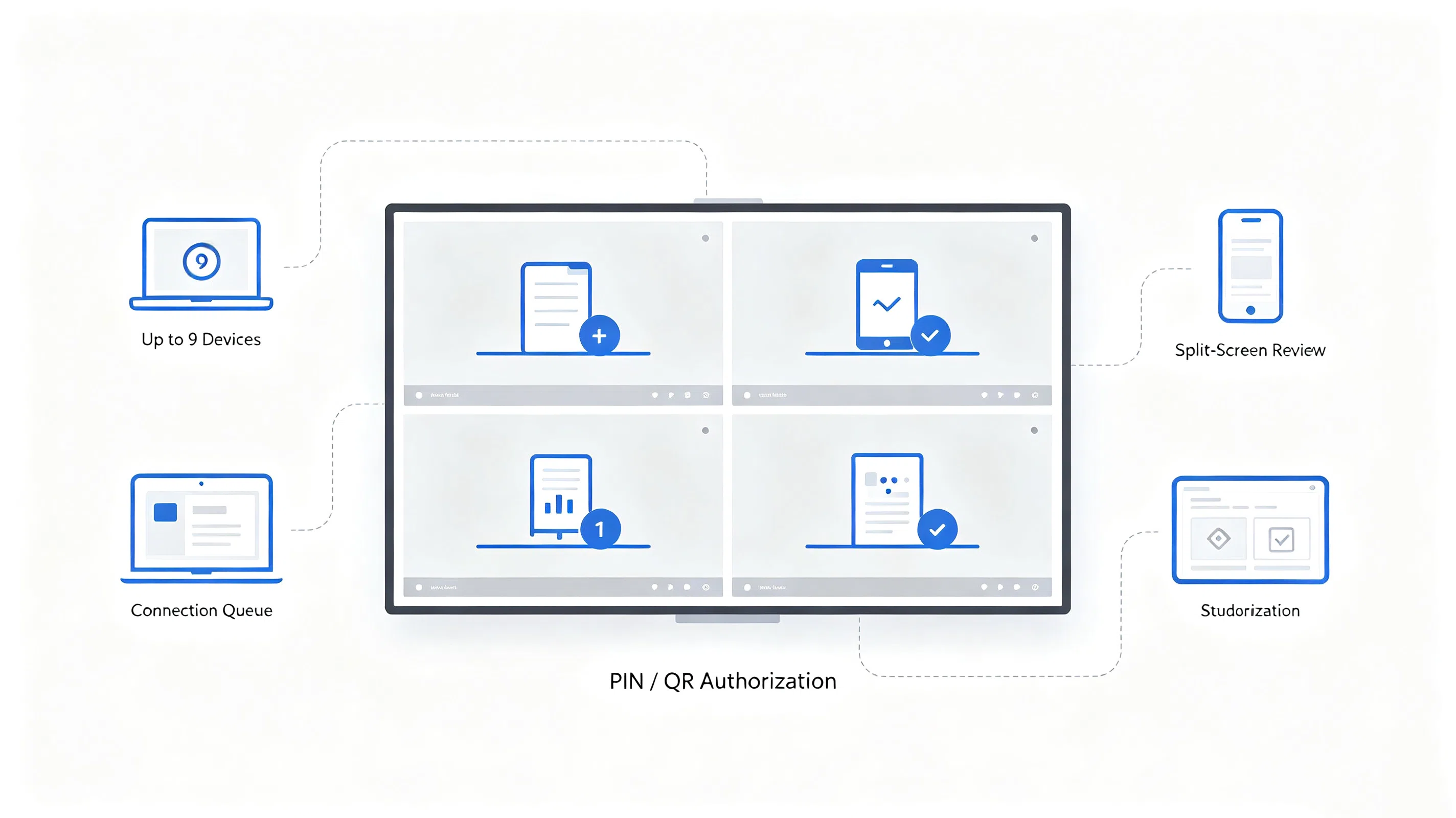
อุปกรณ์ส่ง (แล็ปท็อปแท็บเล็ตหรือโทรศัพท์) และแผงแบนแบบโต้ตอบจะค้นหาซึ่งกันและกันบนเครือข่ายท้องถิ่นเดียวกันหรือเชื่อมต่ออุปกรณ์โดยตรงกับอุปกรณ์และสร้างเซสชัน-โดยทั่วไปได้รับการยืนยันกับรหัส PIN หรือรหัส QR บนหน้าจอ
อุปกรณ์ส่งจะจับเฟรมเอาต์พุตหน้าจอของตัวเองอย่างต่อเนื่องด้วยเฟรมพร้อมที่จะดำเนินการสำหรับการส่งสัญญาณ
เฟรมหน้าจอดิบมีขนาดใหญ่เกินไปในการส่งแบบเรียลไทม์ดังนั้นตัวแปลงสัญญาณวิดีโอ (โดยทั่วไป H.264หรือ H.265) จะบีบอัดแต่ละเฟรมลงในสตรีมข้อมูลที่มีขนาดเล็กกว่ามากก่อนที่จะออกจากอุปกรณ์ส่ง
สตรีมที่บีบอัดจะเดินทางผ่าน Wi-Fi ไปยังแผงควบคุมไม่ว่าจะเป็นการเชื่อมต่อแบบ peer-to-peer โดยตรงหรือเส้นทางผ่านเครือข่ายท้องถิ่นขึ้นอยู่กับสภาพแวดล้อม
ชิปถอดรหัสออนบอร์ดของแผงควบคุมสร้างสตรีมที่บีบอัดใหม่กลับสู่ภาพที่มีความละเอียดสูงและทำให้หน้าจอซิงค์กับเสียงหากมีอยู่
ประสิทธิภาพการหล่อคือผลรวมของทั้งห้าขั้นตอนไม่ใช่หนึ่งในนั้นเครือข่าย Wi-Fi ที่รวดเร็วไม่สามารถชดเชยชิปถอดรหัสที่อ่อนแอและตัวแปลงสัญญาณที่มีประสิทธิภาพไม่สามารถชดเชยความแออัดของเครือข่ายได้นี่คือเหตุผลทางเทคนิคสองแผงที่ทั้งสองเรียกร้องให้ "สนับสนุนการหล่อแบบไร้สาย" สามารถมอบประสบการณ์ที่แตกต่างกันอย่างเห็นได้ชัด-จุดที่เรากลับไปในภายหลังในบทความนี้
Screen Cast เป็นระบบหล่อแบบไร้สายที่สร้างขึ้นในแผงแบนแบบโต้ตอบของ qtenboard. แทนที่จะรักษาแต่ละขั้นตอนของท่อด้านบนเป็นฟังก์ชั่นทั่วไป, Off-The-ชั้นวาง, หล่อหน้าจอได้รับการออกแบบรอบเงื่อนไขที่เฉพาะเจาะจงของห้องประชุมและห้องเรียน-การหมุนเวียนอุปกรณ์หนาแน่น, ระบบปฏิบัติการผสมและสภาพแวดล้อมเครือข่ายที่ทีมไม่สามารถควบคุมได้เสมอ
Screen Cast รองรับวิธีการเชื่อมต่อสามวิธีและวิธีใดที่ใช้งานได้มักจะขึ้นอยู่กับช่วงเวลาแทนที่จะเป็นกฎคงที่:
แต่ละวิธีเหมาะสมกับนิสัยและการตั้งค่าห้องที่แตกต่างกันและห้องมักจะจบลงด้วยการใช้มากกว่าหนึ่งในสัปดาห์เดียวกัน-ดองเกิลสำหรับผู้จัดรายการปกติ, app สำหรับเซสชั่นการวางแผนแล็ปท็อปหนัก, การสแกน QR สำหรับแขกที่นำเสนอจากโทรศัพท์ของพวกเขา
ห้องประชุมไม่ค่อยใช้ระบบปฏิบัติการเดียว Screen Cast ออกแบบมาเพื่อให้ครอบคลุมเส้นทางการหล่อ Windows, MacOS และ Android ดังนั้นห้องที่มีการผสมผสานระหว่างแล็ปท็อปของบริษัทและอุปกรณ์ส่วนบุคคลจึงไม่ T ต้องการให้ทุกคนอยู่บนแพลตฟอร์มเดียวกันในการเชื่อมต่อ
ในด้านการส่งผ่านหน้าจอหล่อจะปรับสมดุลสองเป้าหมายการแข่งขัน: การรักษากระแสบีบอัดขนาดเล็กพอที่จะส่งด้วยแฝงต่ำ, และทำให้รายละเอียดเพียงพอที่ข้อความและองค์ประกอบ UI ที่ดีจะอ่านได้บนแผงขนาดใหญ่ซึ่งรวมถึงการจัดการบัฟเฟอร์เพื่อดูดซับความผันผวนของเครือข่ายขนาดเล็กโดยไม่ต้องพูดติดอ่างที่มองเห็นได้และตรรกะการเชื่อมต่อใหม่ดังนั้นการลดลง Wi-Fi สั้นๆไม่จำเป็นต้องให้ผู้ใช้รีสตาร์ทกระบวนการจับคู่ทั้งหมด
"Latency ต่ำ" เป็นหนึ่งในวลีที่ใช้มากเกินไปที่สุดในการตลาดแบบหล่อและหนึ่งในการอธิบายน้อยที่สุดเวลาแฝงคือหมายเลขเดียวที่ผู้ขายสามารถเรียกร้องในการแยก-มันล่าช้าสะสมในท่อห้าขั้นตอนที่อธิบายไว้ก่อนหน้านี้นี่คือสิ่งที่ขับหมายเลขนั้นขึ้นหรือลงจริงๆ
ประสิทธิภาพตัวแปลงสัญญาณ ตัวแปลงสัญญาณที่เร็วขึ้นสามารถบีบอัดเฟรมได้โดยไม่ต้องทิ้งรายละเอียดมากเกินไปจะมีการเพิ่มเวลาน้อยลงก่อนที่เฟรมจะออกจากอุปกรณ์ส่งนี่คือเหตุผลที่ระบบการหล่อถูกสร้างขึ้นรอบๆตัวแปลงสัญญาณที่มีฮาร์ดแวร์เร่งมากกว่าขั้นตอนการบีบอัดทั่วไป
เส้นทางของเครือข่าย การเชื่อมต่ออุปกรณ์โดยตรงกับแผงควบคุมมีฮ็อปน้อยกว่ากระแสที่ต้องเดินทางไปยังเราเตอร์และด้านหลังทุก Hop เพิ่มเติมเพิ่มการประมวลผลและการเข้าคิวล่าช้าซึ่งเป็นเหตุผลที่โทโพโลยีเครือข่ายในห้อง-ไม่เพียงแต่ความแรงของสัญญาณ Wi-Fi-ส่งผลกระทบต่อประสบการณ์การหล่อ
ประสิทธิภาพชิปถอดรหัสนี่คือผู้ซื้อตัวแปรมองข้ามบ่อยที่สุดฮาร์ดแวร์ถอดรหัสออนบอร์ดของแผงควบคุมจะเป็นตัวกำหนดว่าสตรีมขาเข้าจะกลายเป็นภาพที่มองเห็นได้เร็วแค่ไหนชิปถอดรหัสที่ช้ากว่าหรือต่ำกว่าที่ระบุจะเพิ่มความล่าช้าในขั้นตอนสุดท้ายของไปป์ไลน์หลังจากที่เครือข่ายได้ทำงานแล้ว-หมายถึงเครือข่าย Wi-Fi ที่บ้านหรือสำนักงานที่รวดเร็วไม่สามารถแก้ไขความล่าช้าในการหล่อที่เกิดจากตัวถอดรหัสที่อ่อนแอได้
สภาพแวดล้อม Wi-Fi ในอาคารที่มีเครือข่ายที่ทับซ้อนกันจำนวนมากหรือห้องที่อุปกรณ์หลายเครื่องกำลังหล่อหรือสตรีมมิ่งในครั้งเดียวช่อง2.4GHz และ5GHz. ความแออัดเพิ่มเวลาแฝงและความถี่ของเฟรมที่ลดลงโดยไม่ขึ้นกับวิธีการที่ดีซอฟต์แวร์หล่อตัวเองได้รับการออกแบบ
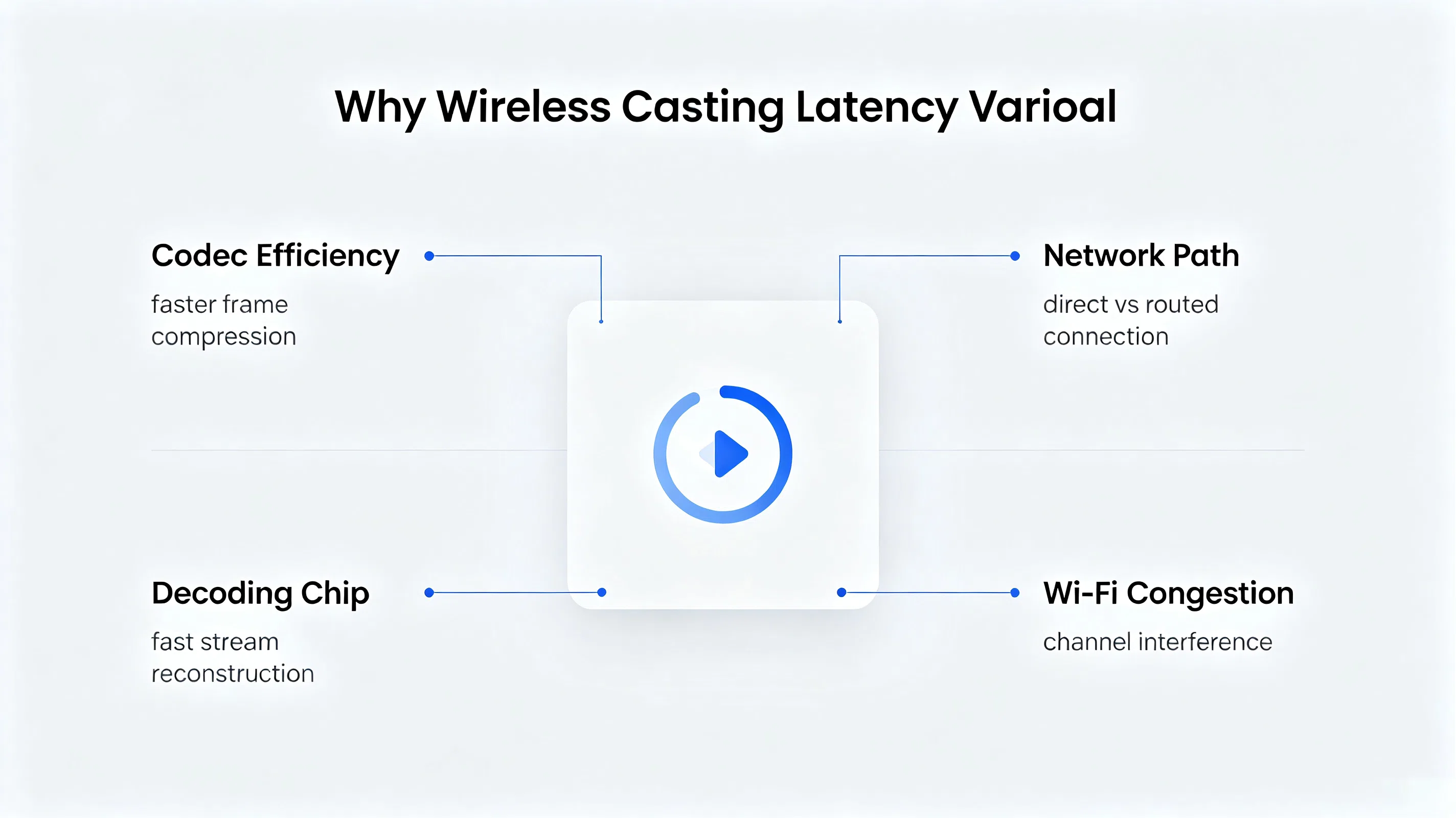
นี่คือทีมจัดซื้อคำถามถามบ่อยที่สุดและมีคำตอบทางวิศวกรรมที่ตรงไปตรงมา: โปรโตคอลการหล่อกำหนดว่าอุปกรณ์สองเครื่องสร้างการเชื่อมต่ออย่างไร-ไม่ได้กำหนดวิธีที่มีประสิทธิภาพของผู้ผลิตแปลงสัญญาณบีบอัดวิดีโอวิธีที่มีความสามารถในการรับชิป, หรือวิธีที่ซอฟต์แวร์จัดการกับเครือข่ายที่อ่อนแอหรือผันผวนตัวแปรทั้งสามตัวนั้นอยู่ภายในการตัดสินใจทางวิศวกรรมของผู้ผลิตไม่ใช่ภายในตัวโปรโตคอลเอง
ในทางปฏิบัติซึ่งหมายความว่าสองแผงสามารถแสดงความสามารถในการหล่อแบบเดียวกันและยังคงทำงานแตกต่างกันมากภายใต้ห้องเรียนจริงหรือสภาพห้องประชุม-หนึ่งถือมั่นคง, ภาพแฝงต่ำผ่านเครือข่าย Wi-Fi ไม่ว่างอื่นๆพูดติดอ่างหรือตัดการเชื่อมต่อภายใต้เงื่อนไขเดียวกัน Differentiator คือการลงทุนของผู้ผลิตในการถอดรหัสการเลือกฮาร์ดแวร์การเข้ารหัสการปรับแต่งและความยืดหยุ่นของเครือข่ายไม่ใช่ชื่อโปรโตคอลที่พิมพ์บนแผ่นข้อมูลจำเพาะ
การหล่อจากอุปกรณ์เดียวเป็นปัญหาเพียงครึ่งเดียวในสภาพแวดล้อมระดับมืออาชีพห้องประชุมและห้องเรียนทั้งสองต้องจัดการหลายคนที่ต้องการแบ่งปันหน้าจอแต่ด้วยเหตุผลที่แตกต่างกันและมีความต้องการทางเทคนิคที่แตกต่างกัน
ผู้เข้าร่วมผลัดกันนำเสนอและบางครั้งจำเป็นต้องเปรียบเทียบสองแหล่งขึ้นไปเคียงข้างกันเช่นการจำลองนักออกแบบที่อยู่ถัดจากลูกค้าไฟล์อ้างอิง S การโทรนี้สำหรับการสลับแหล่งที่มาอย่างรวดเร็วระหว่างพิธีกรและการแสดงผลหน้าจอแยก (เช่นการแยกสี่ทาง) เพื่อให้สามารถดู casts หลายตัวได้พร้อมกันโดยไม่ต้องตัดการเชื่อมต่อและเชื่อมต่อใหม่
งานกลุ่มมักต้องการอุปกรณ์นักเรียนหลายเครื่องที่แสดงพร้อมกันเพื่อให้ชั้นเรียนสามารถเปรียบเทียบคำตอบหรือโครงการได้ครูยังต้องควบคุมผู้ที่ได้รับอนุญาตให้โยนและเมื่อ-ความสามารถในการอนุมัติคิวหรือแทนที่คำขอการเชื่อมต่อมากกว่าออกจากแผงเปิดให้กับใครก็ตามที่จับคู่ก่อน
การจัดการนี้ดีต้องใช้เครื่องยนต์หล่อเพื่อจัดการคิวการเชื่อมต่อสนับสนุนหลายสตรีมถอดรหัสพร้อมกันและเปิดเผยชั้นได้รับอนุญาตไปยังห้องอุปกรณ์หลักของ S (โดยปกติแล้วหน้าจอของครูหรือโฮสต์ของตัวเอง) แทนที่จะรักษาคำขอเชื่อมต่อทุกครั้งScreen Cast สร้างขึ้นเพื่อรองรับอุปกรณ์สูงสุด9เครื่องที่เชื่อมต่อกับแผงเดียวกันในคราวเดียวซึ่งครอบคลุมเซสชันการตรวจสอบหน้าจอแยกส่วนใหญ่และสถานการณ์การแสดงผลแบบกลุ่มโดยไม่ต้องกดปุ่มเพดานเชื่อมต่อการประชุมกลาง
สำหรับผู้ซื้อใน B2B ความปลอดภัยในการหล่อมักจะมีคำถามที่เป็นรูปธรรมจำนวนน้อยมากกว่าข้อกังวลเชิงนามธรรม: ข้อมูลอยู่ในเครือข่ายท้องถิ่นหรือไม่มีขั้นตอนการตรวจสอบใดๆก่อนที่อุปกรณ์จะสามารถเชื่อมต่อได้และแผงสามารถใช้งานได้โดยไม่ต้องเปิดเผยห้องไปยังอินเทอร์เน็ตที่กว้างขึ้น
เหล่านี้เป็นกลไกในสถานที่-ผู้ซื้อประเมินการใช้งานที่เฉพาะเจาะจงโดยเฉพาะอย่างยิ่งหนึ่งที่มีความต้องการการปฏิบัติตามอย่างเป็นทางการ, ควรยังคงยืนยันรายละเอียดเกี่ยวกับนโยบายของตนเองและขอคำแนะนำทางเทคนิคแทนที่จะอาศัยสำเนาการตลาดเพียงอย่างเดียว
สำนักงานองค์กรในภูมิภาคกำลังแทนที่กองเรือแสดงห้องประชุมรุ่นเก่าที่อาศัยสาย HDMI เส้นเดียวต่อห้องพนักงานมักนำแล็ปท็อป Windows, macbooks และโทรศัพท์ส่วนตัวและการประชุมหายไปหลายนาทีเพื่อค้นหาอะแดปเตอร์และสลับสายเคเบิล
ทีมไอทีระบุการสนับสนุนการหล่อข้ามแพลตฟอร์ม (Windows, MacOS, Android) การหล่อที่ทำงานโดยไม่ต้องอาศัยเครือข่าย Wi-Fi ของแขกรองรับการเชื่อมต่อพร้อมกันอย่างน้อยสี่ครั้งต่อห้องสำหรับการตรวจสอบภายในและการตรวจสอบการเชื่อมต่อแบบ Pin-based สำหรับการประชุมที่เกี่ยวข้องกับผู้เข้าชมภายนอก
ทีมสั้นแผงตามแผ่นข้อมูลจำเพาะแล้วร้องขอในเว็บไซต์หน่วยทดสอบสำหรับสองแบรนด์เข้ารอบสุดท้าย, ใช้การทดสอบการหล่อแบบเคียงข้างกันด้วยการผสมผสานที่แท้จริงของอุปกรณ์ที่ใช้ในสำนักงานมากกว่าแล็ปท็อปทดสอบเดียว
แผง qtenboard ที่มีหน้าจอถูกนำไปใช้ในห้องประชุมของสำนักงานโดยมีพนักงานหล่อโดยตรงจากอุปกรณ์ของตัวเองโดยใช้แอพ, กล่องหล่อหรือรหัส QR ขึ้นอยู่กับการตั้งค่าและรายงานการลดลงที่ทำเครื่องหมายไว้ในตั๋วสนับสนุนที่เกี่ยวข้องกับการเชื่อมต่อจอแสดงผลในสัปดาห์ต่อไปนี้ rollout.
"การเปลี่ยนแปลงที่ใหญ่ที่สุดคือคุณลักษณะเดียวใดๆ-นั่นคือการประชุมหยุดเริ่มต้นห้านาทีช้าเพราะมีคนไม่สามารถรับแล็ปท็อปของพวกเขาบนหน้าจอ"
ให้ทุกอย่างข้างต้น "ไม่สนับสนุนการหล่อแบบไร้สาย" ไม่ใช่คำถามเกี่ยวกับการจัดซื้อที่มีประโยชน์ด้วยตัวเองรายการตรวจสอบการประเมินผลที่มีประโยชน์มากขึ้นมีลักษณะเช่นนี้:
การประเมินผู้ซื้อ บอร์ดอัจฉริยะสำหรับธุรกิจ และก็พร้อม กระดานอัจฉริยะสำหรับการสอน การปรับใช้เคียงข้างกันมักจะพบว่าคำถามพื้นฐานเหมือนกันในการตั้งค่าทั้งสอง: เครื่องยนต์หล่อทำงานอย่างไรภายใต้ความหลากหลายของอุปกรณ์จริงและสภาพเครือข่ายที่แท้จริงไม่ใช่คนที่เหมาะ
สร้างหน้าจอหล่อลงในผู้เล่นตัวจริงแผงแบนแบบโต้ตอบเป็นชั้นหล่อพื้นเมืองครอบคลุม Windows, MacOS และเส้นทางการจับคู่ Android ผ่านกล่องหล่อไร้สาย, หรือ QR Code Scan-พร้อมการตรวจสอบการเชื่อมต่อ PIN-Code และ QR-Code, และรองรับอุปกรณ์สูงสุด9เครื่องที่เชื่อมต่อกับแผงเดียวกันในคราวเดียวสำหรับการประชุมหลายแหล่งและการกำหนดค่าห้องเรียน
Screen Cast ได้รับการออกแบบมาเพื่อเสริมให้กับสถาปัตยกรรมอินเทอร์เฟซแบบมีสายของ qtenboard แทนที่จะใช้แทนการเชื่อมต่อ HDMI และ USB แบบมีสายยังคงจัดการกับสถานการณ์ที่เรียกร้องแบนด์วิดท์ที่รับประกันเช่นไฟล์ CAD ขนาดใหญ่หรือการนำเสนออย่างต่อเนื่องในขณะที่การโยนหน้าจอจัดการกับความยืดหยุ่นของการสลับอุปกรณ์เฉพาะกิจที่รวดเร็ว AS Anผู้ผลิตจอแบนแบบโต้ตอบ การทำงานในทั้งการศึกษาและการปรับใช้องค์กร qtenboard Tunes ชั้นการหล่อนี้กับชนิดเดียวกันของอุปกรณ์ผสมเงื่อนไขการหมุนเวียนสูงที่อธิบายไว้ในบทความนี้มากกว่ากับอุปกรณ์อ้างอิงเดียว
ไควันที่1รองรับระบบปฏิบัติการและวิธีการเชื่อมต่อแบบใด?
แคสต์หน้าจอครอบคลุมการหล่อจากอุปกรณ์ Windows, MacOS และ Android และรองรับวิธีการเชื่อมต่อสามวิธี-กล่องหล่อแบบไร้สายแอปแคสต์หน้าจอหรือสแกนรหัส QR จากโทรศัพท์-ผู้ใช้ที่แตกต่างกันในห้องเดียวกันสามารถเชื่อมต่อแบบที่เหมาะสมกับพวกเขา
ไตรมาสที่2สามารถใช้การแคสต์หน้าจอได้โดยไม่ต้องเชื่อมต่ออินเทอร์เน็ตหรือไม่
หน้าจอส่งคู่และสตรีมผ่านเครือข่าย Wi-Fi ท้องถิ่นดังนั้นจึงสามารถทำงานได้โดยไม่ต้องเชื่อมต่ออินเทอร์เน็ตที่ใช้งานอยู่ให้อุปกรณ์ส่งและแผงควบคุมอยู่ในเครือข่ายท้องถิ่นเดียวกัน
ไตรมาส3สามารถเชื่อมต่ออุปกรณ์กับ Screen Cast พร้อมกันได้กี่เครื่อง?
Screen Cast รองรับอุปกรณ์สูงสุด9เครื่องที่เชื่อมต่อกับแผงเดียวกันในคราวเดียวซึ่งครอบคลุมสถานการณ์การแบ่งหน้าจอและการแสดงกลุ่มส่วนใหญ่ในห้องประชุมและห้องเรียน
ไตรมาสที่4เวลาแฝงที่แท้จริงของหน้าจอในการใช้งานในโลกแห่งความเป็นจริงคืออะไร?
เวลาแฝงขึ้นอยู่กับอุปกรณ์ส่งเงื่อนไขเครือข่ายและประเภทเนื้อหาดังนั้นเราจึงไม่เสนอราคารูปสากลเดียวเราขอแนะนำให้ร้องขอการสาธิตสดในสถานที่ภายใต้เงื่อนไขเครือข่ายของคุณเองเพื่อดูประสิทธิภาพที่แท้จริงก่อนที่จะซื้อ
Q5แล็ปท็อปรุ่นเก่าที่ไม่มีฮาร์ดแวร์ไร้สายที่ทันสมัยสามารถใช้ Screen Cast ได้หรือไม่?
ความเข้ากันได้ในการหล่อขึ้นอยู่กับรุ่นระบบปฏิบัติการของอุปกรณ์และฮาร์ดแวร์เครือข่ายมากกว่าอายุเพียงอย่างเดียวอุปกรณ์ที่มีระบบปฏิบัติการที่ล้าสมัยหรือไม่มีความสามารถ Wi-Fi อาจต้องมีการเชื่อมต่อแบบมีสายแทน-นี่เป็นมูลค่าการยืนยันกับยานพาหนะอุปกรณ์เฉพาะของคุณ
คำถามที่6การโยนหน้าจอป้องกันไม่ให้อุปกรณ์ที่ไม่ได้รับอนุญาตจากการหล่อได้อย่างไร?
การเชื่อมต่อต้องใช้รหัส PIN หรือขั้นตอนการจับคู่รหัส QR ดังนั้นอุปกรณ์บนเครือข่ายเดียวกันจึงไม่สามารถเข้าร่วมเซสชั่นการหล่อได้โดยไม่มีขั้นตอนการอนุญาตที่ชัดเจน
คำถามที่7เราสามารถทดสอบความเข้ากันได้ของหน้าจอและเวลาแฝงก่อนที่จะสั่งซื้อได้หรือไม่?
ใช่-เราขอแนะนำให้ร้องขอหน่วยสาธิตหรือการทดสอบในสถานที่ที่มีอุปกรณ์ผสมของคุณเองและสภาพแวดล้อมเครือข่าย, เนื่องจากประสิทธิภาพการหล่อเป็นสภาพแวดล้อมขึ้นอยู่กับโชว์รูมสาธิตเพียงอย่างเดียวจะไม่ & #039; T จับภาพเงื่อนไขเฉพาะของคุณ
Q8หน้าจอสามารถปรับแต่งอินเทอร์เฟซหรือตรรกะการอนุญาตสำหรับโครงการ oem/odm ได้หรือไม่?
Oem/odm และสามารถพูดคุยเกี่ยวกับขอบเขตการปรับแต่งรวมถึงการสร้างแบรนด์อินเตอร์เฟซและตรรกะได้รับอนุญาตในโครงการพื้นฐาน-เข้าถึงทีมงานของเราด้วยความต้องการเฉพาะของคุณเพื่อยืนยันความเป็นไปได้
ดูหน้าจอโยนบน qtenboard FLAT PANEL แบบโต้ตอบ
สำรวจผู้เล่นตัวจริงไวท์บอร์ดแบบโต้ตอบที่พร้อมการศึกษาดาวน์โหลดแคตตาล็อกผลิตภัณฑ์เต็มรูปแบบหรือพูดคุยกับทีมของเราเกี่ยวกับการทดสอบการหล่อแบบไร้สายบนเครือข่ายของคุณเอง
ความหน่วงความเข้ากันได้และตัวเลขอุปกรณ์พร้อมกันที่อ้างอิงในบทความนี้แตกต่างกันไปตามอุปกรณ์สภาพแวดล้อมเครือข่ายและการกำหนดค่าแผงโปรดขอการสาธิตในสถานที่หรือการให้คำปรึกษาด้านเทคนิคเพื่อยืนยันประสิทธิภาพสำหรับการใช้งานเฉพาะของคุณ

ซีอีโอ | ผู้เชี่ยวชาญด้านโซลูชันการแสดงผลแบบโต้ตอบและการทำงานร่วมกัน
ฉันเป็นผู้ก่อตั้ง qtenboard นำความเชี่ยวชาญด้านการลงมือปฏิบัติมากกว่า17ปีมาสู่อุตสาหกรรมการแสดงผลแบบสัมผัสจากมุมมองการจัดการทั่วโลกที่ได้รับจากการศึกษา EMBA ของฉันที่มหาวิทยาลัยเซินเจิ้นฉันนำทีมของฉันในการเพิ่มประสิทธิภาพทุกขั้นตอนของการดำเนินงานของเรา-จากความละเอียดของผลิตภัณฑ์ที่มีประสิทธิภาพสูงการจัดการห่วงโซ่อุปทาน-มั่นใจความสามารถในการผลิตของเรายังคงอยู่ในระดับแนวหน้าของอุตสาหกรรม
ในฐานะผู้นำของ qtenboard ฉันเชี่ยวชาญในการให้บริการโซลูชั่น oem/odm ที่ปรับแต่งสำหรับกระดานไวท์บอร์ดแบบโต้ตอบผนังวิดีโอ LCD ป้ายดิจิตอลและเทอร์มินัลสัมผัสระดับอุตสาหกรรมสนับสนุนโดย330,000ตารางเมตรสวนอุตสาหกรรมที่ทันสมัยของเราในเซินเจิ้น, เรารักษาเต็ม Lifecycle ควบคุมการออกแบบอุตสาหกรรม, การผลิตที่มีความแม่นยำ, และการทดสอบประสิทธิภาพที่เข้มงวด.
ด้วยประสบการณ์โครงการเกือบสองทศวรรษโซลูชันการแสดงผลของ qtenboard จึงถูกนำไปใช้ในกว่า120ประเทศและภูมิภาคได้รับความไว้วางใจจากลูกค้าระดับองค์กรมากกว่า15,000รายทั่วโลกหากคุณกำลังมองหาพันธมิตรที่ตอบสนองต่อการผลิตที่ลึกซึ้งสำหรับโครงการแสดงผลแบบสัมผัสที่กำหนดเองของคุณทีมของฉันและฉันพร้อมที่จะสนับสนุนวิสัยทัศน์ของคุณด้วยความเป็นเลิศระดับมืออาชีพ

 th
th
 EN
EN  pt
pt  spa
spa  vie
vie  aze
aze  bel
bel  est
est  lav
lav  ukr
ukr  ru
ru