Cómo funciona la fundición inalámbrica de Screen Cast & #039;s en paneles planos interactivos Qtenboard, por qué la latencia difiere según la configuración y qué compradores de IFPD deben verificar antes de la compra.
Un distribuidor con el que trabajamos en el Medio Oriente nos contó sobre una reunión semanal de administración en uno de sus sitios de clientes: cinco jefes de departamento, cinco computadoras portátiles diferentes, una pantalla plana interactiva. Conseguir todo el mundo conectado utilizado para tomar los primeros diez minutos de la reunión-alguien & #039;s portátil haría & #039;t par, otra persona & #039;s fundido congeló a mitad de camino a través de una diapositiva, y la reunión sería a menudo sólo por defecto de nuevo a una persona & #039;s pantalla para que todos bisqueen. Después de que el cliente cambió a un panel que ejecuta Screen Cast, la misma reunión ahora comienza con personas que lanzan desde sus propios asientos a los pocos segundos de sentarse.Esa brecha, entre una hoja de especificaciones que dice "admite la fundición inalámbrica" y una sala donde la fundición realmente funciona de la manera que la gente espera, es de lo que trata este artículo. We & #039; caminará a través de cómo funciona la fundición inalámbrica a nivel técnico, por qué dos paneles con el mismo reclamo de fundición pueden comportarse de manera muy diferente en el uso diario, y cómo Screen Cast, el sistema de fundición integrado en las pizarras interactivas Qtenboard, está diseñado para manejar salas de reuniones y aulas reales en lugar de una sola configuración de demostración limpia.
Hoy en día, las salas de reuniones y aulas rara vez se ejecutan en una sola PC fija. Una sala de reuniones corporativa típica ve computadoras portátiles, tabletas y teléfonos que giran a través de la misma pantalla varias veces al día; un aula típica ve que el dispositivo de presentación cambia cada período. Debido a eso, la fundición inalámbrica se ha convertido en algo que los compradores comprueban tan rutinariamente como la respuesta táctil o la resolución del panel: es simplemente parte de cómo unpizarra interactiva Acostumbrado día a día.
La consecuencia práctica es que la calidad de fundición ya no es una conveniencia menor-es algo que la gente confía en muchas veces a la semana. Una conexión de casting que funciona en unos pocos segundos y mantiene una imagen estable ahorra tiempo real durante una semana de reuniones o clases. Uno que cae cuadros, pierde la sincronización de audio, o necesita ser re-emparejado después de cada período de inactividad se suma a una fuente constante, de bajo grado de fricción-que es exactamente por qué vale la pena entender lo que realmente determina que la experiencia, en lugar de tomar "apoyado" a su valor nominal.
Antes de mirar Screen Cast específicamente, ayuda a comprender la mecánica general que cualquier sistema de fundición inalámbrica tiene que resolver. El casting no es simplemente "tomar una captura de pantalla y enviarla": es una tubería de datos continua y en tiempo real con cuatro etapas distintas, y el rendimiento de cada etapa se convierte en lo que el usuario finalmente ve en el panel.
El dispositivo emisor (portátil, tableta o teléfono) y la pantalla plana interactiva se ubican en la misma red local, o se conectan directamente de dispositivo a dispositivo y establecen una sesión, normalmente confirmada con un código PIN o un código QR en pantalla.
El dispositivo emisor captura continuamente su propia salida de pantalla, trama por trama, lista para ser procesada para su transmisión.
Los marcos de pantalla sin procesar son demasiado grandes para transmitir en tiempo real, por lo que un códec de video (típicamente H.264 o H.265) comprime cada cuadro en un flujo de datos mucho más pequeño antes de que salga del dispositivo de envío.
El flujo comprimido viaja a través de Wi-Fi al panel, ya sea como una conexión directa peer-to-peer o enrutado a través de la red local, dependiendo del entorno.
El panel & #039;s chip de decodificación a bordo reconstruye el flujo comprimido de nuevo en una imagen de resolución completa y lo hace en la pantalla, en sincronización con el audio si está presente.
El rendimiento del casting es la suma de las cinco etapas, no una sola de ellas. Una red Wi-Fi rápida no puede compensar un chip de decodificación débil, y un códec eficiente no puede compensar la congestión de la red. Esta es la razón técnica por la que dos paneles que ambos afirman "admitir la fundición inalámbrica" pueden ofrecer experiencias notablemente diferentes, un punto al que volveremos más adelante en este artículo.
Screen Cast es el sistema de casting inalámbrico integrado en las pantallas planas interactivas de Qtenboard. En lugar de tratar cada etapa de la tubería anterior como una función genérica, Screen Cast está diseñada en torno a las condiciones específicas de las salas de reuniones y aulas: rotación densa de dispositivos, sistemas operativos mixtos y entornos de red que los equipos de TI no siempre controlan.
Screen Cast admite tres métodos de conexión, y cuál se usa generalmente depende del momento en lugar de una regla fija:
Cada método se adapta a diferentes hábitos y configuraciones de habitaciones, y las habitaciones a menudo terminan usando más de una en la misma semana: un dongle para el presentador regular, la aplicación para una sesión de planificación pesada para computadoras portátiles, escaneo QR para un invitado que se presenta desde su teléfono.
Las salas de reuniones rara vez ejecutan un solo sistema operativo. Screen Cast está diseñado para cubrir rutas de casting de Windows, macOS y Android, por lo que una sala con una combinación de computadoras portátiles de la empresa y dispositivos personales no necesita que todos estén en la misma plataforma para conectarse.
En el lado de la transmisión, Screen Cast está sintonizado para equilibrar dos objetivos: mantener el flujo comprimido lo suficientemente pequeño como para transmitir con baja latencia, y mantenerlo lo suficientemente detallado como para que el texto y los elementos finos de la interfaz de usuario permanezcan legibles en un panel de gran formato. Esto incluye la gestión de búfer para absorber las pequeñas fluctuaciones de la red sin tartamudeo visible, y la lógica de reconexión por lo que una breve caída de Wi-Fi doesn & #039;t requieren que el usuario reinicie todo el proceso de emparejamiento.
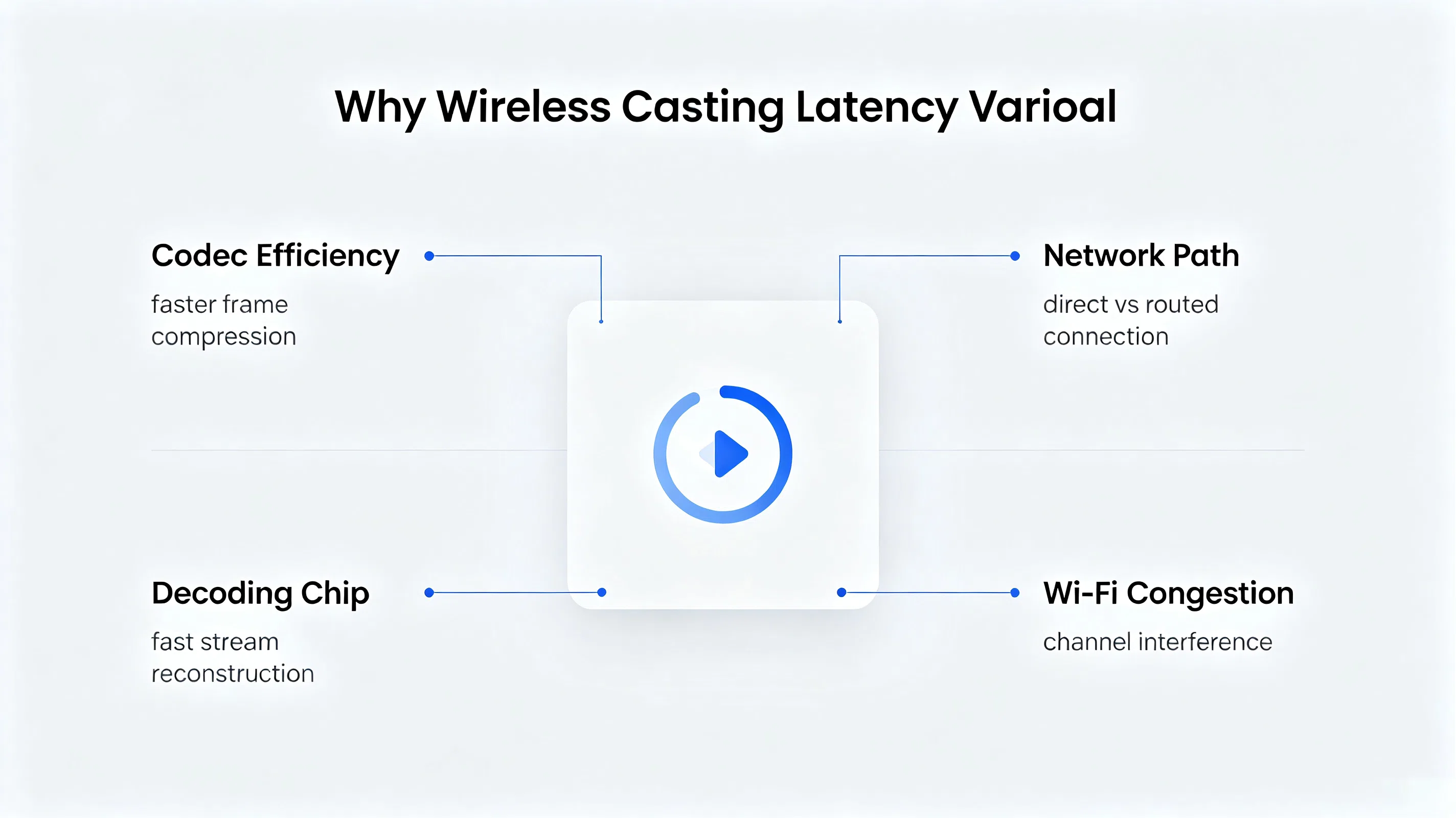
"Baja latencia" es una de las frases más usadas en el marketing de casting, y una de las menos explicadas. La latencia es & #039;t un solo número que un proveedor puede reclamar de forma aislada: es & #039;s el retraso acumulado en la tubería de cinco etapas descrita anteriormente. Esto es lo que realmente impulsa ese número hacia arriba o hacia abajo.
Eficiencia del códec. Cuanto más rápido un códec puede comprimir una trama sin descartar demasiados detalles, menos tiempo se agrega antes de que la trama salga del dispositivo emisor. Esta es la razón por la cual los sistemas de casting se construyen alrededor de códecs acelerados por hardware modernos en lugar de rutinas de compresión genéricas.
Ruta de red. Una conexión directa de dispositivo a panel tiene menos saltos que una transmisión que tiene que viajar a un enrutador y regresar. Cada salto adicional agrega retardo de procesamiento y cola, por lo que la topología de red en la sala, no solo la intensidad de la señal Wi-Fi, afecta la experiencia de lanzamiento.
Rendimiento del chip de decodificación.Esta es la variable que los compradores pasan por alto con mayor frecuencia. El panel & #039;s a bordo de hardware de decodificación determina la rapidez con que un flujo entrante se convierte en una imagen visible. Un chip de decodificación más lento o poco especificado agrega retraso en el último paso de la tubería, después de que la red ya haya hecho su trabajo, lo que significa que una red Wi-Fi rápida en el hogar o la oficina no puede solucionar un retraso de transmisión causado por un decodificador débil.
Entorno Wi-Fi. En un edificio con muchas redes superpuestas, o una sala donde varios dispositivos están transmitiendo o transmitiendo a la vez, los canales de 2,4 GHz y 5GHz se congestionan. La congestión aumenta tanto la latencia como la frecuencia de los fotogramas caidos, independientemente de lo bien que esté diseñado el software de casting.
Esta es la pregunta que los equipos de adquisición hacen más a menudo, y tiene una respuesta de ingeniería directa: un protocolo de casting define cómo dos dispositivos establecen una conexión: no define la eficiencia con la que el códec de un fabricante comprime el video, qué tan capaz es el chip receptor, o cómo el software maneja una red débil o fluctuante. Esas tres variables se sientan completamente dentro de las propias decisiones de ingeniería de un fabricante, no dentro del protocolo en sí.
En la práctica, esto significa que dos paneles pueden enumerar la misma capacidad de transmisión y aún así comportarse de manera muy diferente en condiciones reales de aula o sala de reuniones: uno sostiene una imagen estable y de baja latencia a través de una red Wi-Fi ocupada, el otro se tambalea o se desconecta en las mismas condiciones. El diferenciador es la inversión del fabricante en la decodificación de la selección de hardware, el ajuste de codificación y la resistencia de la red, no el nombre del protocolo impreso en una hoja de especificaciones.
Casting desde un solo dispositivo es solo la mitad del problema en entornos profesionales. Tanto las salas de reuniones como las aulas necesitan administrar a varias personas que desean compartir una pantalla, pero por diferentes razones y con diferentes requisitos técnicos.
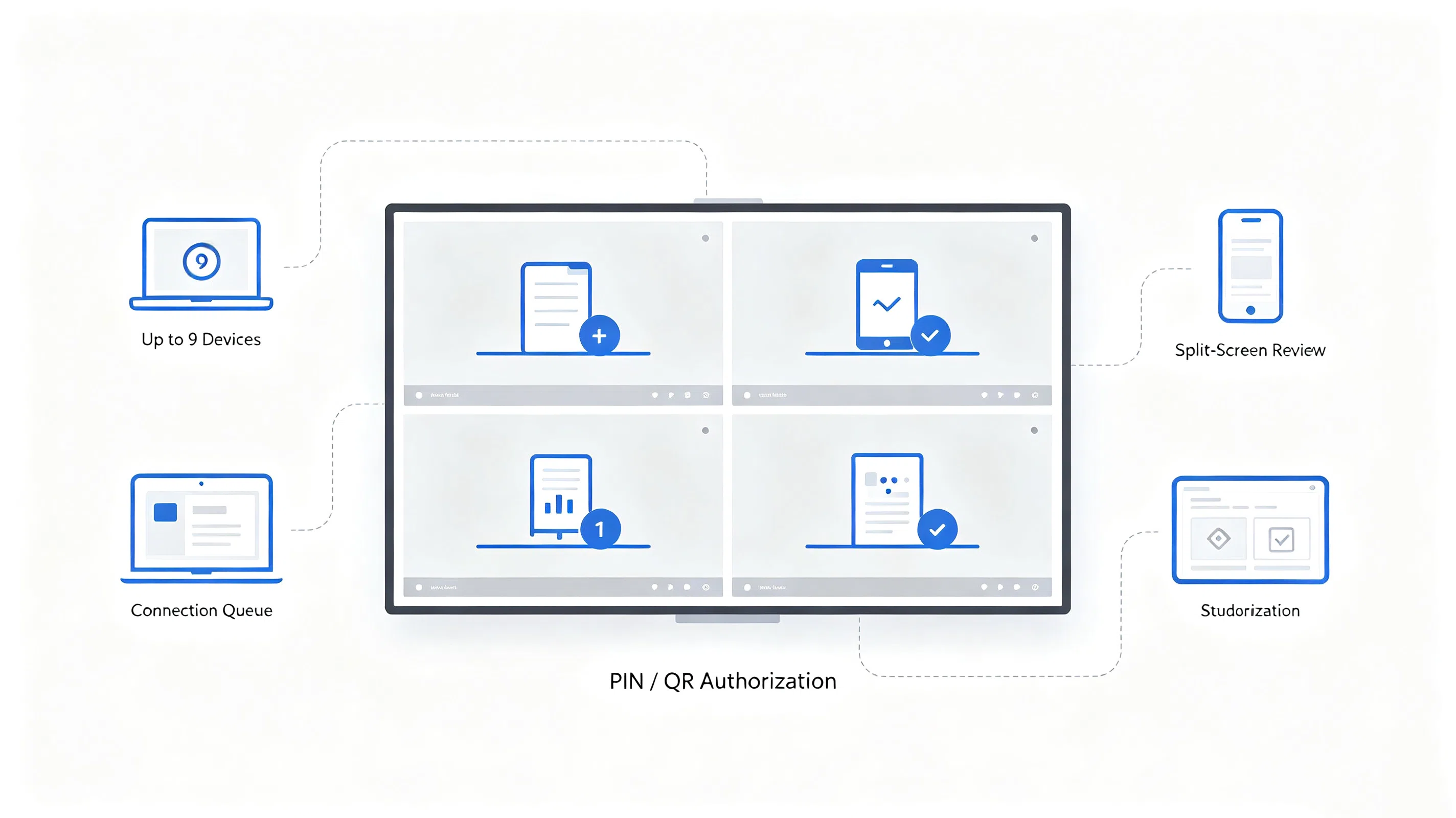
Los participantes se turnan para presentar, y a veces tienen que comparar dos o más fuentes de lado a lado-por ejemplo, un diseñador & #039;s maqueta junto a un cliente & #039;s archivo de referencia. Esto requiere un cambio rápido de fuente entre los presentadores y la pantalla dividida (como la división de cuatro vías) para que se puedan ver múltiples moldes a la vez sin desconectar y volver a conectar.
El trabajo en grupo a menudo necesita que se muestren varios dispositivos de los estudiantes a la vez para que la clase pueda comparar respuestas o proyectos. Los maestros también necesitan control sobre quién puede emitir y cuándo: la capacidad de aprobar, poner en cola o anular una solicitud de conexión en lugar de dejar el panel abierto para quien se empareja primero.
Manejar esto bien requiere que el motor de fundición para gestionar una cola de conexión, soporte de múltiples flujos de decodificación simultánea, y exponer una capa de permiso a la sala & #039;s dispositivo primario (por lo general el maestro & #039;s o host & #039;s propia pantalla), en lugar de tratar todas las solicitudes de conexión de forma idéntica.Screen Cast está diseñado para contener hasta 9 dispositivos conectados al mismo panel a la vez, lo que cubre la mayoría de las sesiones de revisión de pantalla dividida y los escenarios de visualización de trabajo en grupo sin alcanzar un techo de conexión a mitad de reunión.
Para los compradores B2B, la seguridad del casting generalmente se reduce a un pequeño número de preguntas concretas en lugar de preocupaciones abstractas: ¿los datos permanecen en la red local, hay algún paso de verificación antes de que un dispositivo pueda conectarse y se puede usar el panel sin exponer la habitación a la Internet más amplia?
Estos son los mecanismos implementados: los compradores que evalúan una implementación específica, particularmente una con requisitos de cumplimiento formal, aún deben confirmar los detalles en contra de su propia política de TI y solicitar un recorrido técnico en lugar de confiar solo en la copia de marketing.
Una oficina corporativa regional estaba reemplazando una antigua flota de pantallas para salas de reuniones que dependía de un solo cable HDMI por habitación. El personal traía rutinariamente una mezcla de computadoras portátiles con Windows, MacBooks y teléfonos personales, y las reuniones con frecuencia perdían varios minutos en búsquedas de adaptadores e intercambio de cables.
El equipo de TI especificó soporte de casting multiplataforma (Windows, macOS, Android), casting que funcionaba sin depender de la red Wi-Fi de invitados, soporte para al menos cuatro conexiones simultáneas por sala para sesiones de revisión interna y verificación de conexión basada en PIN para reuniones que involucran visitantes externos.
El equipo preselectó los paneles basados en hojas de especificaciones, luego solicitó unidades de prueba en el sitio para dos marcas finalistas, realizando pruebas de fundición lado a lado con la combinación real de dispositivos utilizados en la oficina en lugar de una sola computadora portátil de prueba.
Los paneles Qtenboard con Screen Cast se implementaron en las salas de reuniones de la oficina, con el personal casting directamente desde sus propios dispositivos utilizando la aplicación, casting box o código QR según la preferencia, y TI informa una marcada caída en los tickets de soporte relacionados con la conectividad de pantalla en las semanas posteriores al lanzamiento.
"El cambio más grande fue & #039;t cualquier característica única-era que las reuniones dejaron de comenzar cinco minutos tarde porque alguien podía & #039;t conseguir su ordenador portátil en la pantalla."
Teniendo en cuenta todo lo anterior, "es compatible con la transmisión inalámbrica" no es una pregunta de adquisición útil por sí sola. Una lista de verificación de evaluación más útil se ve así:
Los compradores que evalúan Tableros elegantes para el negocio Y Tablero inteligente para la enseñanza Las implementaciones lado a lado generalmente encontrarán que la pregunta subyacente es la misma en ambas configuraciones: cómo se comportará el motor de fundición bajo la diversidad real del dispositivo y las condiciones reales de la red, no las ideales.
Qtenboard incorpora Screen Cast a su línea interactiva de paneles planos como una capa de casting nativa, que cubre rutas de emparejamiento de Windows, macOS y Android a través de la caja de casting inalámbrica, la aplicación Screen Cast o un escaneo de código QR, con código PIN y verificación de conexión de código QR. Y soporte para hasta 9 dispositivos conectados al mismo panel a la vez para configuraciones de reuniones y aulas de múltiples fuentes.
Screen Cast está diseñado como un complemento de la arquitectura de interfaz cableada de Qtenboard & #039; en lugar de reemplazarla: las conexiones HDMI y USB cableadas continúan manejando escenarios que requieren ancho de banda garantizado, como archivos CAD grandes o presentaciones largas e ininterrumpidas, mientras que Screen Cast maneja la flexibilidad de rápido, conmutación de dispositivos ad-hoc. Como unFabricante interactivo de la pantalla plana Trabajando en implementaciones educativas y empresariales, Qtenboard sintoniza esta capa de fundición contra el mismo tipo de dispositivo mixto, condiciones de alta rotación descritas a lo largo de este artículo, en lugar de contra un solo dispositivo de referencia.
Pregunta 1¿Qué sistemas operativos y métodos de conexión admite Screen Cast?
Screen Cast cubre la transmisión desde dispositivos Windows, macOS y Android, y admite tres métodos de conexión: una caja de transmisión inalámbrica, la aplicación Screen Cast o un escaneo de código QR desde un teléfono, para que diferentes usuarios en la misma habitación puedan conectarse de la manera que más les convenga.
Q2¿Se puede utilizar Screen Cast sin conexión a Internet?
Screen Cast se empareja y transmite a través de la red Wi-Fi local, por lo que puede funcionar sin una conexión a Internet activa, siempre que el dispositivo de envío y el panel estén en la misma red local.
Q3¿Cuántos dispositivos se pueden conectar a Screen Cast al mismo tiempo?
Screen Cast admite hasta 9 dispositivos conectados al mismo panel a la vez, lo que cubre la mayoría de los escenarios de pantalla dividida y de visualización grupal en salas de reuniones y aulas.
Q4¿Cuál es la latencia real de Screen Cast en uso real?
La latencia depende del dispositivo de envío, las condiciones de red y el tipo de contenido, por lo que no citamos una sola cifra universal. Recomendamos solicitar una demostración en vivo en el sitio bajo sus propias condiciones de red para ver el rendimiento real antes de la compra.
P5¿Pueden las computadoras portátiles más antiguas sin hardware inalámbrico moderno usar Screen Cast?
Casting compatibilidad depende del dispositivo & #039;s versión del sistema operativo y hardware de red en lugar de su edad solo. Los dispositivos con un sistema operativo desactualizado o sin capacidad de Wi-Fi pueden necesitar una conexión por cable; vale la pena confirmarlo contra su flota de dispositivos específica.
Pregunta 6¿Cómo evita Screen Cast que los dispositivos no autorizados se casen?
Las conexiones requieren un paso de emparejamiento de código PIN o código QR, por lo que un dispositivo en la misma red no puede unirse a una sesión de casting sin ese paso de autorización explícita.
Q7¿Podemos probar la compatibilidad y la latencia de Screen Cast & #039; antes de realizar un pedido?
Sí, recomendamos solicitar una unidad de demostración o una prueba en el sitio con su propia mezcla de dispositivos y entorno de red, ya que el rendimiento de fundición depende del entorno y una demostración de la sala de exposición solo ganó & #039;t capturar sus condiciones específicas.
Pregunta 8¿Se puede personalizar la interfaz de Screen Cast & #039;s o la lógica de permisos para proyectos OEM/ODM?
Qtenboard admite compromisos OEM/ODM y puede discutir el alcance de la personalización, incluida la marca de la interfaz y la lógica de permisos, sobre la base del proyecto: contacte a nuestro equipo con sus requisitos específicos para confirmar la viabilidad.
Ver Screen Cast en una pantalla plana interactiva de Qtenboard
Explore la línea de pizarra interactiva preparada para la educación, descargue el catálogo completo de productos o hable con nuestro equipo sobre las pruebas de fundición inalámbrica en su propia red.
Las cifras de latencia, compatibilidad y dispositivos simultáneos a las que se hace referencia en este artículo varían según el dispositivo, el entorno de red y la configuración del panel. Solicite una demostración en el sitio o una consulta técnica para confirmar el rendimiento de su implementación específica.

CEO | Experto en soluciones interactivas de visualización y colaboración
Soy el fundador de Qtenboard y aporto más de 17 años de experiencia práctica a la industria de las pantallas táctiles. Basándome en la perspectiva de gestión global obtenida a través de mis estudios de EMBA en la Universidad de ShenZhen, dirijo a mi equipo en la optimización de cada etapa de nuestras operaciones, desde la definición del producto hasta la gestión de la cadena de suministro de alta eficiencia, asegurando que nuestras capacidades de fabricación permanezcan a la vanguardia de la industria.
Como el líder de Qtenboard, me especializo en el abastecimiento de las soluciones adaptadas de OEM/ODM para los whiteboards interactivos, las paredes video del LCD, la señalización digital, y los terminales del tacto del industrial-grado. Con el respaldo de nuestro moderno parque industrial de 330.000 m² en Shenzhen, mantenemos el control del ciclo de vida completo sobre el diseño industrial, la fabricación de precisión y las rigurosas pruebas de rendimiento.
Con casi dos décadas de experiencia en proyectos, las soluciones de visualización de Qtenboard ahora se implementan en más de 120 países y regiones, y se ganaron la confianza de más de 15.000 clientes empresariales en todo el mundo. Si está buscando un socio receptivo con una base de fabricación profunda para sus proyectos personalizados de pantallas táctiles, mi equipo y yo estamos listos para respaldar su visión con excelencia profesional.

 spa
spa
 EN
EN  pt
pt  th
th  vie
vie  aze
aze  bel
bel  est
est  lav
lav  ukr
ukr  ru
ru