
















Настаўленні кіоска ўдома самай сервіса з скануванням пакод 1D/2D, чытанне код QR, Періферы стварэння Усталяваць у канфігурацыі на сцяна і падлоу для кантралі, рэсторані, гомна, Праекты кантроль доступу.


Гэтая бакад і сканування кода QR — працоўны тэрмінал самослужэння не экран, які паказвае толькі код QR. Яго асноўная задача — Сканінальныя коды з кліента &# 039; тэлефону або паперовак І скончыць крок самослужэньне: парадку, плаціць, праверка, праверкі клікета, вызначанага членства, рэгістрацыя наведвальніка, Праверка доступу або пошук інфармацыі.


Таму што сканер 2D фарматавання прачытаць найбільшы звычайны пакоды, а і коды QR, гэтай мабуть у м Кіёск сканэра QR-кодаў І кіёск для сканавання штрых-кодаў - не кіёск для адлюстравання QR-кодаў. На этапе налады пацвердзіце модуль сканэра і тыпы кодаў, якія падтрымліваюцца ў вашым праекце.
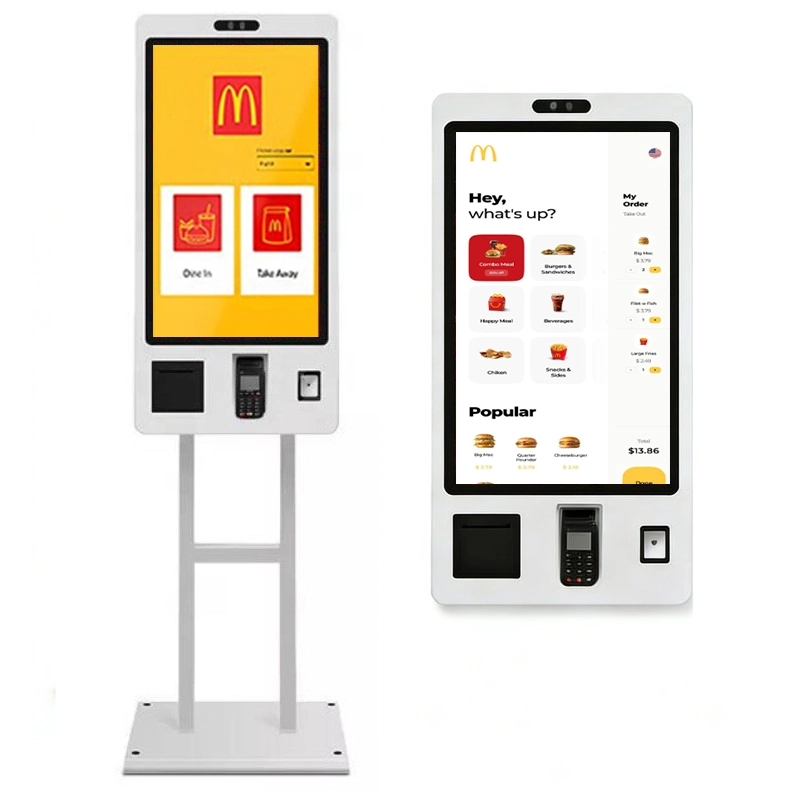
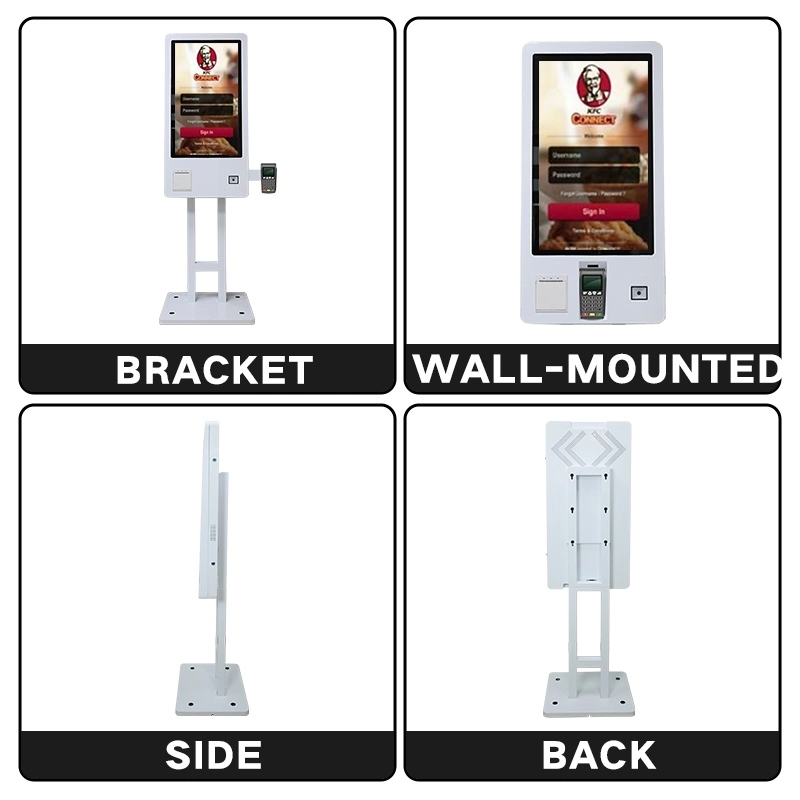
Суе сканування, Пакінуць экран і періферальная платформа даступнаць як кэоск накладаная сцянаў для вызначаныя сервісаваныя пункты або пакласці пагорка. Кіоск з думак і базы для гнучкі ўдома. Гэта ключова вылучэньне настаўленняў для більшоўных праектаў - вылучыць перад апералізацыі аперацыі.

Настаўленне сцяна ідэальны для месцаў, дзе абмежаваны прасторы падлоў або дзе кіск павінна застацца у постійным стане. Яна вызначае чыстальнік усталяванне для праверкі QR- коду, кіравання доступу, плаціць і рэгулярных праграмы.

Напольная канфігурацыя аб’ядноўвае тэрмінал-кіёск са стабільным апорным кранштэйнам і падставай. Яна можа быць уставіць у веховах, адчыненых коридорах, падзеях і іншыя месцаў, дзе шкідныя пазіцыю.
Насценная мантажная пласціна з унутранай прокладкай кабеляў за корпусам кіёска.
Падлогавы кранштэйн з уцяжаранай асновай і ўнутраным кабельным кіраваннем.
| Параўнанне | Насценны кіёск | Кіоск |
|---|---|---|
| Устаноўка | Фіксаванае мацаванне на сцяне | Устаноўлена на кранштэне і аснове |
| Касмічны след | Мінімальны - толькі прастора | Патрабуецца плошча падлогі |
| Мобіліць | Нізкі - фіксаванае становішча | Опера - ДАП |
| Найлепшае | Выдаліць праверку | Магманы, ресторані, хотелі, падзеі, выказы |
| Мантажныя работы | Патрабуецца мацаванне да сцяны | Звычайна няма сценавых работ |
| Візуальны эфект | Чысты, інтэграваны з інтэр’ерам | Аўтаномны, кіруе рухам |
| Рэкамендуецца для | Сістэмныя інтэгратары, стацыянарныя пляцоўкі | Раздробныя гандляры, рэстараны, арганізацыя мерапрыемстваў |
| Кіраванне кабулы | Пракладка ў сцяне | Внутранае крапленне або базавая маршрутызацыя |
| Падтрымка | Абслугоўванне з пазіцыі сцяны | Панелі доступу |
Інтэграваны сканэр прызначаны для здабывання падтрымоўваемых аднамерных штрых-кодаў і двухмерных кодаў з друкаваных матэрыялаў або з экранаў мабільных тэлефонаў. Модел сканэра, інтэрфейс і декодуваны вылучаныя як праграма і пацверджаецца ў тэксту праекту.
| Параметр сканэра | Настаўленне |
|---|---|
| Тып сканавання | Сканер двухмернага/трывымернага выяўлення |
| Крыніца сканавання | Раздрукаваны код / экран мабільнага тэлефона |
| Адлегласць сканавання | Пацверджаны з вылучанам модуля |
| Памер акна | Пацверджана з дызайнам корпуса |
| Інтэрфейс | USB / RS232 / UART |
| Падтрымліваныя тыпы кодаў | Па выбранай спецыфікацыі сканэра |
| Індыкатар сканавання | Звесткі LED / гукавання |
| Праца пры слабым асвятленні | Пацверджаны з вылучанам модуля |
| Падтрымка сплатка QR | Патрабуецца інтэграцыя платформы аплаты і праграмнага забеспячэння. |


Сканер чытае, што падтрымлівае выбраны модуль. Калі праект неабходзіць спецыфічнай сімнагіў, доўгі адстаноў і чытанне коды з гляньных тэлефонных экрана, Вылучыць правай сканэры квароту або модуля сканэра QR.

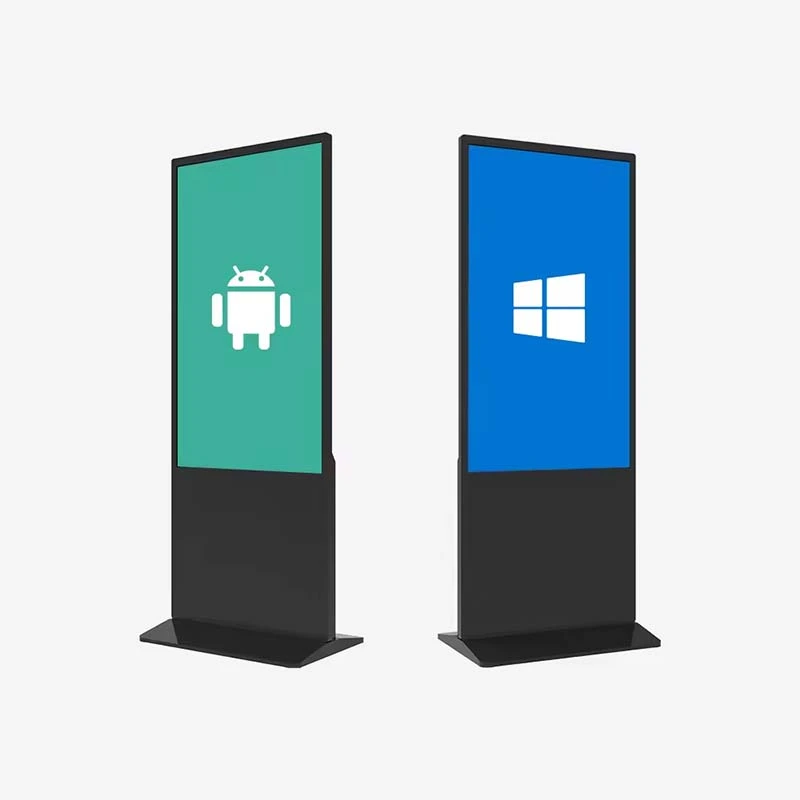
Экран паказвае трэба аперацыі, выкананні, меню, парадку, старонку сплатага і пацверджання. Інтэрфейс можа быць бінадзіць і выканаць да вашага працоўнага трэба, па ўсеб, Android або Windows.
Тэхналогія допакання (не-такка / PCAP / інфрачервонага), яскравіць і лінія панелі паказаны ў настаўленні. Стандартная комерцыяльнасць дыяпазон ад ≥300 да ≥500 cd/m².
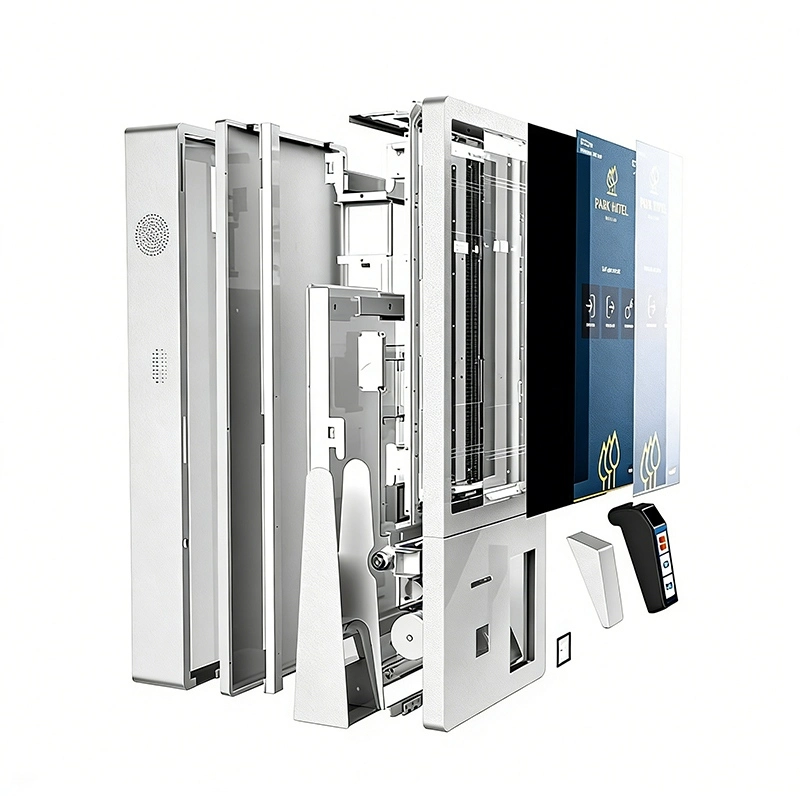
Кіоск-плафмета захоўваць стандартную прастору для плаціння, друку і ідэнтыфікацыі, Такім чынам, апошняй машын настаўлена вакол праграма замест, а не ўбудоўная як дастачаны продукт.
Залежныя праекту, QR- кіоск можа быць усталяваны:
Функцыя сплатка залежаць на вылучаных тэрмінару плаціў, апісацыі сертыфікатаў, паставіць плаціў і інтэрвалу праграма. Пацверджайце неабходны распусці для вашага рынка
Дадатковы тэрмапрынтэр выводзіць:
Тып друкаркі (замена адрасна або друкарка), вылучаныя параметры паперы і наладзіць.

The self-service scanning kiosk connects to the systems already running in your venue — POS, ordering, ticketing, membership, access control or a customer-developed platform — subject to interface and compatibility confirmation.
The kiosk can be integrated with third-party software, POS platforms, ticketing systems, access-control systems or customer-developed applications, subject to interface and compatibility confirmation. Interface protocols, SDK, USB, RS232 and network APIs are agreed in the early project phase; software debugging, payment onboarding and access-control integration require cooperation from the customer's backend team.
Every column of this table is a decision point for your barcode kiosk or QR code scanner kiosk project. Standard profiles exist; everything below can be customized for bulk and OEM orders.
| Элемент канфігурацыі | Наступныя параметры |
|---|---|
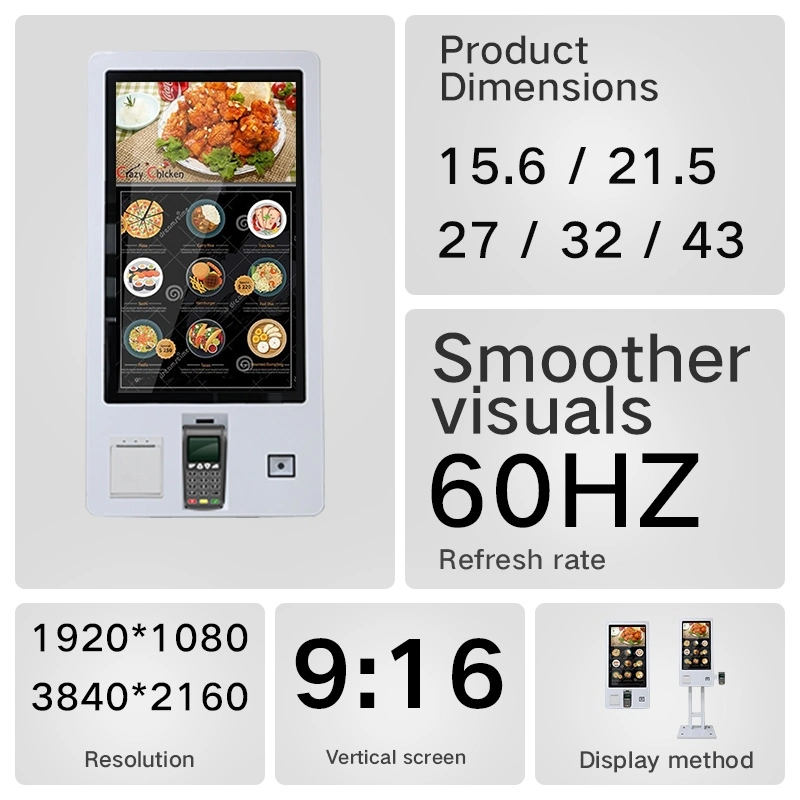
| Памер паказу | 15.6" / 21.5" / 23.8" / 27" or customized |
| Размяшчэнне | 1920×1080 (FHD); 3840×2160 (4K UHD optional) |
| Яркыс | ≥300 / 400 / 500 cd/m² |
| Паказаць арытулы | Портрэт ці пейзаж |
| Экрана | Non-touch / PCAP capacitive / infrared |
| Сканэры | 1D barcode scanner / 2D barcode scanner / QR code scanner |
| Аперацыя | Android 11/13/14/16 · Windows 10/11 Pro · customized |
| Працэср | Rockchip RK3566/RK3576/RK3588 · Intel i5/i7 options |
| Memory / storage | 2/4/8GB RAM · 16/32/64/128GB ROM |
| СеткаName | Wi-Fi · Ethernet · 4G (optional) |
| Элемент канфігурацыі | Наступныя параметры |
|---|---|
| Сплата | Card reader · NFC · RFID · QR payment module |
| Друкарка | Thermal receipt printer / ticket printer |
| Камера | Optional front camera module |
| Аўдыа | Built-in speaker / optional audio output |
| Устаноўка | Wall-mounted or floor-standing |
| Жыллё | Aluminum / SPCC steel · standard or custom color |
| Абарона | 3mm tempered glass · lockable service door options |
| Брэндынг | Logo · boot animation · UI · label · packaging |
| Software | Customer software / third-party platform / custom app |
| Сертыфікат | CE / FCC / RoHS / PSE / UL optional · ISO 9001 / 14001 factory |

Certification options and project documentation can be discussed according to destination-market and project requirements. Additional options include 120Hz panels, 10-bit color, Wi-Fi 6, 4G/5G modules, card readers, RFID and NFC.
Click to download or view the full specification sheet (PDF).
The customer chooses ordering, check-in, payment, ticketing, validation or inquiry on the touchscreen.
The built-in scanner reads a barcode or QR code from a phone screen, paper ticket, membership card or order voucher.
Payment, identity check, order submission, ticket validation, access authorization or inquiry completes per your configuration.
The result shows on screen and can be printed as a receipt, ticket or voucher.

One scanning kiosk platform, configured per venue. The six deployment families below cover the majority of self-service scanning projects.

Self-ordering, membership QR recognition, coupon validation, QR payment, order confirmation and receipt printing for restaurants, fast food, cafes and food courts. Ordering usually connects to the POS, kitchen display or printing system.

Product barcode scanning, price and stock lookup, membership points recognition, coupon validation and self-checkout front-end operations for stores, malls and supermarkets.

E-ticket QR validation, barcode ticket recognition, on-site check-in, ticket voiding, entry voucher printing and event information display for exhibitions, cinemas, scenic areas and stadiums.

Self check-in, reservation confirmation, member recognition, QR access, service requests, event check-in and bill inquiry with payment for hotels, resorts, conference centers and serviced apartments.

Appointment check-in, patient QR recognition, visit-flow confirmation, queue number printing and self-payment for hospitals, clinics and pharmacies. Healthcare projects require separate hardware and software confirmation per the customer's security and data requirements.

Visitor QR validation, appointment check-in, employee QR recognition, temporary pass verification and visitor voucher printing for offices, campuses, schools and member venues. Controlling gates, doors or turnstiles requires integration with the customer's access system and interfaces.
Whether you need a compact wall-mounted QR kiosk for a fixed service point or a branded floor-standing barcode kiosk for retail and events, Qtenboard configures the hardware, peripherals and software interface around your application.


Every barcode kiosk and QR code scanner kiosk passes production-line testing before shipment, including a 48-hour aging and reliability run to verify stable 24/7 operation.

The final test procedure is adjusted according to the selected scanner, payment terminal, printer, operating system and software platform. Scanner, payment terminal and printer alone do not decide total product capability — actual function also depends on software, interface protocols, certifications and the customer's backend system.


48-hour aging test before shipment · packing and shipping inspection for every unit.
Qtenboard operates dual manufacturing hubs in Shenzhen and Guangzhou with automated production lines and a daily output capacity of up to 300 units, supplying system integrators, distributors and project contractors in 100+ countries. Certification options and project documentation can be discussed according to destination-market and project requirements.
Typical project types Qtenboard supports with system integrators, distributors and end customers across 100+ countries. Project references and documentation are available for qualified projects.
Wall-mounted QR ordering kiosks at counter lines and floor-standing units at entrance zones, connected to the chain's POS and kitchen display system.
Check-in and e-ticket validation kiosks at registration zones for conferences, exhibitions and entertainment venues.
Product barcode inquiry and self-checkout front-end kiosks inside stores, linked to the retailer's product database and inventory system.
Hotel self check-in and visitor access terminals integrated with the property management or access-control system.
A QR code scanner kiosk is a self-service terminal equipped with a QR code scanner. It allows users to scan codes from mobile phones or printed materials for ordering, payment, ticket validation, check-in, access control, membership identification or information retrieval.
Yes. The kiosk can be configured with a scanner that supports compatible 1D barcodes and 2D QR codes. The supported code types depend on the selected scanner module — confirm the required symbologies for your project.
Yes. The product can be supplied as a wall-mounted kiosk for fixed installation points where floor space is limited, such as check-in, access control and payment counters.
Yes. The floor-standing version uses a support bracket and base, making it suitable for retail stores, restaurants, hotels, exhibitions, event areas and open public spaces.
A suitable 2D scanner can be selected for reading QR codes displayed on mobile phones. Please confirm the required screen-scanning distance, code size and application environment before final configuration.
The kiosk may support QR payment through an integrated QR scanner or payment terminal. Payment availability depends on the payment provider, software integration, local regulations and required certifications.
Yes. Card readers, NFC/RFID readers and other payment peripherals can be integrated according to the project requirements and market certifications.
Yes. A thermal printer or ticket printer can be added for receipts, queue numbers, tickets, visitor badges or order confirmations.
The kiosk can be configured with Android, Windows or another suitable platform. Customer software and third-party applications should be checked for operating-system, interface and peripheral compatibility before ordering.
Yes. Customization may include the housing, color, logo, scanner position, payment-terminal position, startup screen, user interface, packaging and other project details, including CKD/SKD supply for local assembly.
The shown configuration is intended for indoor environments. If the project requires outdoor deployment, the enclosure, brightness, temperature range, waterproofing, vandal resistance and other specifications must be redesigned and confirmed separately.
As a kiosk manufacturer since 2005, Qtenboard provides a dedicated account manager, technical consultation, sample testing, budget and proposal assistance, a 1–3 year warranty, spare parts support, remote technical assistance and a multilingual sales team. MOQ, lead time and sample policy are confirmed at quotation according to configuration and order volume.

 bel
bel
 EN
EN  pt
pt  spa
spa  th
th  vie
vie  aze
aze  est
est  lav
lav  ukr
ukr  ru
ru