Open a tender for classroom or meeting-room displays and you'll see it in almost every spec sheet: "20-point touch," "40-point touch," "100-point touch." The number changes, and so does the price — sometimes by 30% or more between two Interactive Flat Panel models that otherwise look identical. Procurement teams are left asking a fair question: is this a real technical differentiator, or just another parameter stacked on the spec sheet to justify a markup?
This guide answers that question from the ground up. We'll define what a "touch point" actually is, explain — in plain terms — how infrared multi-touch hardware turns a fingertip into a coordinate, and then address the two concerns that come up in almost every procurement conversation we have: does touch performance decline after a year or two of daily use, and how fragile is the infrared frame in practice. The goal isn't to sell you the highest number available. It's to help you match the right touch-point tier to the way your Interactive Whiteboard will actually be used.
In the Interactive Flat Panel industry, a "touch point" refers to the number of individual contacts a touch controller can detect and track independently at the same instant — formally, simultaneous touch points. A 20-point panel can resolve 20 separate fingers, palms, or styluses touching the screen at once, each with its own coordinate and movement path, without the system merging them into a single blob or dropping the extras.
This is a narrower claim than it sounds. It does not describe how many people can physically stand at the panel — that's a function of screen size and ergonomics. It does not describe how sharp a single stroke looks — that's touch resolution and report rate, a separate spec entirely. A 20-point panel and a 100-point panel can draw an equally crisp line for one user; the difference only appears the moment multiple contacts land on the glass at overlapping instants.
"Point count = user capacity" is the most frequent misunderstanding in tender documents. A 20-point IFPD does not mean "only 20 students can use the board." In a typical classroom, five students writing simultaneously use perhaps 5–10 contact points (fingers, palms resting on the glass, styluses). The number becomes operationally relevant only in genuinely concurrent multi-user scenarios — collaborative whiteboarding walls, multi-group brainstorming sessions, or exhibition touch walls — not in single-presenter classroom use.
Behind each number sits a different hardware and firmware configuration. Moving from 20 to 50 to 100 points isn't a software toggle — it requires denser optical hardware and materially more signal-processing capacity, which is the honest reason higher tiers cost more.
| Tier | Typical Optical Axis Spacing | Typical Scan Frequency | Controller Processing Load | Representative Use Case |
|---|---|---|---|---|
| 20-Point | ~5–6 mm pitch | ≈100–150 Hz | Entry-level MCU, single-thread coordinate resolution | Single-presenter classrooms, standard meeting rooms |
| 40 / 50-Point | ~3–4 mm pitch | ≈150–200 Hz | Mid-tier controller with basic ghost-point filtering | Group-work classrooms, collaborative meeting rooms |
| 100-Point | ~2–3 mm pitch, dual-axis redundancy | ≈200–240 Hz | High-throughput controller with real-time disambiguation algorithms | Multi-user collaboration walls, multi-screen splicing, exhibition/public interaction |
Figures above are representative industry ranges for infrared multi-touch Interactive Flat Panels and vary by manufacturer and generation of controller chipset.
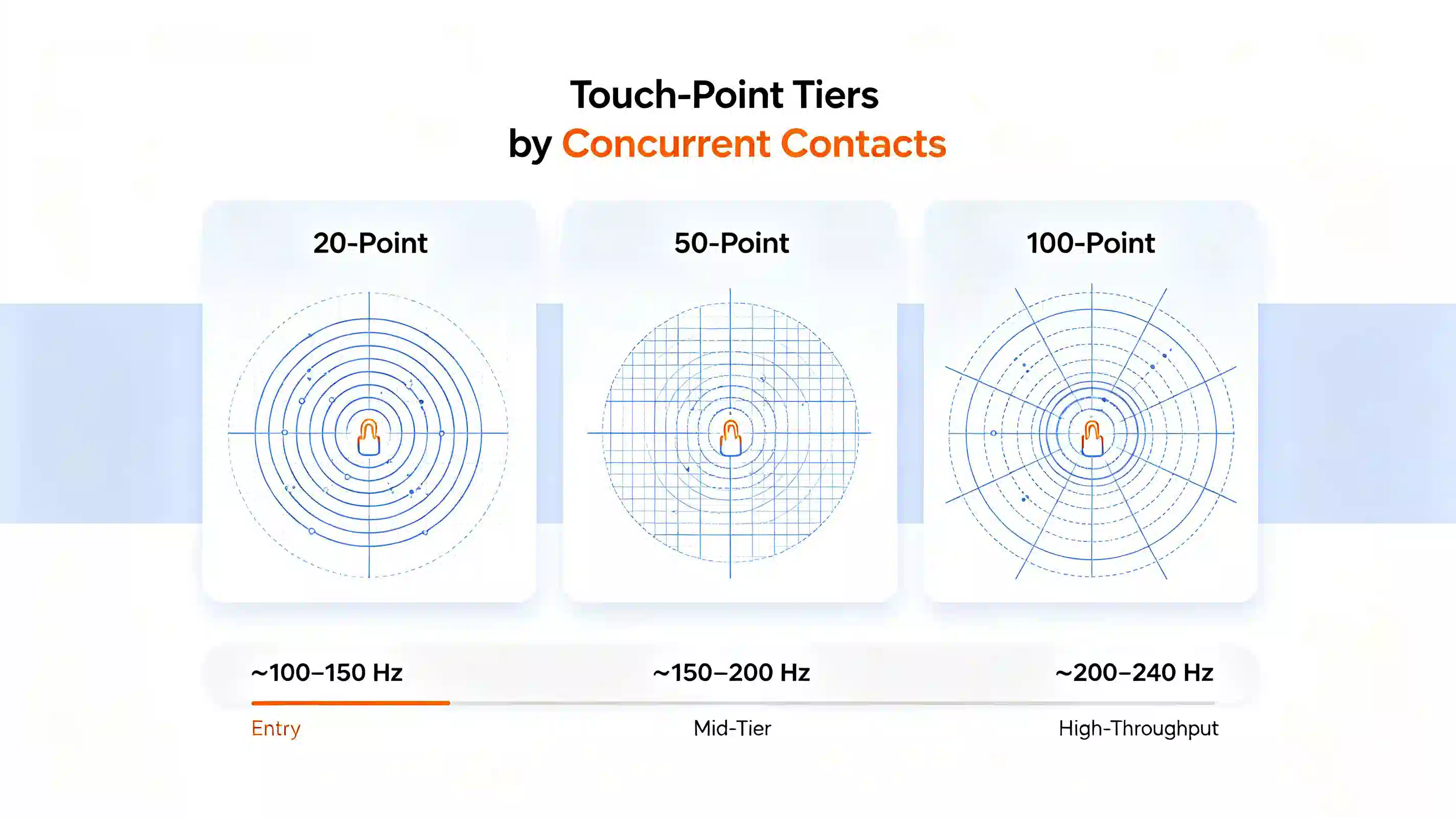
Because touch-point count is a marketing-friendly number, it's also one of the easiest specs to overstate. A controller may technically report "100 points" in a lab test with a robotic touch rig, yet fail well before that under real fingers, gloves, or styluses with varying reflectivity. A simple field test: press ten or more fingers and palms onto the panel simultaneously in a cross pattern and check whether every contact is tracked independently, without contacts merging, dropping, or jumping position. We'll return to this as a procurement checklist item later in this guide.
Most commercial Interactive Flat Panels — including nearly all education and meeting-room IFPDs — use infrared (IR) touch technology rather than capacitive touch (the technology in smartphones). Understanding the mechanism is what makes the rest of this guide — degradation, maintenance, and scenario selection — make sense, rather than being abstract numbers on a spec sheet.
An infrared touch frame is built into the bezel surrounding the display. Along two adjacent edges, rows of infrared LEDs emit invisible light across the screen surface; along the two opposite edges, matching rows of photodiodes (light receivers) detect that light. Together, the horizontal and vertical beams form a dense, invisible grid of crisscrossing optical axes sitting just above the glass.
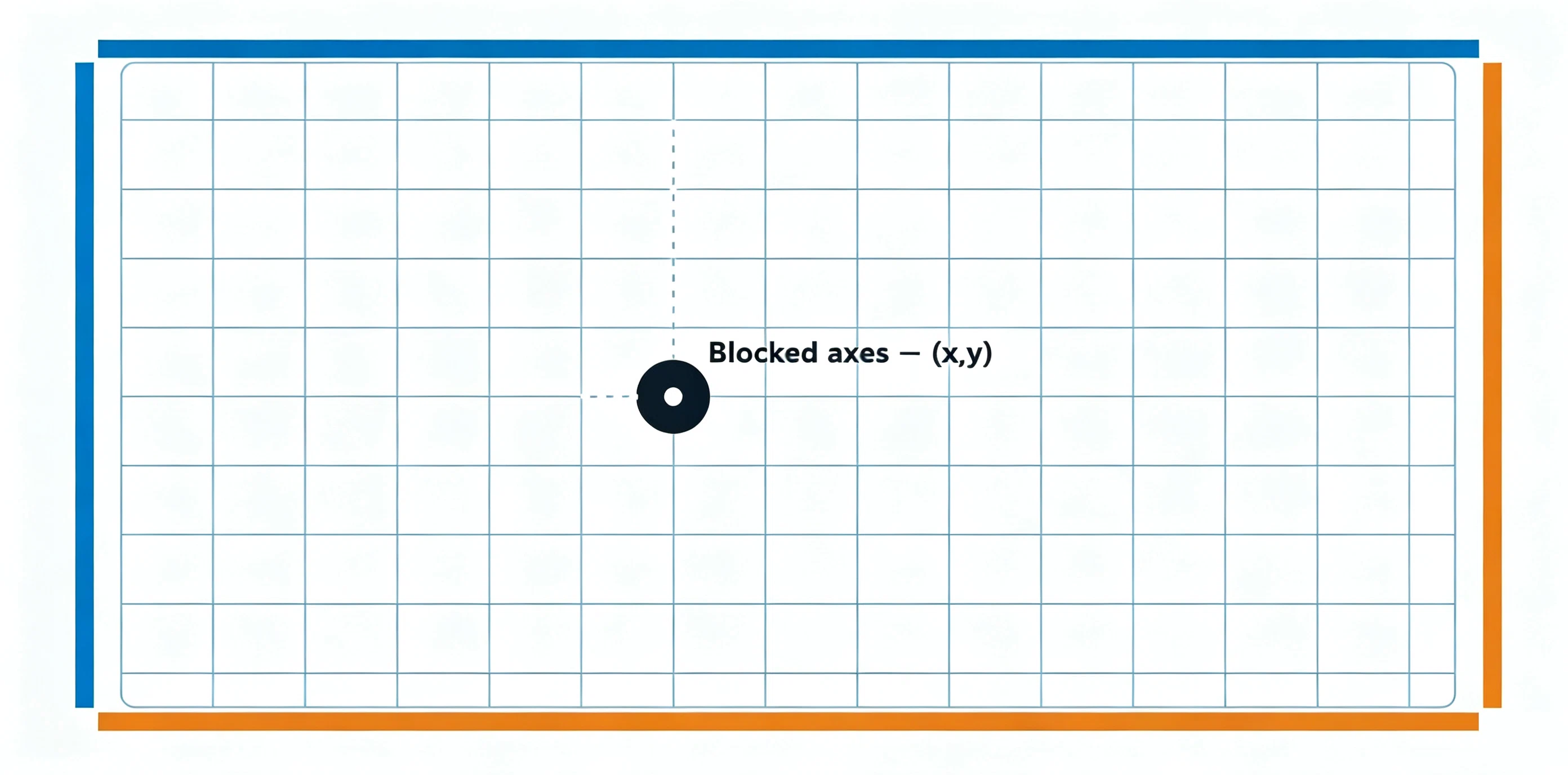
When a finger, palm, or stylus touches the surface, it physically blocks one horizontal beam and one vertical beam. The controller detects which beams were interrupted and calculates their intersection as an (x, y) coordinate. For a single touch, this is straightforward geometry.
The complexity — and the reason higher point counts are genuinely harder engineering, not just marketing — appears with multiple simultaneous touches. If two fingers touch the panel at once, they block two horizontal and two vertical beams, which mathematically produces four possible intersection points, not two. The two "extra" intersections are called ghost points, and the controller's firmware has to run a disambiguation algorithm — using timing patterns, beam-blocking sequence, and signal strength — to correctly discard the two false points and keep the two real ones. As the number of simultaneous contacts rises toward 20, 50, or 100, the number of possible ghost combinations grows exponentially, which is exactly why higher-tier controllers require more processing headroom and more sophisticated firmware, not just a denser LED grid.
Scan frequency — how many times per second the controller re-reads the entire optical grid — determines how quickly a moving finger's position is updated and how reliably fast, near-simultaneous touches are captured rather than missed between scan cycles. Entry-level 20-point panels typically scan in the 100–150 Hz range, sufficient for single-user writing and occasional two-hand gestures. 100-point panels generally run at 200 Hz or higher, paired with a higher-throughput controller chip, because resolving dozens of contacts and their ghost-point combinations within each scan cycle demands materially more computation. This is the honest cost driver behind higher point-count tiers: denser optics, faster scanning, and heavier real-time processing — not an arbitrary price tag.
Capacitive touch (the technology behind smartphones and premium in-cell panels) uses a grid of transparent electrodes embedded in or beneath the glass, sensing changes in electrical capacitance rather than blocked light. It generally offers finer touch resolution and no risk of frame-related optical degradation, but at large-format sizes (65"–110" class Interactive Whiteboards) it carries a significantly higher bill-of-materials cost and is more sensitive to screen protector or moisture interference. This is why infrared remains the dominant, cost-effective technology for education and enterprise-scale Interactive Flat Panels, while capacitive is more common on premium all-in-one collaboration displays.
With the underlying mechanism established, here is how the three common tiers compare across the dimensions that actually affect day-to-day use and total cost of ownership.
| Dimension | 20-Point | 40/50-Point | 100-Point |
|---|---|---|---|
| Ghost-point disambiguation load | Low — basic filtering sufficient | Moderate — dedicated algorithm required | High — real-time multi-object tracking required |
| Typical multi-finger recognition accuracy (5+ simultaneous contacts) | ~90–94% under concurrent group use | ~96–98% | ~98–99.5% |
| Palm-rejection reliability | Adequate for single-writer use | Good for 2–3 concurrent writers | Optimized for 4+ concurrent writers |
| Best-fit scenario | Single-presenter classrooms, standard huddle rooms | Group-work classrooms, collaborative meeting rooms | Multi-user whiteboarding, multi-screen splicing walls, exhibitions |
| Concurrent-touch failure mode under real conditions | Extra contacts beyond ~15–20 dropped or merged | Occasional lag under 5+ writers at once | Rare failure below rated capacity; degrades gracefully |
| Relative hardware/controller cost | Baseline | +15–25% over 20-point | +35–55% over 20-point |
| Value in single-user daily use | Full value realized | Marginal gain, mostly unused headroom | Largely unused headroom — poor cost efficiency |
The technical mechanism explained above leads directly to a procurement principle: touch-point count has a use-dependent value curve, not a linear one. Beyond the number of contacts your actual workflow generates at any single moment, additional points sit idle — you're paying for optical density and controller throughput the room will never call on.
For a teacher writing on the board while occasionally inviting one or two students up, effective concurrent contact count rarely exceeds 6–8 points (fingers, palm rest, stylus). A 20-point panel already carries meaningful headroom above that. Pushing to 100 points in this scenario adds cost without adding usable capability — the classic "parameter stacking" the person evaluating a quote is right to be suspicious of.
The curve inverts, however, the moment a room's real use case involves genuine concurrency: four people annotating a shared canvas at once, two classroom groups working on split zones of the same panel simultaneously, or a public exhibition wall drawing multiple visitors' hands at once. In these cases, a 20-point panel isn't "extra safe" — it's structurally undersized, and the failure mode (dropped or merged contacts) shows up as a visible, frustrating malfunction rather than a rare edge case.
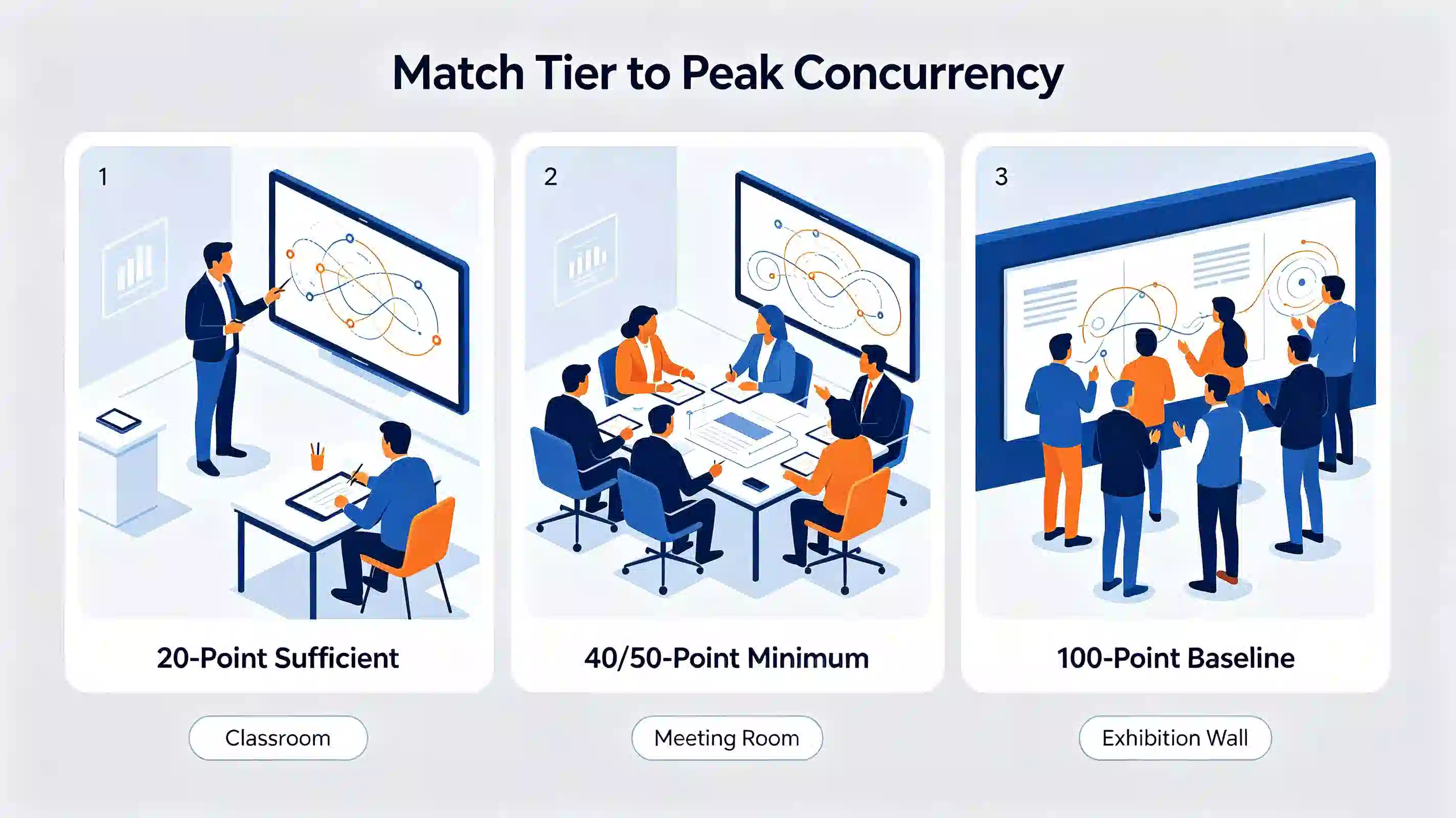
Match the tier to peak realistic concurrency, not average use. If your room's busiest moment involves three or more people touching the panel at once, budget for 40–50 points minimum. If concurrent multi-user interaction is the room's core function — a collaboration wall or public touch display — 100 points is not overspecification; it's the baseline requirement.
This is one of the most common questions we hear from IT procurement teams evaluating a multi-year deployment, and it deserves a precise answer rather than a blanket "no." There are two genuinely different phenomena that get conflated under "degradation," and they have different causes:
In practical terms: a well-engineered infrared frame with sealed optical windows and adequate LED power margin should show negligible accuracy drift over a 5-year service life under normal indoor lighting. The failure pattern buyers actually encounter in poorly engineered products is almost always dust ingress or physical frame damage, addressed below, rather than gradual electronic wear.
The infrared frame is the most mechanically exposed component of an Interactive Flat Panel — it sits at the perimeter of the screen, at the height where users lean, place bags, or bump equipment carts. Understanding its common failure modes is directly useful for estimating maintenance cost:
The cost implication that matters most to a procurement decision is architecture, not just component quality: on a modular design, a damaged frame is a bolt-on part that can be replaced independently — a same-day, low-cost service visit. On designs where the touch frame is bonded or tightly integrated with the display module, the same damage often requires returning the full panel to a service center, multiplying both downtime and repair cost. When evaluating total cost of ownership, ask suppliers directly whether the IR frame is field-replaceable as a discrete module, and request the mean-time-between-failure (MTBF) or accelerated aging-test data behind that claim rather than accepting a general durability statement.
A typical primary or secondary classroom involves one teacher writing continuously, occasionally inviting one to three students to the board for interactive exercises. Peak concurrent contact rarely exceeds 8–10 points including palm rests. A 20-point Interactive Whiteboard comfortably covers this pattern with headroom to spare.
Design reviews and cross-functional workshops often involve three to five participants annotating a shared canvas simultaneously — marking up a wireframe, voting with sticky-note style tags, or co-editing a document projection. This pattern regularly generates 15–25 concurrent contact points once palm contact and rapid successive touches are counted. A 20-point panel begins dropping or merging contacts under this load; 40–50 points is the realistic minimum for reliable group annotation without visible lag or missed strokes.
Public interaction walls, multi-screen video-wall splicing displays, and large-format exhibition installations are designed for concurrent use by multiple unrelated visitors — several people touching different zones of the same canvas at once, often with fast, exploratory gestures rather than deliberate writing. This is the scenario where 100-point capability is not a premium upsell but a functional requirement: undersized touch capacity here manifests as visibly unresponsive zones during peak foot traffic, directly undermining the installation's purpose.
Touch-point count is only one variable in perceived responsiveness. Evaluating it in isolation — the "parameter stacking" this guide set out to move past — misses several factors that affect day-to-day experience as much or more:
A panel with a high point-count rating but weak performance on these dimensions will still feel sluggish or imprecise in daily use — which is exactly why a technically literate buyer should request all four figures together, not the point count alone.
Qtenboard's Interactive Whiteboard for Education and enterprise-grade panels are built around the principle established throughout this guide: point-count tier should be selected for the room's real concurrency pattern, and the hardware behind that number should be engineered to hold its rated performance for the full service life of the installation.
This scenario-matched, field-serviceable approach is the same engineering philosophy behind Qtenboard's broader interface and system-integration design — deployed across more than 120 countries and trusted by education institutions and enterprises worldwide, with product performance validated through accelerated aging and field-failure-rate testing rather than marketing claims alone.
Q1 Is there a real, noticeable difference between 20-point and 100-point touch in daily use?
For single-presenter use — one teacher or one meeting host writing on the board — the difference is minimal, because actual concurrent contact rarely exceeds 8–10 points. The difference becomes clearly noticeable once three or more people touch the panel simultaneously: at that point, a 20-point panel starts dropping or merging contacts, while a 40–100 point panel (matched to the concurrency level) keeps every stroke independently tracked.
Q2 How is touch-point count actually defined and tested?
It's defined as the number of simultaneous, independently tracked contacts a touch controller can resolve. It's tested by placing the rated number of fingers or a robotic touch rig on the surface at once and confirming each contact is reported with a distinct, stable coordinate — not merged, dropped, or jumping position. Buyers can approximate this in an on-site demo by pressing ten-plus fingers and palms onto the panel in a spread pattern.
Q3 What's the technical difference between infrared and capacitive multi-touch?
Infrared touch detects contact by sensing which beams in a grid of LED/photodiode pairs around the bezel are interrupted; capacitive touch senses changes in electrical capacitance through an electrode grid embedded in the glass. Infrared is more cost-effective at large IFPD sizes and dominates education/enterprise deployments; capacitive typically offers finer touch resolution but at significantly higher cost at 65"+ diagonal sizes.
Q4 Does touch-point capability decline as the panel ages?
The rated maximum point count itself — a controller firmware capability — does not decline with normal use. What can decline over years of operation is touch accuracy and edge reliability, driven by gradual LED optical output decay, dust or micro-scratch accumulation on the optical windows, or strong ambient infrared interference. A well-sealed frame with adequate LED power margin shows negligible drift over a typical 5-year service life.
Q5 Is the infrared touch frame fragile, and is it expensive to maintain?
The frame is the most physically exposed component, and edge impact is the most common cause of service issues. The maintenance cost depends heavily on architecture: a modular, field-replaceable frame allows a damaged section to be swapped on-site at low cost; a frame bonded into the display module typically requires full-unit service center repair, which is significantly more expensive and slower. Ask suppliers directly whether the IR frame is field-replaceable before comparing warranty terms.
Q6 How many touch points does a standard classroom or meeting room actually need?
Match the tier to peak realistic concurrency, not average use. Single-presenter classrooms and standard meeting rooms: 20 points is typically sufficient. Group-work classrooms or collaborative meeting rooms with 3–5 simultaneous annotators: 40–50 points is the realistic minimum. Multi-user collaboration walls, multi-screen splicing, or public exhibition displays: 100 points is a baseline requirement, not overspecification.
Q7 How can I tell if a supplier's touch-point rating is overstated?
Request the test method behind the rating, not just the number — ask whether it was validated with a robotic touch rig, real fingers, gloves, and styluses of varying reflectivity. During an on-site or video demo, press the rated number of fingers/palms onto the panel simultaneously in a spread pattern and confirm every contact is tracked independently without merging or dropping, including near frame edges where interference is most common.
Q8 How should touch-point requirements be written into a tender or bid specification?
Specify the point count alongside the concurrency scenario it must support (e.g., "minimum 40-point simultaneous touch supporting 4+ concurrent annotators without contact drop"), rather than a bare number. Also request scan frequency, palm-rejection behavior, and whether the IR frame is field-replaceable — these determine real-world reliability and total cost of ownership as much as the headline point count.
Qtenboard's Interactive Whiteboard for Education is engineered with a modular, field-replaceable infrared frame and tier-matched touch configurations validated through accelerated aging tests. Explore the product line, download the full catalogue, or talk to our team about matching touch-point specifications to your project's concurrency requirements.

CEO | Interactive Display & Collaboration Solution Expert
I am the founder of Qtenboard, bringing over 17 years of hands-on expertise to the touch display industry. Drawing on the global management perspective gained through my EMBA studies at ShenZhen University, I lead my team in optimizing every stage of our operations—from product definition to high-efficiency supply chain management—ensuring our manufacturing capabilities remain at the forefront of the industry.
As the leader of Qtenboard, I specialize in providing tailored OEM/ODM solutions for interactive whiteboards, LCD video walls, digital signage, and industrial-grade touch terminals. Backed by our 330,000 m² modern industrial park in Shenzhen, we maintain full-lifecycle control over industrial design, precision manufacturing, and rigorous performance testing.
With nearly two decades of project experience, Qtenboard’s display solutions are now deployed in over 120 countries and regions, earned the trust of more than 15,000 enterprise customers worldwide. If you are seeking a responsive partner with a deep manufacturing foundation for your customized touch display projects, my team and I are ready to support your vision with professional excellence.

 EN
EN
 pt
pt  spa
spa  th
th  vie
vie  aze
aze  bel
bel  est
est  lav
lav  ukr
ukr  ru
ru