A Qtenboard 43″/50″ L-shaped touch kiosk for office towers, residential buildings and mixed-use properties. Hardware, cloud CMS and open SDK from the factory — your integrator brings the wayfinding app and the transit feed.
Every office lobby runs two searches at the same time. A visitor walks in and asks the desk which floor the law firm is on. A tenant walks past the same desk and wants to know whether the 08:40 bus is already gone. One of those questions gets answered all day by a receptionist. The other gets answered by nobody, because nobody has put a transit feed into the lobby.
Both questions can be handled by one floor-standing kiosk at the entrance, with the screen split between a searchable floor directory and a live arrival board. The hardware question is not “do we buy two devices”. It is “can one unit run two content streams reliably, at 7×24, in a lobby where nobody reboots anything”. That is the question this page answers.
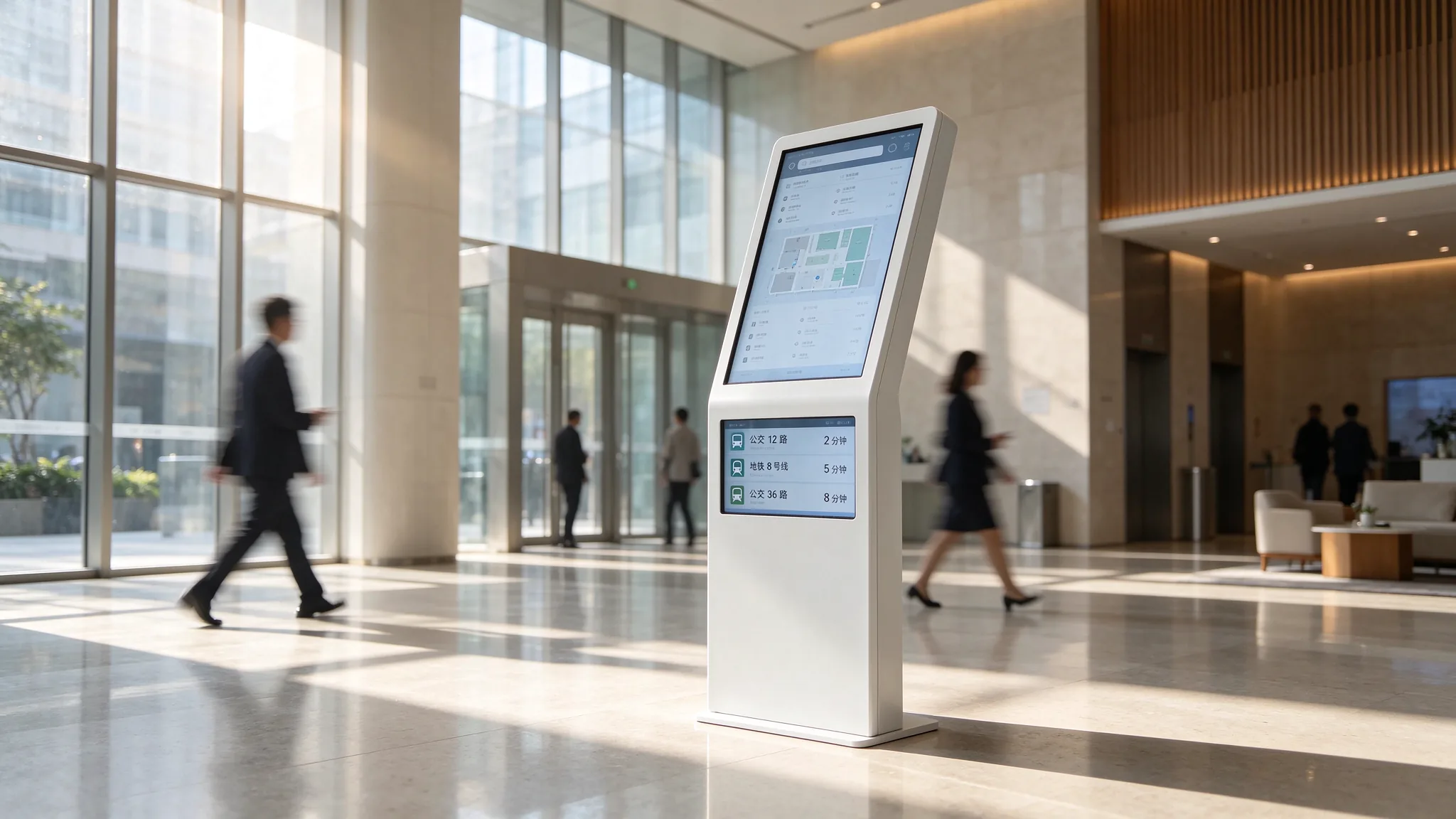
Ground-floor lobby, single L-shaped kiosk: tenant directory on the slanted upper screen, next bus and rail arrivals along the bottom third.
The two audiences in a lobby behave nothing alike, and that is why a single static poster on a wall never worked. A first-time visitor needs depth: a search box, a floor plan, a route drawn from the entrance to a specific suite. They will stand in front of the screen for 40 to 90 seconds. A daily tenant needs one glance: is my bus in four minutes or fourteen. They will look for two seconds while walking past, and they will never touch the screen.
Published deployment data backs the split. Property wayfinding programmes that replaced paper boards with interactive directories report front-desk route questions dropping by roughly half, because the answer is now on the screen at the lift bank. Transit information research in commercial buildings found around 85% of occupants rated an in-building arrival display as useful or very useful, and a measurable share changed their departure timing as a result. One device, two jobs, both of them already validated by operators who ran them separately.
Directory occupies the upper two thirds of the panel, a fixed arrival strip runs along the bottom. Best for towers with heavy daily footfall and a transit stop within a five-minute walk. The strip never disappears, so tenants learn it is always there.
06:30–09:30 and 16:30–19:30 the panel runs the arrival board full screen. Outside those windows it runs the directory full screen. Best for buildings where a half-height strip would make the directory map too cramped to read, and where management wants arrival data to feel like a morning service rather than wallpaper.
Directory waits behind a 10-second attract loop that alternates building notices with the next three arrivals. Any touch drops the loop and opens search. Best for mixed-use buildings where the screen must also carry leasing and community messaging without turning into an advertising board.
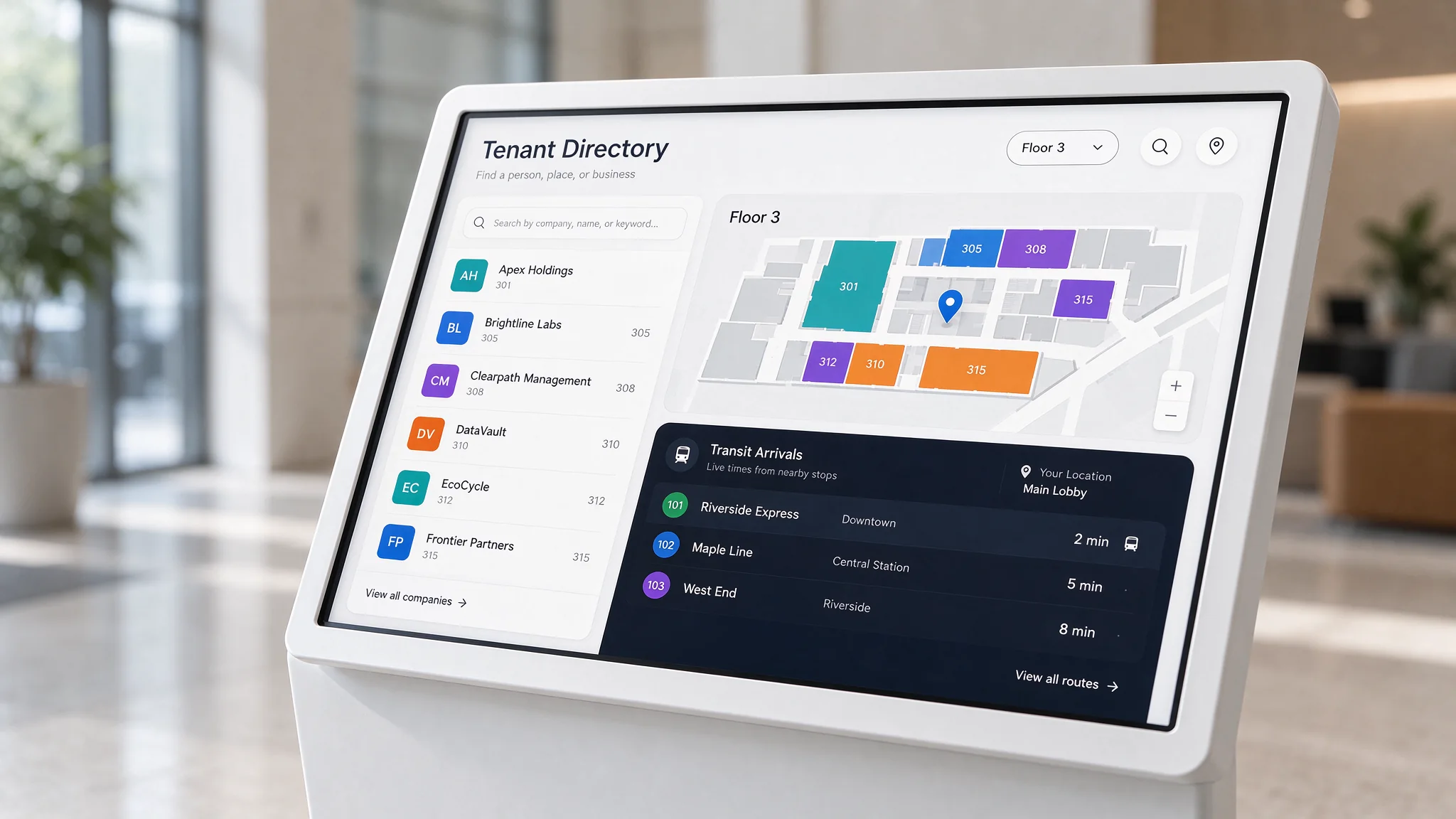
Layout A in service: searchable tenant directory above, permanent arrival strip below, both driven from one cloud CMS playlist.
Whichever layout you pick, two physical constraints decide whether it reads at all. The panel has to be legible from about two metres, which rules out anything under 43″ in a lobby with daylight. And it has to hold contrast under lobby lighting, which is why commercial-grade panels rated from 300 up to 700 cd/m² matter more here than in a dim showroom. Both sizes on this platform clear that bar before content is even discussed.
A vertical wall panel assumes the viewer stands back and looks straight on. A lobby does not work that way. People walk up to the unit, stand close, and look down. The L-body tilts the interactive surface toward that natural reading angle, so a visitor does not have to crouch to reach the lower part of the map, and a tenant walking past still catches the top of the screen from a distance. It also puts the touch surface below eye level, which keeps the screen from blocking the entrance line of sight.
| Specification | Configuration | Why it matters in a lobby |
|---|---|---|
| Screen size | 43″ / 50″ floor-standing (larger on OEM basis) | Readable at 2 m without eating floor space in a narrow entrance |
| Resolution | 1920×1080 (2K) up to 3840×2160 (4K UHD) | Floor maps and small suite numbers stay sharp at close range |
| Panel | 3000:1 contrast, 16:9, ≥300–700 cd/m² | Holds up against daylight glass walls and lobby downlights |
| Operating system | Android 16 / Windows (x86), dual boot optional | Android for a hosted wayfinding app; Windows when the integrator needs local software |
| Memory / storage | RAM 2GB / 4GB, ROM 16GB / 32GB (expandable to 16GB / 256GB) | Headroom for map tiles, video and a local cache of the arrival feed |
| Touch | IR multi-touch standard, PCAP capacitive optional | IR survives high-traffic halls and gloves; PCAP gives a flush glass finish |
| Connectivity | RJ45 LAN, Wi-Fi, optional 4G; USB, HDMI, audio, serial on side panel | Wired where the riser allows, 4G where the landlord will not open a port |
| Enclosure | White streamline L-body, metal anti-tip base; black / silver / custom | Anti-tip base is the difference between a lobby unit and a liability |
| Duty cycle | 7×24 continuous, industrial mainboard, engineered airflow | Lobby screens are never switched off, and heat is the usual killer |
| Recovery | Built-in watchdog timer, automatic restart | A frozen screen in an unattended lobby stays frozen until someone notices |
| Quality gate | 24–72 h aging burn-in before shipment, pre-shipment inspection | Dead-on-arrival panels cost a building manager a week, not a day |
| Certification | CE / FCC / RoHS / CB | Clears most landlord and tender documentation without a second round |
| Peripherals | QR scanner, 58 mm thermal printer, NFC reader, card dispenser, camera | Pre-wired at the factory for visitor badges and printed directions |
| Warranty | 1–3 years, extendable, core parts replaced free | Multi-site portfolios need a replacement path, not a repair promise |
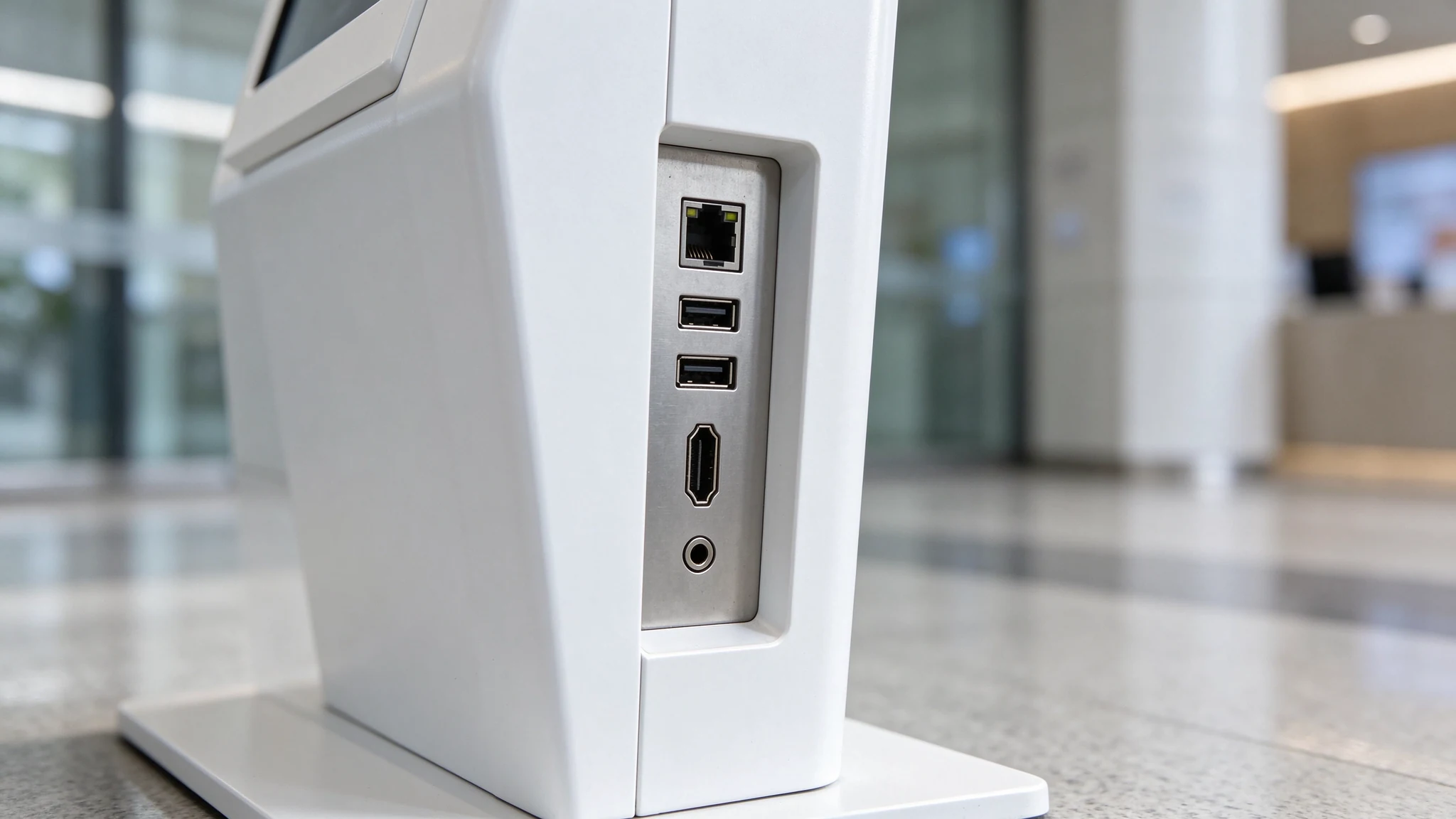
Side panel detail: USB, HDMI, audio and serial ports sit where a commissioning engineer can reach them without lifting the unit.
The platform ships from a Shenzhen facility that has been building displays since 2005, with a self-owned plant area of 330,000 m² and output above 200 units per day. That capacity is what makes a 2,000-unit tender batch shippable in one container cycle instead of six.
The failure mode of every lobby directory is not hardware. It is a map that was correct in March. Tenants move, suites get renumbered, a clinic changes its floor, and the screen keeps sending visitors to the wrong lift bank. A wrong map damages trust faster than no map, because the visitor has already committed to walking.
Four content layers belong on the device, in this order of priority:
Then the governance layer, which is what actually keeps the screen accurate. One named owner per building. A change request path from tenant to property manager to content editor. A version log so a dispute about “the screen said 14B” can be settled in thirty seconds. And a monthly audit against the leasing record, because letting agents update their own listing is not the same as updating the building directory.
On the hardware side, all of this is pushed from one cloud console rather than visited on site. Playlists, split-screen zones, on/off schedules and per-device status run from a browser dashboard that supports more than 20 languages, which matters when a regional property group operates buildings in three countries and wants the local ops team, not head office, to edit the local directory.
Multilingual and accessibility settings belong in the first build, not in phase two. Text scaling, high-contrast modes and a language switcher on the home screen cost nothing to include and remove an entire category of complaint from a building's accessibility review.
For a deeper operator view on content accuracy, platform governance and version control, see the Qtenboard guide on wayfinder kiosk deployment and terminal governance.
This is the part buyers underestimate. The screen is the easy half. The arrival times have to come from somewhere, and in most cities there is no single plug-and-play answer. There are three workable paths, and each has a different owner.
Path 1 — Transit authority API
Your integrator calls the local operator’s public or partner API, normalises the stop IDs for the two or three stops nearest the building, and renders a simple board. Cleanest result, needs a developer and a key.
Path 2 — Official display web page
Several transport agencies publish a browser-ready board you can point at a screen. The kiosk runs it in a browser window, full screen, refreshed on a timer. Lightest deployment, least control over layout.
Path 3 — Third-party transit app
A white-label app installed on the Android build, configured for the building’s stops. Fastest to stand up, but you inherit the vendor’s uptime and branding.
Whichever path you take, three engineering details decide whether the board looks reliable in week six.
Polling interval. Fifteen to thirty seconds is enough for bus and metro arrival predictions and cheap on bandwidth. Sub-minute polling does not make the data more accurate, it just burns data.
Failure display. When the feed drops, the board must say so. A stale arrival time that keeps counting down is worse than an honest “live data unavailable, next scheduled service 08:52”. Build the fallback text before you build the board.
Screen allocation. A ticker that scrolls continuously is fine for a bottom strip. A full arrival panel should not animate, because tenants read it while walking and moving text is unreadable at that speed.
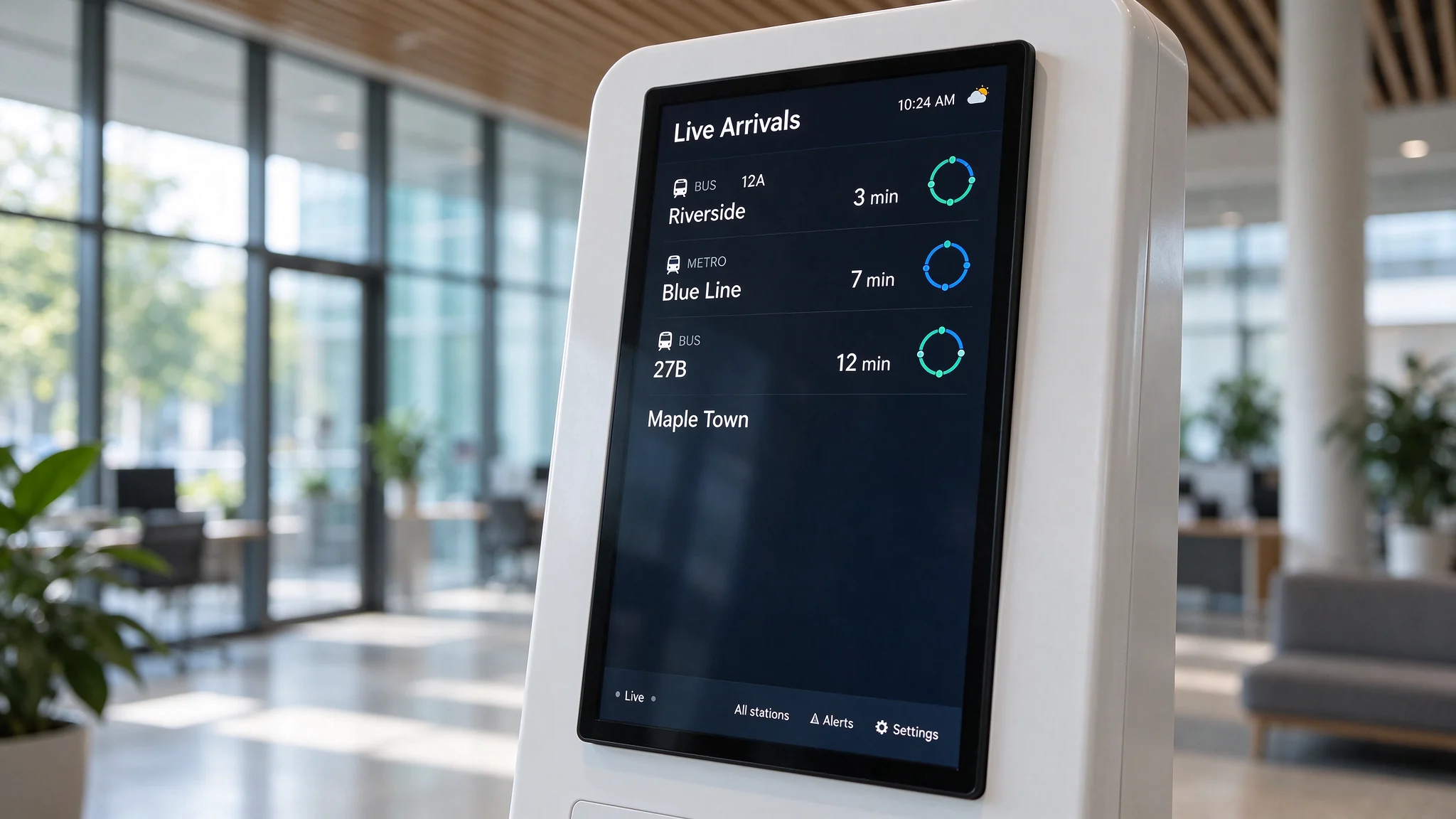
Arrival strip in service: three nearest stops, two lines each, minute countdown plus a fallback line when the feed is stale.
If a building only wants the arrival board and has no directory requirement, a vertical floor-standing display is the cheaper and simpler shape to deploy. Qtenboard builds those as a separate line — see indoor floor-standing digital signage. The L-body earns its place when the same panel has to be touched.
Residential lobby search intent is not the same as office lobby intent. The person searching for a residential lobby terminal is usually solving visitor management, parcel handling or access control, not wayfinding. That changes the honest answer.
The kiosk can carry
The kiosk cannot replace
The integration path is straightforward when the access-control vendor publishes an API or SDK. The kiosk becomes a display and input terminal: the visitor types a unit number, the kiosk asks the door system to ring that unit, the resident answers on the intercom or the app. Qtenboard’s hardware exposes an open SDK and REST API and standard network ports for exactly this pattern, and our engineers will confirm the integration route against your vendor’s interface document before you order.
When the access vendor will not open an interface, the kiosk still earns its place as a front-of-house information terminal: resident directory, parcel notice, amenity rules, and a printed visitor pass if a thermal printer is fitted. It just will not open the door, and that is better stated before the tender than discovered during commissioning.
Visitor selects the resident’s unit or scans a pre-issued QR code on the kiosk. No phone number read out loud at the desk.
The kiosk passes the request to the door-entry system, which rings the unit and shows the visitor on the resident’s handset or app.
The resident approves remotely. The kiosk shows a green confirmation and, where a printer is fitted, issues a timed access pass.
The access system logs the entry. The kiosk keeps no resident database of its own, which keeps the privacy question with the party that already holds the resident data.
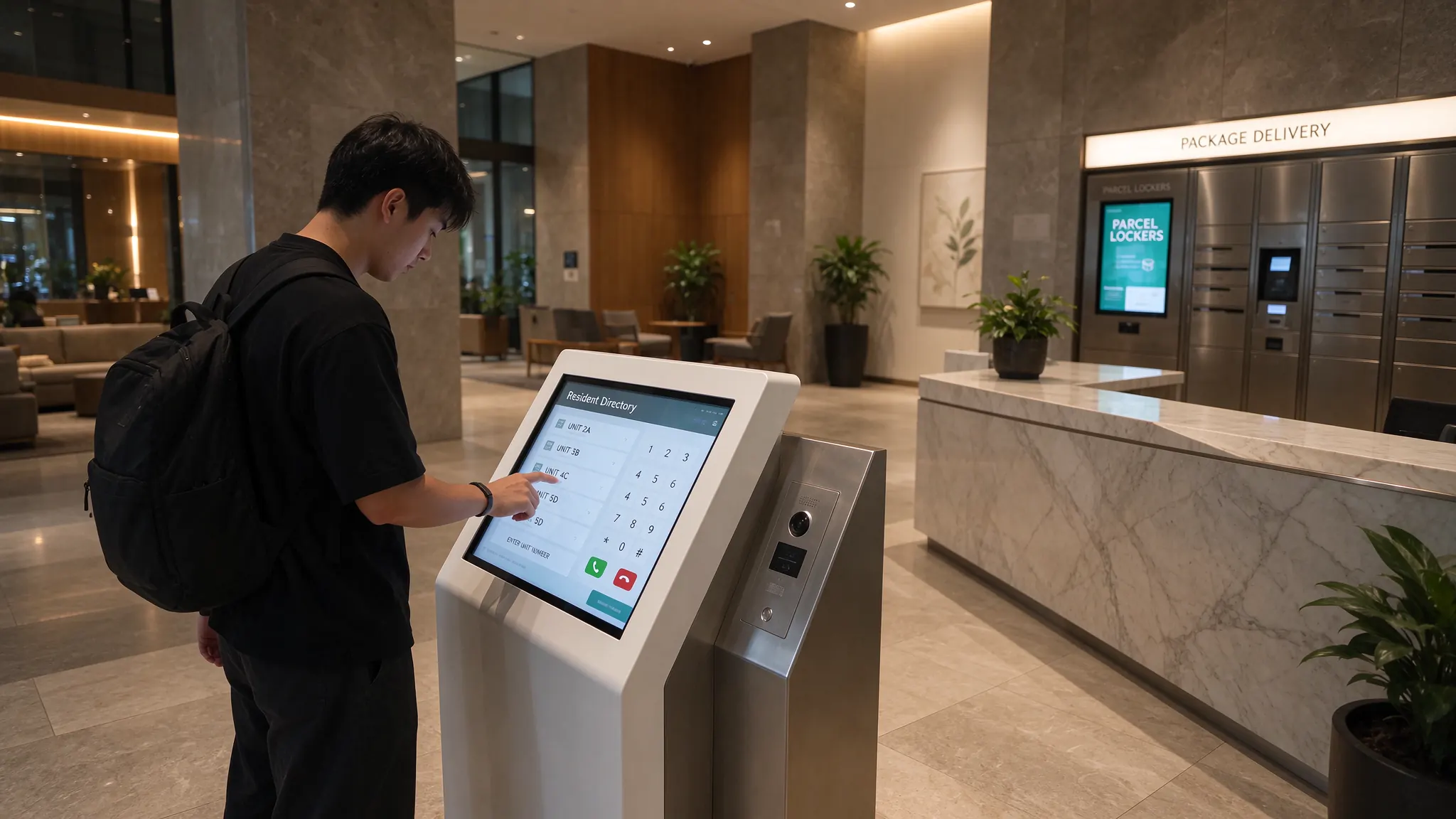
Residential lobby terminal: unit selection, call-to-unit prompt and parcel notice, with the door controller staying with the access vendor.
A single building is a hardware sale. A portfolio is a systems question, and that is where most of Qtenboard’s lobby volume actually comes from: property groups and integrators rolling the same unit across dozens of addresses.
On the software side, the kiosk exposes open SDK and REST API access so your team can connect it to a CRM, an ERP, a POS, a queue system, a door-entry controller or a building management platform. Content, scheduling and device health run from the cloud CMS: one playlist pushed to two hundred units overnight, per-site playlists when buildings differ, split-screen zones for the arrival strip, on/off schedules tied to lobby hours, and an online-status dashboard that tells you which screen went dark before a tenant does.
On the hardware side, three things matter more in year two than in month one: the watchdog that restarts a frozen unit on its own, the industrial mainboard and airflow design that survive a lobby running at 30°C all summer, and the spare-parts policy. Faulty core parts ship free inside the warranty, and spare panels and mainboards can travel with the bulk order so a local engineer swaps a unit in minutes rather than waiting on an international shipment.
For specifiers who need the full product range rather than this single model, the digital signage and kiosk solution overview covers kiosks, wall displays, outdoor units and the matching CMS. And the interactive touch line that sits above this model is documented in the QTB-TS interactive touch series, where 32″ to 65″ sizes and IP65 front protection are relevant for entrances with weather exposure.
These are real programmes shipped from Qtenboard’s Shenzhen and Guangzhou lines. None of them is a “lobby reference customer” invented for a web page; they are the closest shipping precedents for a lobby rollout, and each one answers a question a property buyer will ask.
A regional integrator tendered a national self-service hall rollout. Windows-version kiosks were pre-integrated with the local queue and ticketing system, the CMS was deployed in the local language, and the full batch shipped in one container cycle and commissioned on schedule.
2,000 units · single batchA fashion and supermarket chain replaced staff-printed posters with floor kiosks. Head office pushes new playlists to every store overnight; store teams stop printing signs and start greeting shoppers. The measurable outcome was a lift in impulse purchases and a sharp cut in update cost.
Impulse +22% · Update cost −60%A mid-scale hotel group put the 43″ L-body at lobby arrival. Guests check in, collect Wi-Fi details and call the lift themselves. Front desk attention moved to higher-value guests, and the arrival queue fell from about 15 minutes at peak to 5.
Wait 15 → 5 min · Queues −50%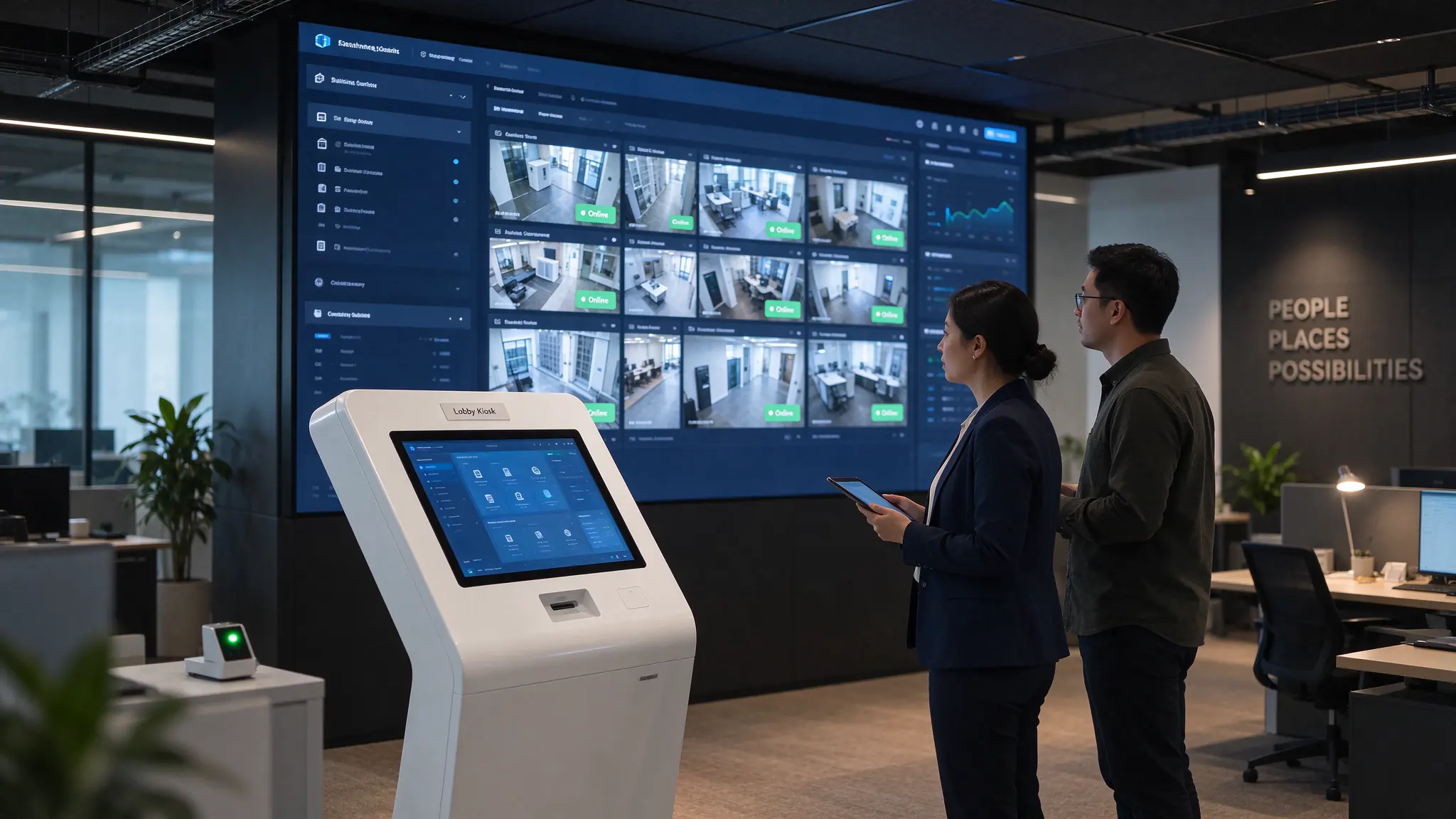
Portfolio deployment: identical hardware, per-site playlists pushed from one console, device status monitored from head office.
What these three have in common is not the industry. It is the shape of the project: content pushed remotely, integration done once with the customer’s own system, and units left unattended for years. That is the same shape as a multi-building lobby rollout — which is why a portfolio buyer should read these as deployment precedent, not as unrelated case studies.
Lobby projects rarely fail on the screen. They fail on the commercial path: a sample that takes six weeks, a custom colour with an MOQ nobody mentioned, a certification the tender asked for and the supplier does not hold. Here is the path, stated plainly.
| Item | What you get | Practical note |
|---|---|---|
| Sample order | From 1 unit | Test your wayfinding app and your transit feed on real hardware before committing a floor |
| Standard OEM | Roughly 10–50 units | Logo, body colour, pre-installed app, boot animation |
| Full ODM | Project by project | Structural redesign, custom housing, non-standard screen size |
| Lead time | 7–15 days standard, 15–30 days custom | Tender schedules get reserved production slots and a milestone plan |
| Certification | CE / FCC / RoHS / CB | Regional packaging and documentation adapted to destination |
| CKD / SKD | Component kits for local assembly | Lowers freight and duty in markets with high finished-goods tariffs |
| Warranty | 1–3 years, extendable | Panel, mainboard, PSU, touch film and enclosure covered under 7×24 commercial use |
| Support | Installation manual, SDK docs, remote assistance | Technical response within 2 hours, 24/7 |
| Pricing | Tiered quotation for distributors and integrators | Same-business-day quote against your quantity and configuration |
One commercial point worth saying out loud: a lobby kiosk is a five-to-eight year asset in a building, and the cheapest quote usually wins the tender and loses the second year. Ask what happens when a panel fails at a site with no local engineer, who pays freight on the replacement, and whether spare parts can travel with the original order. Those three answers separate a factory from a trader.
Can one kiosk really run a floor directory and a live transit board at the same time?
Yes, and it is a content layout question rather than a hardware limit. The panel runs a split-screen playlist from the cloud CMS, so the directory app and the arrival board occupy separate zones on one screen. On the Android build both run as apps or browser windows; on Windows they run as two windows or one composite application. A 4GB / 32GB configuration is the comfortable choice when a map, video and a cached feed share the device.
Who supplies the live bus and train data? Can Qtenboard provide it?
Qtenboard does not supply transit data and does not operate a feed. The data comes from your city operator’s API, from an official browser-based display page, or from a third-party transit app installed on the kiosk. What we confirm before you order is that the hardware can render and refresh that source reliably — browser engine, network path, refresh scheduling and a defined fallback display when the feed is unavailable.
Our building already has a door-entry and visitor system. Can this kiosk integrate with it?
It can act as the display and input terminal if your access vendor exposes an API or SDK. We work from your vendor’s interface document and confirm the integration path and effort before the order, rather than after. If the vendor keeps the interface closed, the kiosk still works as a front-of-house information terminal — directory, parcel notice, amenity rules, printed visitor pass — but it will not control the door, and we would rather say that now.
IR or PCAP touch for a lobby — which should we specify?
IR multi-touch is standard and is the right default for high-traffic halls: glove-friendly, tolerant of pointing with a fingernail, and less sensitive to the scratches and rings that come with public use at 43″ and 50″. PCAP gives a flush glass surface with no frame, which suits flagship and luxury residential lobbies where appearance outranks abuse tolerance. Both support 10-point gestures. If the entrance is exposed to weather, consider the IP65 front option documented in the wider interactive touch line.
How do we update the directory across twelve buildings without visiting them?
Through the cloud CMS. You push one playlist to all units, or per-site playlists where buildings differ, and schedule changes to publish at a chosen hour. The dashboard shows online status per device so a dark screen is visible before a tenant reports it. The interface supports more than 20 languages, which lets local property teams edit local content instead of routing every change through head office.
43″ or 50″ for a lobby entrance, and what does installation involve?
43″ suits a narrow entrance or a lift-bank position where floor space is tight; 50″ is the better choice when the directory carries a detailed floor plan that visitors will read at close range, or when the arrival strip has to be legible from across a lobby. Both are floor-standing with a metal anti-tip base, so the unit needs a flat surface and a power point, not a wall bracket or structural fixing. Confirm cable routing to the riser and whether the site prefers RJ45 or 4G before production, since both change the configuration.
Four details are enough for our team to come back with a hardware configuration, an integration boundary and a quote — usually the same business day, with technical review inside two hours.

CEO | Interactive Display & Collaboration Solution Expert
I am the founder of Qtenboard, bringing over 17 years of hands-on expertise to the touch display industry. Drawing on the global management perspective gained through my EMBA studies at ShenZhen University, I lead my team in optimizing every stage of our operations—from product definition to high-efficiency supply chain management—ensuring our manufacturing capabilities remain at the forefront of the industry.
As the leader of Qtenboard, I specialize in providing tailored OEM/ODM solutions for interactive whiteboards, LCD video walls, digital signage, and industrial-grade touch terminals. Backed by our 330,000 m² modern industrial park in Shenzhen, we maintain full-lifecycle control over industrial design, precision manufacturing, and rigorous performance testing.
With nearly two decades of project experience, Qtenboard’s display solutions are now deployed in over 120 countries and regions, earned the trust of more than 15,000 enterprise customers worldwide. If you are seeking a responsive partner with a deep manufacturing foundation for your customized touch display projects, my team and I are ready to support your vision with professional excellence.

 EN
 spa
 pt
 vie
 th
 est
 lav
 aze
 ukr
 bel
 ru