Solutions / Airport & Transit
The two queries that keep landing in our inbox — “airport check in kiosk manufacturer” and “airport kiosk manufacturer” — come from people who already know what they want to buy. They are not browsing. They are holding a tender document, a CUSS interface question, and a departure hall that cannot afford a dead terminal. This guide is written for that moment.
Section 01
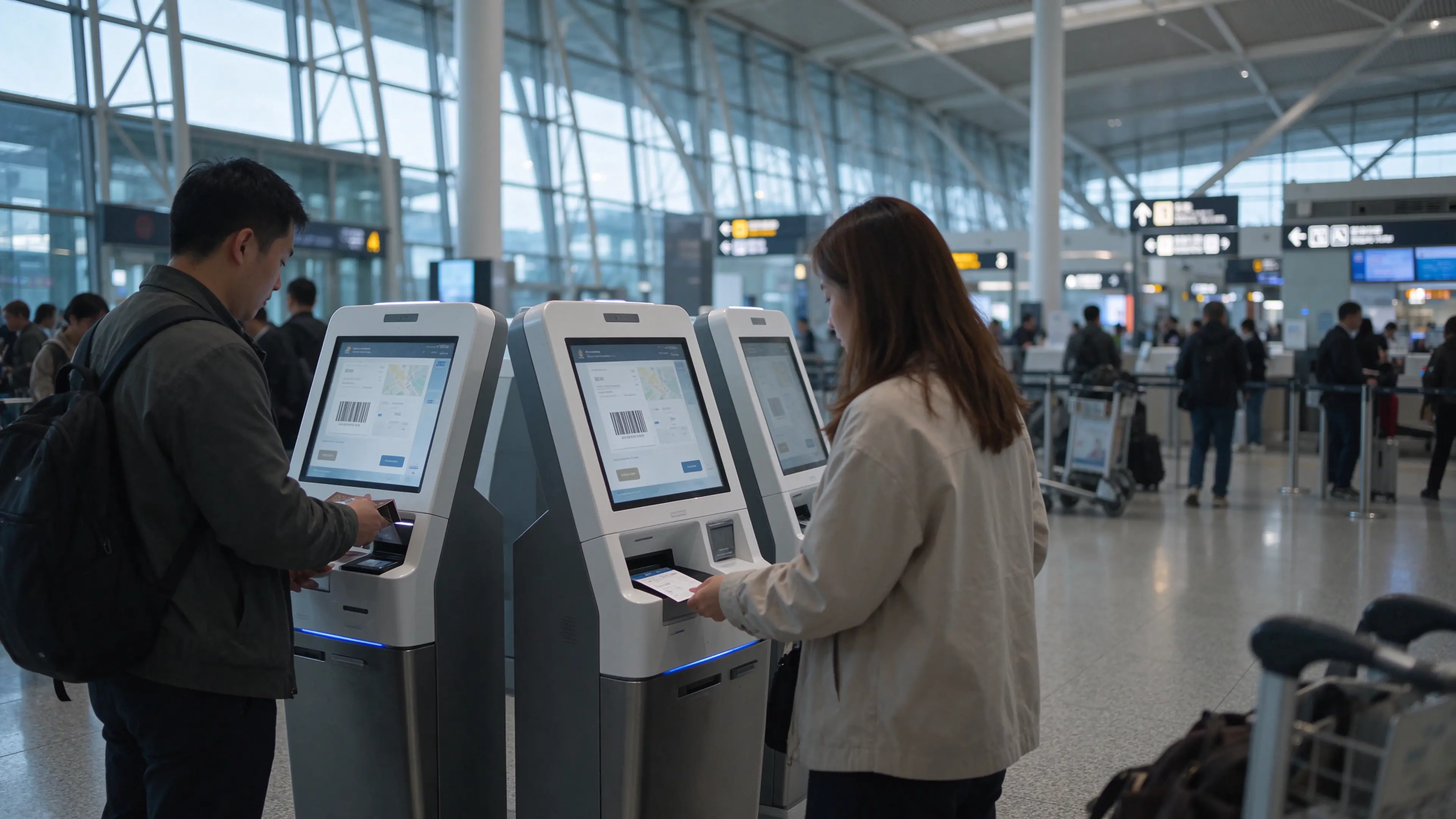
A self-service kiosk that fails at two in the afternoon in a shopping mall generates a service ticket. A check-in kiosk that fails at 05:40 on a Monday generates a departure bank with three hundred passengers and two open counters. That public consequence per failure is the reason terminal hardware is a different purchase category. It is not a nicer version of a retail kiosk. It is equipment that has to keep issuing documents while nobody is standing next to it.
Most kiosk supplier pages answer a question the buyer has already moved past. “Supports scanning and printing” is a description, not a specification. It does not tell a procurement officer whether the printer will survive a ninety-minute departure peak, whether the document reader will accept a foreign passport at an angle, or who is responsible when the boarding pass comes out blank at 06:00. Those three questions decide whether the project opens on schedule.
Gate 01
A kiosk that reads a QR code but not a passport machine-readable zone can only serve domestic self-print. One that reads MRZ changes the airport’s international capability. This is a passenger-segment decision disguised as a peripheral decision, and it is usually made by accident.
Gate 02
The terminal is the last link in a chain that starts inside an airline departure control system. Hardware without drivers, interface documentation and a defined test sequence stalls at the site acceptance stage, after the money has been spent.
Gate 03
Print head wear, cutter jams and dust in the paper path are not warranty items that show up in year one. They show up in year two as a spare-parts line nobody budgeted for, and in year three as queue complaints in the peak bank.
Scope of this guide
We already publish a wider transport-hub hardware guide covering the base machine, wayfinding, parking payment and station terminals — transportation hub self-service terminal hardware for OEM/ODM. This article stays on one lane only: the check-in flow, from passenger document to printed boarding pass to the CUSS boundary. If you are configuring a station ticket machine, read the hardware guide. If you are writing a check-in RFQ, keep reading.
Section 02
Buyers searching for an airport kiosk manufacturer are usually inside one of four project types, and the four do not want the same machine. Getting this wrong is expensive in a way that shows up late: an overflow kiosk specified like a common-use terminal carries peripherals the operator will never use, and a bag drop specified like a check-in kiosk arrives without the one module that justifies the project.
Deployment A
One terminal serves several airlines, each loading its own application through the airport’s common-use platform. The shell has to stay brand-neutral, the document reader has to handle every passport the airport sees, and the interface documentation has to satisfy an airport IT security review rather than a single airline.
RFQ impact: neutral enclosure, wide document support, platform certification path, and a named owner for application deployment.
Deployment B
A single carrier owns the terminal, the branding and the departure control connection. The hardware is stable across the estate, which makes spare parts and remote monitoring the real cost drivers. The airline will also ask for its own livery on the shell, its own paper stock, and its own escalation path.
RFQ impact: livery and silkscreen, printer media matched to the carrier’s stock, remote monitoring into airline operations.
Deployment C
Seasonal capacity, charter banks, or a terminal refurbishment that removes counters for six months. These units move, run on a standard power outlet and a wireless link, and are expected to be repositioned weekly. Weight, caster base and a short power-up sequence matter more than peripheral depth.
RFQ impact: movable base, single-cable power, quick network rejoin, reduced peripheral set.
Deployment D
Check-in plus a bag tag and a weight reading. This is the deployment that changes the civil works: the unit needs a scale platform, a bag tag printer with heavier stock, and a defined handshake with whatever moves the bag — a conveyor, a belt, or a manual take-away station.
RFQ impact: integrated scale, bag tag module, physical interface to the bag line, and a stated fallback when the scale is offline.
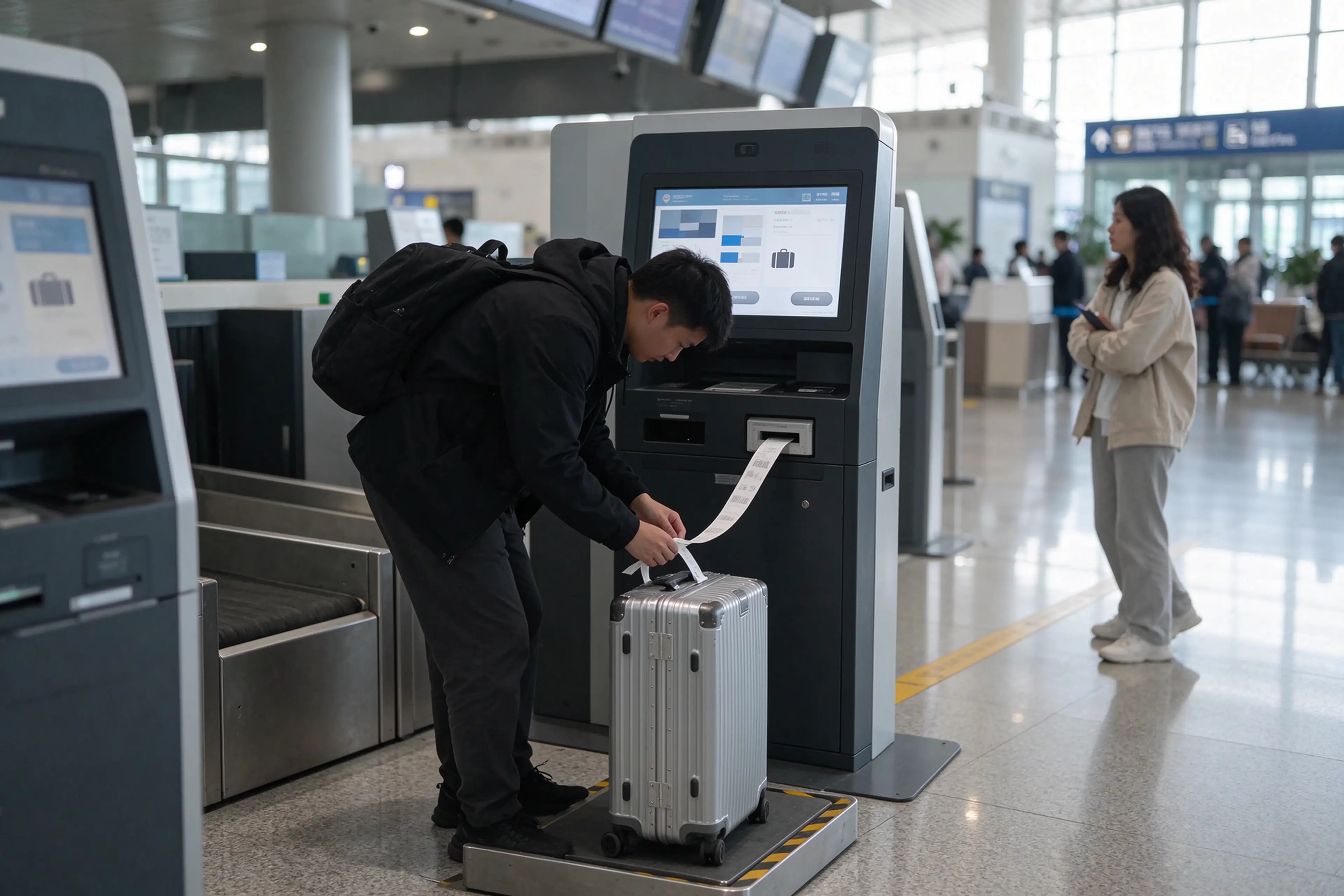
Deployment D changes the hardware more than the software: a scale platform, a bag tag printer with heavier media, and a take-away point for the tagged bag. Specify the physical interface before the enclosure drawing is frozen.
Section 03
What follows is the check-in subset of an airport kiosk specification. Each module is written the way a procurement officer has to read it: what the terminal demands, what to write into the document, and how the item gets accepted on site. If a supplier cannot answer the middle column in writing, the line item is not ready to be priced.
Module 01
The reader is the module that decides whether the terminal can serve an international departure bank at all. A QR-only build is a domestic self-print device. An ICAO 9303 machine-readable-zone reader is a check-in terminal. Full-page optical reading is a separate capability from MRZ parsing and is priced separately, which is why tenders that ask for “passport scanning” without naming the standard end up comparing two different products.
Equally important is the path when reading fails. A passport with a damaged laminate, a wet page, or a passenger holding the document at an angle will produce a rejection, and the kiosk has to hand that passenger to a counter without trapping them in a loop. Ask for the defined fallback, not just the success rate.
Terminal requirement
MRZ parsing to ICAO 9303 for passports and travel documents; optional full-page OCR; NFC e-passport chip reading where the market requires it; a scan window that survives cleaning chemicals and terminal dust.
RFQ field
Reader type, supported document classes, MRZ standard reference, full-page OCR yes or no, chip reader yes or no, glass hardness and coating, interface (USB HID or SDK), fallback behavior on read failure.
Acceptance
Read a sample set of at least twenty real documents from the airport’s top five origin markets, in the actual enclosure, at the actual screen height. Count time per read, not just pass rate.
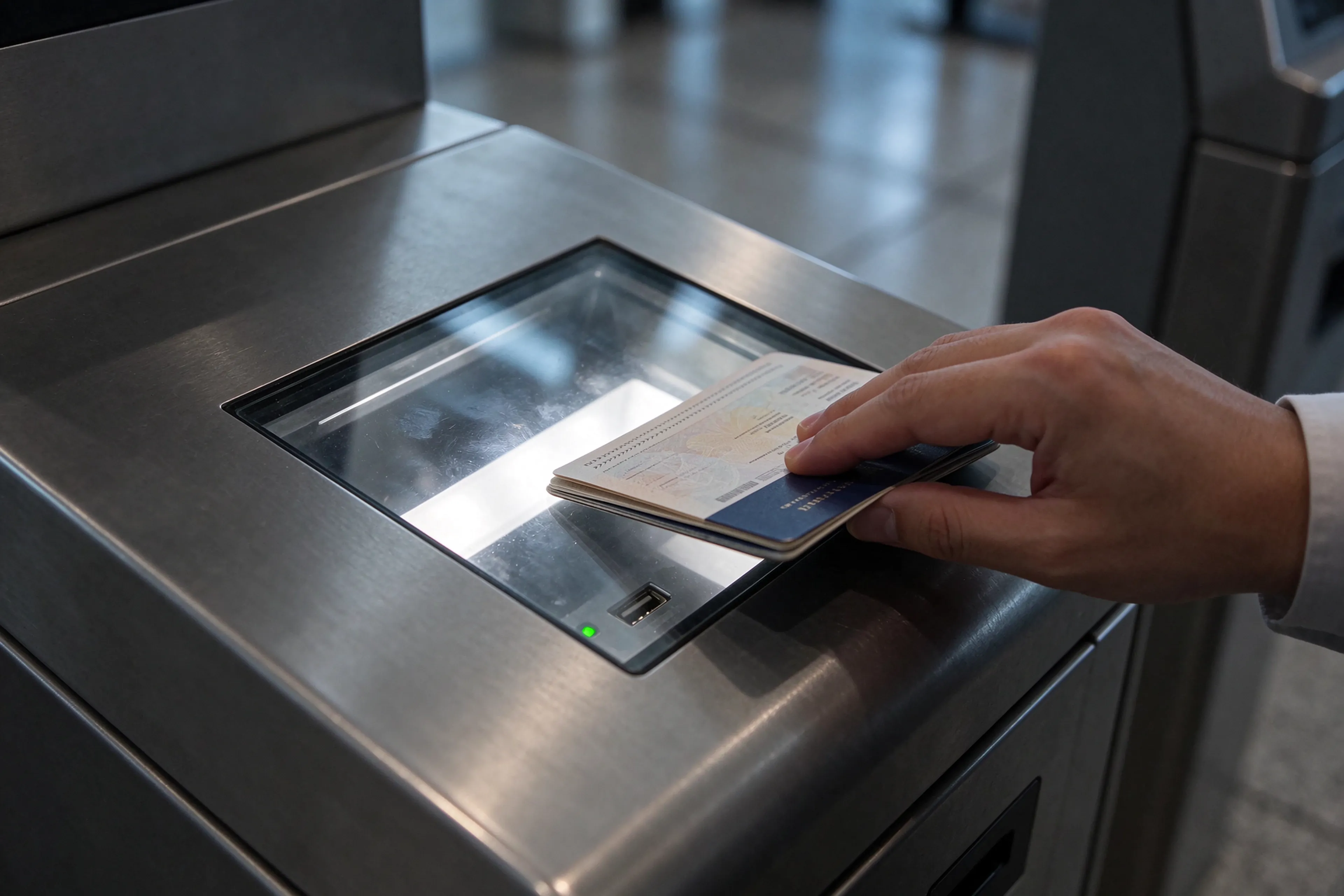
The reader window sits at the height where a standing passenger naturally places a document. If that height is set by the enclosure drawing rather than by passenger reach, accessibility compliance fails at the site visit.
Module 02
A departure peak compresses demand into ninety minutes. Two documents per passenger is normal — a boarding pass and, on many routes, a bag tag. That means a single kiosk can be asked for two hundred prints inside one bank, with passengers waiting. Print speed matters, but cutter reliability matters more: the cutter is the part that jams on a slightly misaligned roll, and a jam takes the terminal out of service until someone opens it.
Boarding pass stock is not receipt paper. It has a defined thickness, a defined width, and a printed back side on many carriers. Between a printer specified for 80mm receipt rolls and one specified for ATB stock there is a difference in the media path, the platen and the cutter load — and that difference is exactly where a project discovers it cannot print the document the airline needs.
Terminal requirement
Support for the boarding pass stock actually used by the operator; a cutter rated for the print volume of the peak bank; low-paper sensing; jam recovery that does not require removing the whole front panel in public.
RFQ field
Print width and resolution, supported media thickness, cutter type and rated cut count, prints per minute at the specified stock, roll diameter, sensor set, service access path, spare print head and cutter part numbers.
Acceptance
Continuous run of the peak-bank volume on the operator’s own stock, in one session, with jam count and cut quality recorded. A bench test on generic paper proves nothing about the tender.
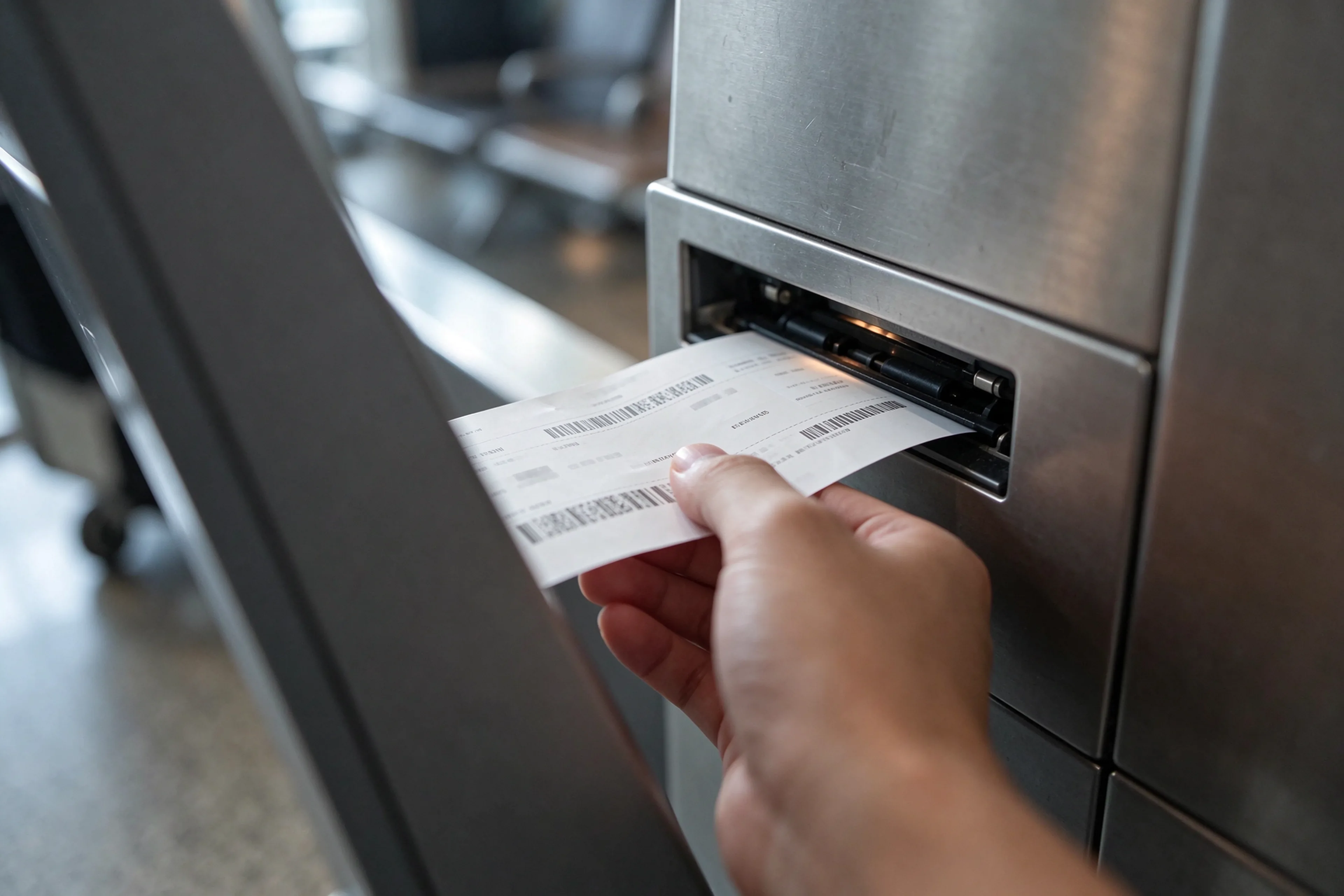
The take-away point is a design detail with an operational consequence: the passenger has to reach the document without touching the mechanism, and the slot has to clear a jam from outside the cabinet.
Module 03
Bag tags use heavier stock, a longer media path and a different cutter profile from boarding passes. Putting both in one chassis is possible and is what most bag drop projects ask for, but it changes the internal layout, the thermal load and the service access. The alternative — a dedicated tag printer beside the check-in printer — is easier to maintain and worse for footprint.
Whichever route the project takes, the interface question arrives early: the tag is issued by the departure control system, not by the kiosk. The hardware side has to expose the print device and its status, and the software side has to decide what happens when the tag prints but the bag is never placed on the line.
Terminal requirement
Media path for tag stock without skew, a cutter that separates the tag cleanly, status reporting for out-of-stock and head-open conditions, and space reserved in the enclosure even if the module ships in a later phase.
RFQ field
Tag media specification, print resolution, barcode symbology required by the carrier, module position, reservation of cutout and harness in phase one, driver and status interface.
Acceptance
Print and scan-back test on the airline’s tag stock, plus a check that the reserved bay can accept the module in phase two without structural change.
Module 04
Check-in traffic is not a self-selected group of confident users. It includes first-time flyers, elderly passengers, travellers with reduced mobility and parents holding a child and a passport at the same time. Screen height, tilt and target size are accessibility decisions, and in several markets they are compliance decisions with a documented reach range.
The public side of the enclosure also has to survive things a retail kiosk never sees: trolley contact, cleaning agents, and the occasional deliberate knock. Anti-vandal glass and a mounting that does not flex are baseline. The specification detail that gets forgotten is the cleaning regime — a coated screen that cannot take the airport’s disinfectant becomes a maintenance complaint in week two.
Terminal requirement
Projected capacitive multi-touch, anti-glare or anti-reflective treatment, impact-resistant cover glass, screen centre within the reach range for a seated wheelchair user, and a surface compatible with the terminal’s cleaning chemicals.
RFQ field
Screen size and orientation, touch technology and points, glass thickness and impact rating, brightness, viewing angle, reach height in mm, allowed cleaning agents, bezel and cable entry protection.
Acceptance
Reach test with a wheelchair user at the installed height, a glare reading under terminal lighting, and a wipe test with the operator’s own cleaning product.
Module 05
Check-in is free, which is why payment hardware is often left out of the first drawing. Then the operator asks for excess baggage payment, a lounge upgrade, a fast-track pass or a ground transport ticket on the same terminal. Adding a reader after the enclosure is designed means a cutout, a bracket, a harness change and a new EMC check.
If there is any chance the terminal will take money in its service life, reserve the bay in phase one. The commercial argument is simple: an ancillary sale at the kiosk removes a counter transaction, and the hardware cost of a reserved bay is a fraction of a retrofit.
Terminal requirement
Contactless and chip payment with a privacy shield around the PIN entry area, QR payment scanning, a receipt option, and status reporting that lets the application reverse an interrupted transaction.
RFQ field
Payment schemes supported, reader certification status, PIN pad shielding, receipt printer share or separate device, cutout reservation, interface documentation for the acquirer.
Acceptance
Transaction test with a live or certification-grade terminal, an interrupted-power test, and verification that the reversal path works when the network drops after the card is read.
Module 06
The computer inside a check-in kiosk runs an application it did not design, on a network it does not control, in a hall that is warmer than an office. It is expected to recover from an unplanned power cut without corrupting the print queue, and to keep running when the terminal’s intake filter is half blocked at the end of a summer.
Thermal design in a sealed public enclosure is where cheap builds fail. A fan that pulls unfiltered terminal air through the electronics bay turns a dust problem into a failure rate. Ask for the airflow path in the drawing, not a description of “heat dissipation channels”.
Terminal requirement
Fanless or filtered positive-pressure cooling, wide-input power supply with surge protection, watchdog with automatic recovery, graceful shutdown on power loss, and remote power cycling for the operator.
RFQ field
CPU and memory class, operating system, storage type, cooling architecture with filter specification, input voltage range, surge rating, watchdog behavior, remote management interface.
Acceptance
Ambient soak test at the hall’s summer temperature, repeated power-cut recovery, and a filter service interval written into the maintenance plan.
| Module | What the terminal actually demands | Field to write into the RFQ |
|---|---|---|
| Document reader | International passengers, damaged documents, angled placement | MRZ standard, document classes, full-page OCR, chip reader, fallback path |
| Boarding pass printer | Two documents per passenger inside a 90-minute bank | Media stock, cutter rating, prints per minute, service access, spare part numbers |
| Bag tag printer | Heavier media, carrier-specific symbology, phase-two upgrade risk | Tag media spec, symbology, module position, reserved bay, status interface |
| Screen and glass | Mixed ability users, trolley contact, daily disinfection | Touch type, impact rating, reach height, brightness, allowed cleaning agents |
| Payment | Ancillary revenue added after commissioning | Schemes, certification, PIN shielding, reserved cutout, acquirer documentation |
| PC, power, thermal | Uncontrolled network, unplanned outages, summer hall temperature | Cooling architecture, filter spec, voltage range, watchdog, remote management |
Section 04
This is the section that prevents the most expensive misunderstanding in an airport project. A common-use self-service deployment runs several airlines’ applications on one terminal through a shared platform. The platform, the airline application and the terminal hardware are three separate products from three separate suppliers, and each has a boundary that has to be written into the contract before the purchase order.
Hardware suppliers are frequently asked, in the first meeting, whether the kiosk “works with CUSS”. The honest answer is a boundary statement, not a yes. The terminal provides the peripherals, their drivers and the interface documentation; the platform provider installs and certifies the applications against its own environment; the airport owns the network, the certificate policy and the device management layer. Nobody in that chain can promise the others’ work.
| Layer | What lives here | Who owns it |
|---|---|---|
| Application layer | Airline check-in application, departure control logic, seat and baggage rules, CUSS platform services | Airline IT, platform provider or the project integrator |
| Interface layer | Peripheral drivers, device status reporting, interface specification documents, test tools | Kiosk hardware supplier, working to the platform’s requirements |
| Hardware layer | Enclosure, screen, readers, printers, PC, power and thermal design | Kiosk hardware supplier |
Four sentences have to appear in the contract, and they are worth more than any datasheet page:
Stated boundary
Qtenboard builds the terminal: enclosure, touchscreen, document reader, thermal printers, card and QR readers, industrial PC, power and thermal design, and the OEM integration that puts a project-specific peripheral into the shell. We do not develop a CUSS platform, a check-in application or airline departure control software, and we do not claim that a kiosk becomes a check-in system once it is plugged in. What we do provide is the peripheral integration, the driver and interface documentation your software partner needs, and a test sequence both sides can sign off. If a supplier tells you the kiosk alone will “do CUSS”, ask them which platform they certify against.
Section 05
“24/7” on a product page usually means the device is switched on all the time. In a terminal it means something harder: the unit has to issue documents during the morning bank with no technician on the floor, and it has to survive the other twenty-two hours without accumulating the faults that appear in the bank. Reliability is therefore a specification with numbers, and the numbers have to come from the buyer’s operation rather than the supplier’s brochure.
Start with the arithmetic. A unit that prints one hundred and eighty documents a day, six days a week, is asked for roughly fifty-six thousand prints a year. That number, not the warranty period, is what a print head and a cutter are actually being asked to do. Put it in the RFQ and ask for the maintenance interval that corresponds to it.
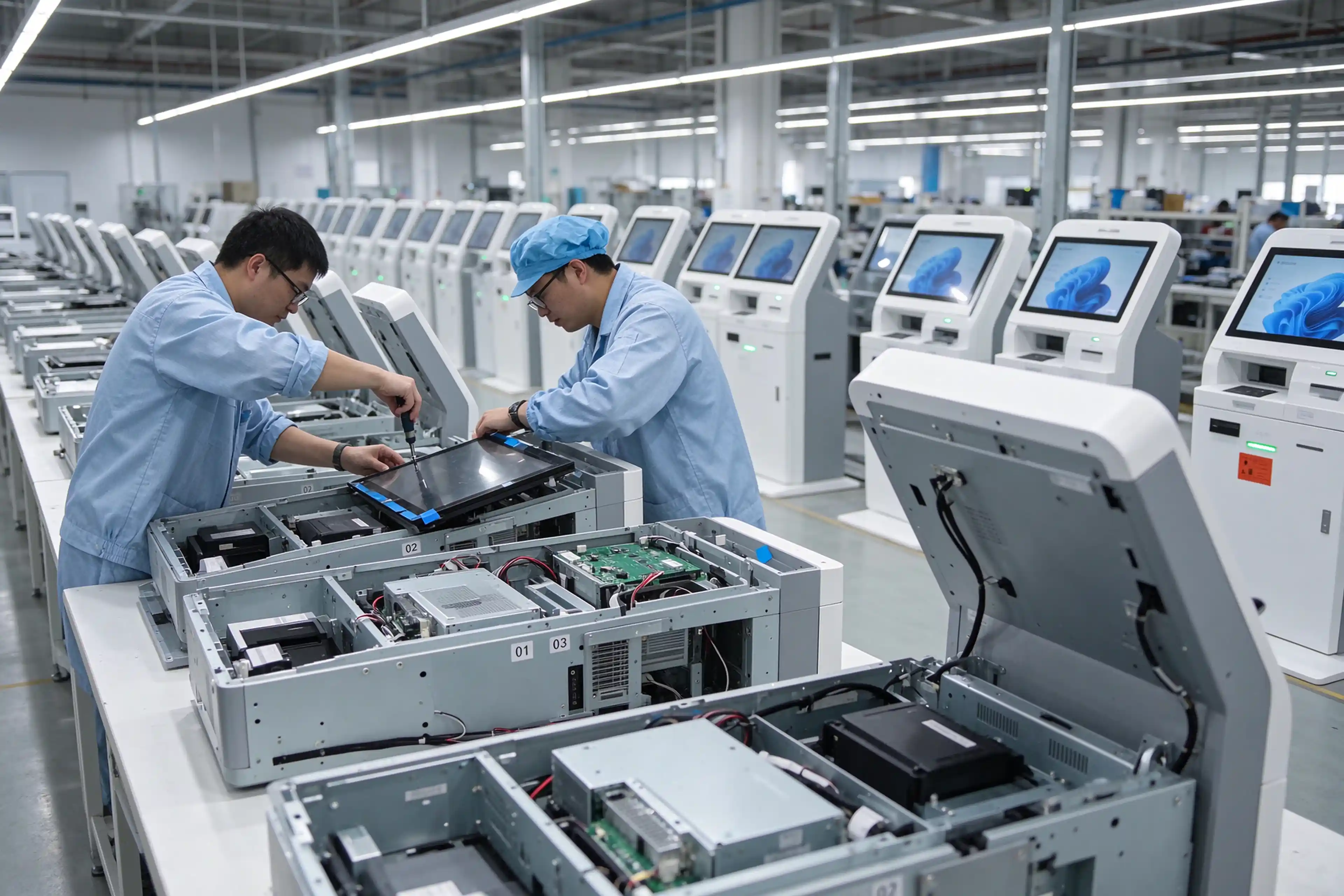
Aging test before shipment is a manufacturing claim, not a warranty claim. Ask how long the run lasts, what is exercised during it, and whether every unit is tested or only a sample.
What to ask a factory
How long is the burn-in run, and is it per unit or per batch? Which functions are exercised during it — printing, reading, payment, reboot? What is the acceptance record that ships with the unit, and can we see a redacted copy before we place the order? A manufacturer that answers these three questions with documents is a different risk profile from one that answers with adjectives.
Section 06
A check-in kiosk passes through several approval gates that have nothing to do with the product’s quality: airport IT security, electrical inspection, fire and materials review, and in some markets accessibility audit. Each gate wants a document. The project that assembles the pack early moves through them in parallel; the project that assembles it after delivery discovers that a certificate covers the wrong model variant.
Reference the standards by name in the RFQ, because a named standard forces both sides to talk about the same thing. Machine-readable travel documents point to ICAO 9303. Bar-coded boarding passes and bag tags point to the IATA resolutions behind common-use printing. Accessibility points to the reach and contrast rules the airport applies locally. Electrical safety and electromagnetic compatibility point to the market’s own mark, not a generic statement of compliance.
| Document | Why the gate asks for it |
|---|---|
| Product specification sheet, model-specific | Security and facilities review compare the delivered unit against a fixed description, not against a family page |
| Peripheral list with part numbers | Spare-parts planning and second-source risk assessment |
| Interface specification and driver package | Software partner sizing and platform certification |
| Electrical safety and EMC certificates | Terminal electrical inspection and coexistence with airport radio systems |
| RoHS and material declaration | Fire and materials review, plus the operator’s own procurement policy |
| Accessibility statement with dimensions | Reach height, contrast and target size evidence for the accessibility audit |
| Maintenance manual and service intervals | Five-year operating cost model and staffing plan |
| Packing, lifting and environmental limits | Delivery through a landside door, storage temperature, and installation sequencing |
One practical note on certification scope: a certificate issued for a standard configuration does not automatically cover a variant with a different printer, a larger screen or an added payment module. If the project customises the enclosure, ask for the certificate to be reissued against the delivered configuration, or at minimum for a written statement of which changes keep the existing approval valid.
Section 07
Airport projects are rarely catalogue purchases. The terminal has to match a tender specification written by a consultant, carry the operator’s identity, and accept a peripheral that the airport’s incumbent supplier already has in stock. A modular architecture is what makes that possible without re-engineering the whole machine — and it is also what makes a phase-two bag tag or payment module a bracket change instead of a new enclosure.
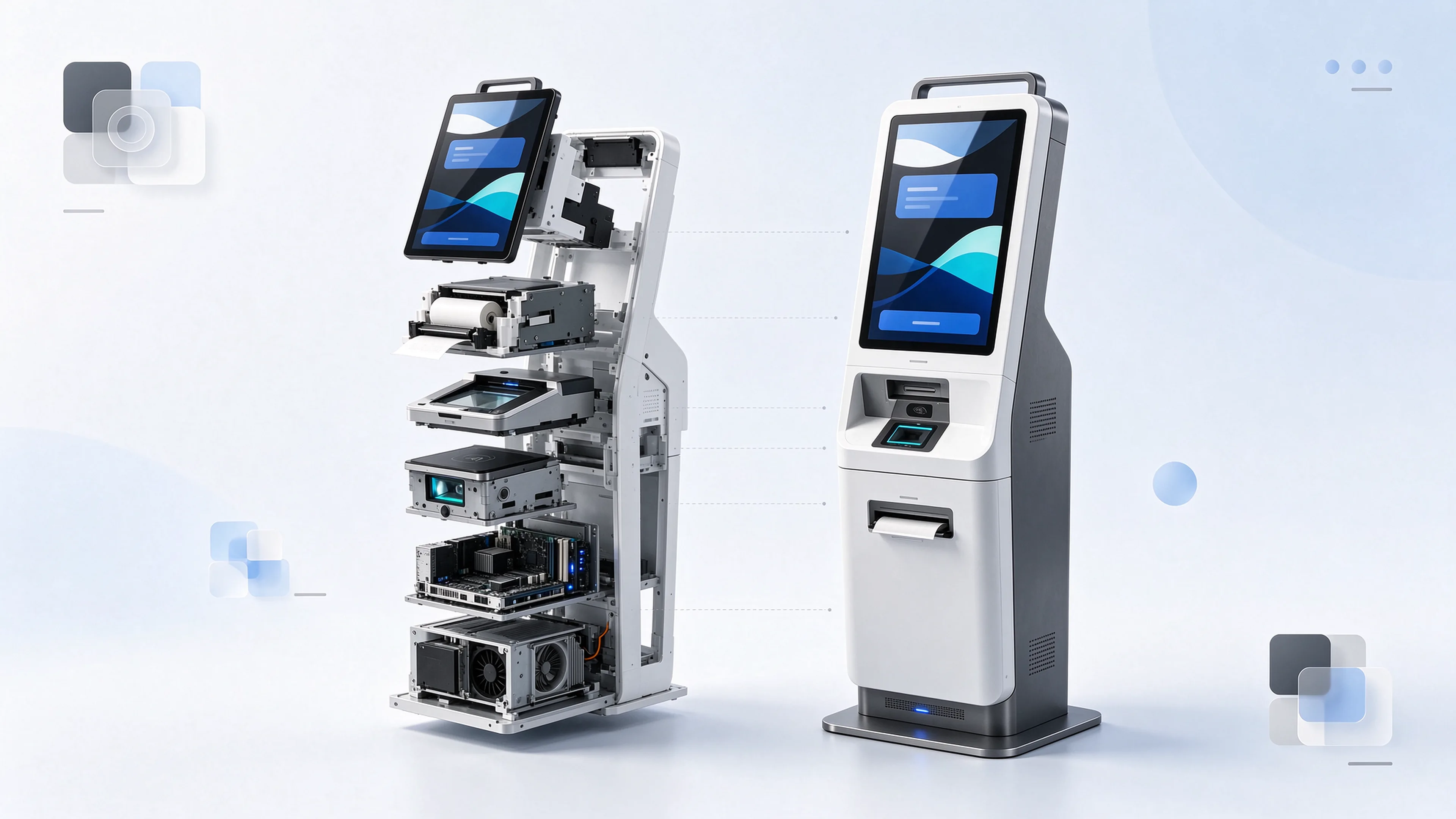
A modular shell separates the parts a project changes from the parts it should not: screen unit, printer bay, reader bay, payment bay, PC bay and thermal path each mount independently.
Enclosure dimensions and colour, silkscreen and startup visual, screen size and brightness, peripheral model substitution where the tender names a brand, cutouts and reserved bays for later modules, industrial PC platform and operating system, and the module layout inside the shell.
These are the items that change between projects, and they should be quoted as engineering work with a sample and a drawing, not as a colour option.
The CUSS platform, the check-in application, airline departure control logic, seat allocation rules and the airport’s device management stack. No enclosure change makes those appear, and no credible supplier should imply otherwise.
Treat these as interfaces to be documented, not features to be bought.
Three commercial details decide whether customisation is a project or a problem. The first is the golden sample: the approved unit that both sides keep, because the tenth production run has a way of drifting from the first. The second is spare-parts parity: spares have to match the delivered configuration, including the substituted peripherals. The third is the reservation clause: if a module ships in phase two, the phase-one drawing has to reserve the space, the harness and the power budget, in writing.
Section 08
Publicly reported airline rollouts are a useful calibration tool, because they describe the configuration an operator chose after living with the alternative. Two recent examples sit at opposite ends of the scale. SriLankan Airlines’ ground services unit installed twenty self-check-in kiosks at Colombo’s departure terminal, bringing its estate to twenty-eight units, ahead of a winter season in which more than three hundred thousand tourists were expected in December. Azul Linhas Aéreas installed eighty-six self-service terminals across Brazilian airports, including eight at Santos Dumont in Rio, with more than two hundred and fifty-five thousand check-ins processed through the installed base at the time of reporting.
The configurations differ in scale and almost nothing else. Both deployments issue boarding passes, both generate bag tags, both target the queue at conventional counters during the peak bank, and both are built around printing that runs all day. That is the procurement signal: airports and airlines do not buy a generic touch terminal for check-in. They buy a document-issuing machine with a reader, a duty-cycle-rated printer and a service plan.
On the manufacturing side, the evidence a buyer can actually verify is narrower and more useful than a customer logo wall. Qtenboard ships kiosk hardware to more than fifty country markets, holds CE, FCC and RoHS as the baseline certification set with PSE and UL available for the destination market, and runs aging and per-unit functional inspection before shipment. Those are checkable claims. A reference list of airport names is not, unless the customer is willing to take the call.
How to read a case study
Ask three questions about any deployment a supplier shows you: which modules were in the delivered configuration, how many documents per day the site actually prints, and what the spare-parts arrangement is. A rollout number without a duty cycle tells you the size of the order, not the suitability of the hardware.
Section 09
Each line below has an owner. If an owner is blank in your project folder, that is the item that will return as a change order.
| Confirm | Who provides it | If it stays open |
|---|---|---|
| Document reader standard and document classes | Hardware supplier | The terminal serves fewer routes than the airport planned |
| Boarding pass media and cutter rating | Operator plus supplier | Jams inside the first peak bank |
| Bag tag module in phase one or reserved | Project integrator | Enclosure redesign mid-project |
| Screen reach height and accessibility evidence | Supplier plus auditor | Accessibility gate fails at site visit |
| Payment bay reservation | Operator | Ancillary revenue delayed a year |
| Cooling architecture and filter interval | Supplier | Summer failure rate and dust faults |
| Interface document set and delivery dates | Supplier | Software partner cannot start |
| Platform certification responsibility | Platform provider | Nobody owns go-live |
| FAT and SAT sequence with pass criteria | Integrator | Dispute after installation |
| Spare parts list and quantities | Supplier | Two-week downtime on a two-hour fault |
| Certificate scope versus delivered variant | Supplier | Electrical or fire gate rejection |
| Golden sample and change control | Both sides | Production drift by unit ten |
Section 10
Three modules and one duty rating. The document reader has to parse passport machine-readable zones to ICAO 9303 if the terminal serves international flights. The printer has to be specified for boarding pass stock rather than receipt paper, with a cutter rated for the peak bank. The enclosure has to meet reach and impact requirements for a mixed-ability public. Everything else — screen, PC, network — is closer to a normal terminal than suppliers like to admit.
Hardware side, yes: we supply the peripheral drivers, command sets, error codes and interface documentation your platform provider needs, and we support bench integration at the factory. The CUSS platform itself, its application certification and the airport’s device management layer sit with the platform provider and the integrator. We do not develop the platform or the check-in application, and we will say so in writing rather than let the boundary blur.
Yes, with a caveat worth stating early. Bag tag stock is heavier and the media path is longer, so a combined unit needs a second print module, more internal space and more thermal headroom. The alternative is a dedicated tag printer inside the same shell. Either way, if the bag tag arrives in a later phase, the first-phase drawing must reserve the bay, the harness and the power budget — otherwise the phase-two cost is a new enclosure, not a module.
Configuration determines it: MRZ parsing for passports and travel documents, ID card reading for domestic markets, optional full-page optical reading, and optional NFC chip reading for e-passports. The failure path matters as much as the success rate. The terminal should offer a defined fallback — retry guidance, an alternative scan method, or a clean hand-off to a counter — rather than looping the passenger until a staff member intervenes.
A duty-cycle-rated printer, a cooling path that does not pull unfiltered hall air into the electronics bay, watchdog recovery, graceful shutdown on power loss, remote power cycling, and a spare-parts kit sized to the estate. Add telemetry for low paper, head temperature and jam counts, because the first sign of a failing unit should be a dashboard alert, not a queue at the terminal.
Enclosure dimensions, colour, branding, screen size, peripheral substitution and reserved module bays are engineering items quoted against a drawing, with a golden sample approved before the production run. Lead time depends on how far the configuration moves from the base platform and on the certification scope for the destination market. Send the tender specification and the target in-service date, and the factory will quote the configuration, the sample schedule and the spare-parts set together rather than as three separate conversations.
Next step
Tell us four things and the reply will be a configuration, not a brochure: domestic or international traffic, whether bag tags print on the same unit, which CUSS or departure control environment the application runs in, and the documents per day the site expects in the peak bank. We will come back with the module list, the interface documentation we can supply, and the items your software partner has to own.
Hardware, peripheral integration and OEM modules from Qtenboard. The check-in application and the CUSS platform stay with your software partner — and the interface documents make that handoff predictable.
Configurations in this article refer to the Qtenboard self-service ticketing kiosk platform for airports and transit terminals. Peripheral choices, document classes and certification scope vary by project market; confirm the final build against your tender specification before the purchase order.

CEO | Interactive Display & Collaboration Solution Expert
I am the founder of Qtenboard, bringing over 17 years of hands-on expertise to the touch display industry. Drawing on the global management perspective gained through my EMBA studies at ShenZhen University, I lead my team in optimizing every stage of our operations—from product definition to high-efficiency supply chain management—ensuring our manufacturing capabilities remain at the forefront of the industry.
As the leader of Qtenboard, I specialize in providing tailored OEM/ODM solutions for interactive whiteboards, LCD video walls, digital signage, and industrial-grade touch terminals. Backed by our 330,000 m² modern industrial park in Shenzhen, we maintain full-lifecycle control over industrial design, precision manufacturing, and rigorous performance testing.
With nearly two decades of project experience, Qtenboard’s display solutions are now deployed in over 120 countries and regions, earned the trust of more than 15,000 enterprise customers worldwide. If you are seeking a responsive partner with a deep manufacturing foundation for your customized touch display projects, my team and I are ready to support your vision with professional excellence.

 EN
 spa
 pt
 vie
 th
 est
 lav
 aze
 ukr
 bel
 ru