An open frame display is not a product you buy once and forget. It becomes a part of your machine, and every millimetre of that boundary is settled before the first sample is built. This guide works the way an integrator works — three decisions in order: form factor, mechanical fit, then compute and I/O — followed by the environment matrix, the sampling schedule, and the six specifications we need to quote a custom open frame monitor within 48 hours.
Three kinds of teams buy open frame hardware, and each of them loses money in a different place. Kiosk builders lose it in assembly labour when the frame does not match sheet metal they have already cut and powder-coated. Equipment OEMs — analysers, test benches, packaging machines, charging stations — lose it in certification and field service, because a change in display depth or thermal load changes how the whole enclosure behaves. AV and project contractors lose it in schedule, when a sample lands in week six and the mounting pattern has moved two millimetres from the drawing they built fixtures around.
None of these failures is a panel defect. A dead pixel is a warranty conversation. An offset mounting hole is a rework programme: new sheet metal, new fixtures, a revised assembly SOP, and a customer who now audits your change control. That is why open frame monitor OEM integration should be treated as a mechanical engineering service rather than a catalogue purchase — and why the three decisions below are worth more of your attention than the brightness figure on the datasheet.
The commercial case for removing the outer housing is well established: open frame hardware typically cuts total display cost by 30–40% against a fully enclosed commercial monitor, and assembly labour falls from roughly eight hours per unit to around three. The depth profile compresses from 3–5 inches down to 1–2 inches, which is what makes shallow payment terminals and compact self-service cabinets possible in the first place. Every one of those savings, however, is conditional on the unit fitting the first time.
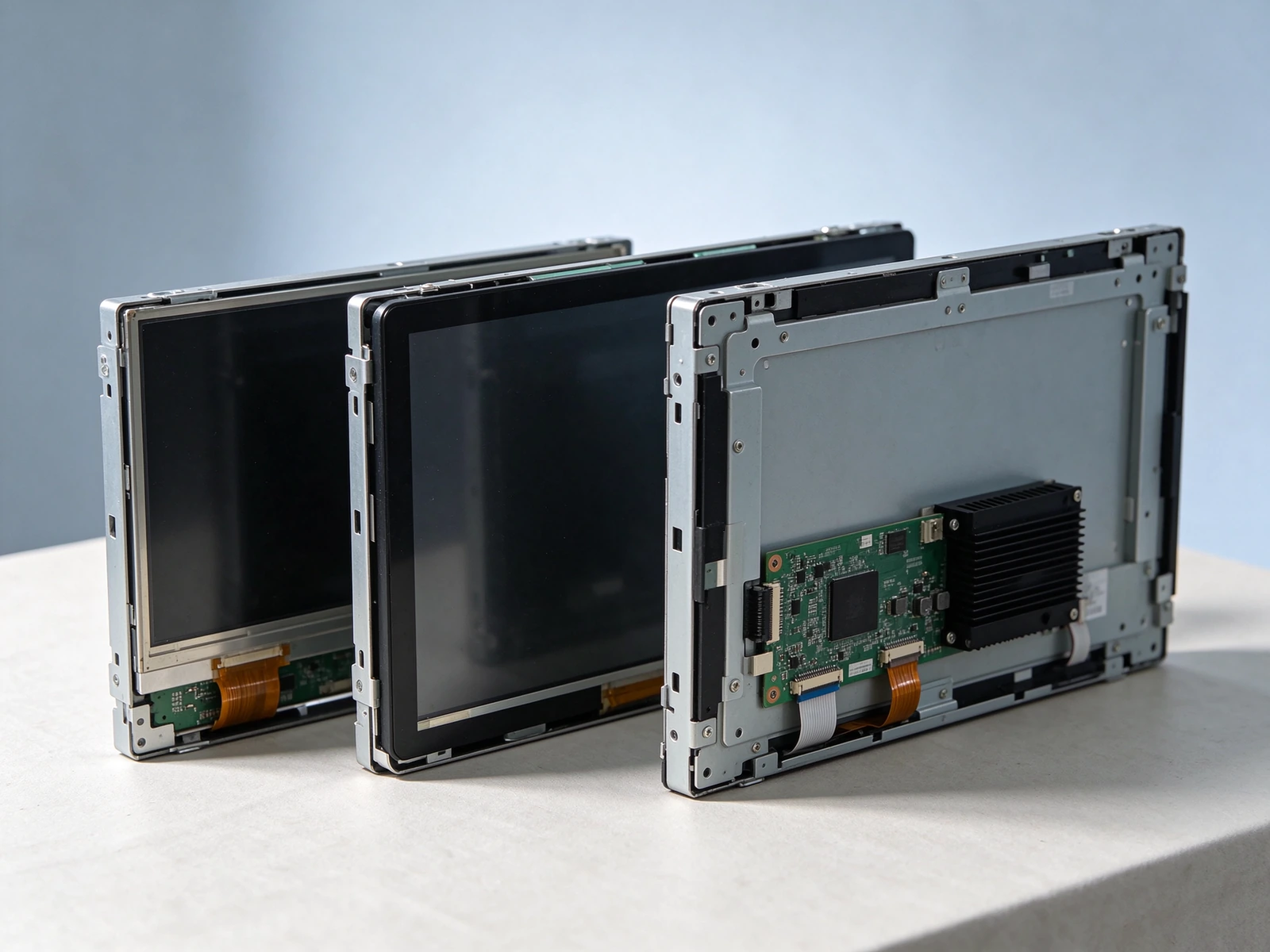
Left to right: a bare open frame monitor, an open frame touch monitor with bonded cover glass, and an open frame touch panel PC with the compute board and passive heatsink mounted directly behind the panel. Same opening, three levels of integration.
This single question decides the rest of the mechanical design. If the computer lives outside your enclosure, you are buying a display and routing a video cable into the cabinet. If it lives behind the panel, you are buying a subsystem and routing one power lead. Both are legitimate; conflating them is what produces a cabinet with no room left for the thing you actually needed to install.
| Integration factor | Open frame monitor | Open frame touch monitor | Open frame touch panel PC |
|---|---|---|---|
| Where compute sits | Outside — existing host, media player or industrial PC | Outside — same, plus a touch controller | Behind the panel — onboard Android or x86 mainboard |
| Depth behind opening | Shallow, roughly 40–55 mm | Shallow to medium, 50–65 mm | Deep, 60–95 mm including heatsink and connector swing |
| Cables into the cabinet | Video + power + touch USB | Video + power + touch USB | One power lead, plus network if required |
| Путь обновления | Swap the host, keep the display | Swap the host, keep the display | Replace the panel PC as a unit |
| Assembly labour | Исходный показатель | Baseline plus touch calibration | Lower — no secondary host box, no second PSU, no internal video run |
| Typical deployment | Menu boards, information panels, machine status displays | Self-ordering kiosks, ticketing, wayfinding, access control | Space-constrained kiosks, medical analysers, line-side HMI, test equipment |
| What to scrutinize | Aperture ratio, brightness, viewing angle | Cover glass type, coating, touch controller tuning | Board lifecycle, I/O layout, thermal budget inside the sealed cabinet |
This is the least expensive entry point and the least forgiving one, because every decision about signal, power and cooling stays with you. Qtenboard's open frame HMI line covers 15.6, 16.8 and 21.5 inch formats at 2K resolution, with Android 9.0 through 16.0 on the embedded variants, capacitive, infrared or non-touch front options, and brightness from 250 cd/m² upward. It is the right answer when your machine already has a controller, an industrial box PC or a media player you intend to standardize across several machine models.
Buyers sourcing an open frame monitor industrial grade unit usually care about two things the consumer channel never mentions: whether the panel is specified for continuous duty rather than office-hours use, and whether the backlight inverter and T-CON board tolerate the ambient temperature inside a closed cabinet. Ask for the panel's continuous-operation rating and the internal temperature the unit was validated at, not just the operating range printed on the outer carton.
Add a touch layer and the unit becomes an interface, but the compute burden stays with the integrator. The engineering content here is not "does it have touch" — it is which touch, behind which glass, tuned for which user. A projected-capacitive stack at 10 points behaves very differently from an infrared frame when the surface carries a film of cooking oil, and differently again when the operator is wearing nitrile gloves on a packaging line.
For public-facing self-service terminals, the cover glass specification matters more than the touch IC. Anti-glare etching reduces reflection from overhead lighting; anti-fingerprint coating keeps a smeared surface from degrading the image; chemically strengthened glass survives a coin, a key or a ring without a scratch that becomes a service call. Qtenboard supplies these as configured options rather than aftermarket add-ons, so the optical stack is bonded and tested as one assembly. If your project is a kiosk enclosure, the same mechanical envelope carries over to our self-ordering kiosk platform, which is useful when you want to validate the display choice inside a finished cabinet before committing to your own sheet metal.
This is where most of the cost savings hide, and where most integrators under-specify. Mount the mainboard behind the panel and three things disappear at once: the host enclosure, the internal video cable run, and the second power supply with its own thermal load. What remains is a single mains lead and, optionally, a network drop. In a kiosk with 120 mm of usable depth, that difference is the project.
Qtenboard & #039;sindustrial touch panel PC platform spans 8.4 to 55 inch, 2K resolution, capacitive touch, fanless passive cooling, Intel i3 / i5 / i7 compute, and an operating envelope of −10 °C to 60 °C. Android and Windows/Linux configurations are both available, which means the same mechanical design can serve a kiosk running a web app and a machine tool running a native controller application. As an open frame touch panel pc manufacturer working from a single mechanical baseline, we can change the compute module without touching the hole pattern your fixture depends on.
When a project team compares a bare open frame monitor against an open frame touch panel PC, the monitor almost always wins on unit price. The comparison is incomplete. Add a fanless mini PC, its DIN rail or bracket, a second PSU, an internal HDMI run with a locking connector, a USB extension for touch, and the labour to install and test all of it — then add the field-service cost of two devices that can fail independently. For volumes under a few hundred units the panel PC frequently lands within a few percent of the assembled alternative, with a shorter build time and one serial number to manage.
Four fixing methods cover almost every embedded project, and they are not interchangeable once your sheet metal exists. Each one trades sealing against serviceability, and the choice should follow from how the machine is maintained rather than from what is easiest to draw.
| Метод | How it works | Sealing | Доступ к услугам | Лучшее для |
|---|---|---|---|---|
| Front mount | Bezel sits through the opening, flange and screws behind the panel | Strong — gasket compresses against the front face | Opening the cabinet from behind | Kiosks, medical housings, washdown fronts |
| Rear mount | Unit mounts to an internal bracket, glass sits just behind the opening | Moderate — depends on your own gasket | Full access from inside | Machine consoles, control cabinets with rear doors |
| VESA | Standard 75/100 mm pattern onto an arm or plate | None on its own | Easiest | Enclosed internal mounting, retrofit projects |
| Clamp / panel mount | Side clamps press the unit against the opening from inside | Good with a supplied gasket | Clamps released from behind | Thin sheet metal, low-volume builds |
The active area is fixed by the panel; the opening is a negotiation between that area, the bezel width and the tolerance your fabricator can hold. The table below gives the reference figures Qtenboard works from on standard formats. Treat them as a starting point for the drawing review, not as a substitute for it — the final opening is confirmed against your enclosure file, because a two-millimetre difference is invisible in a spreadsheet and expensive in sheet metal.
| Размер | Active area (mm) | Reference front opening (mm) | Depth to reserve | Типичное использование |
|---|---|---|---|---|
| 8.4" 4:3 | 170.4 × 127.8 | 182 × 140 | 45–60 mm | Handheld instruments, compact analysers |
| 10.1" 16:10 | 217.0 × 135.6 | 229 × 148 | 50–70 mm | Bench equipment, access terminals |
| 12.1" 4:3 | 246.0 × 184.5 | 258 × 197 | 50–70 mm | Machine control, vehicle consoles |
| 15.6" 16:9 | 344.2 × 193.6 | 356 × 206 | 55–75 mm | Self-ordering kiosks, ticketing, wayfinding |
| 21.5" 16:9 | 476.6 × 268.1 | 489 × 281 | 60–95 mm | Line-side HMI, control room consoles |
| 32" 16:9 | 698.4 × 392.8 | 712 × 406 | 70–100 mm | QSR menu boards, production displays |
| 43" 16:9 | 941.2 × 529.4 | 956 × 544 | 75–110 mm | Retail fixtures, command walls |
| 55" 16:9 | 1209.6 × 680.4 | 1225 × 696 | 80–120 mm | Large-format kiosks, lobbies |
Three mechanical facts cause most field complaints, and all three can be settled at the drawing stage. First, depth is not just the panel thickness: reserve room for the connector bodies plus their swing radius, because an RJ45 plug needs roughly 30 mm of clear travel behind the port. Second, IP ratings on embedded displays are almost always front-only — a front IP65 assembly protects the touch surface against dust and directed water, while the back plate, the mainboard and the connectors carry no such protection and must sit in a dry zone inside the cabinet. Third, the gasket needs a flat, continuous, powder-coat-free mating surface of sufficient width, or the compression that makes the seal work simply is not there.
Bezel material follows the same logic. Aluminium gives a thin, machined edge that disappears into a designed housing; cold-rolled steel suits rugged cabinets and lower tooling cost; stainless is the answer for food, pharmaceutical and washdown environments where caustic cleaning agents attack coated surfaces. Colour matching to your enclosure is a paint or anodizing decision, not a cosmetic one — a visible mismatch reads as an unfinished product to your customer, whatever the panel specification says.
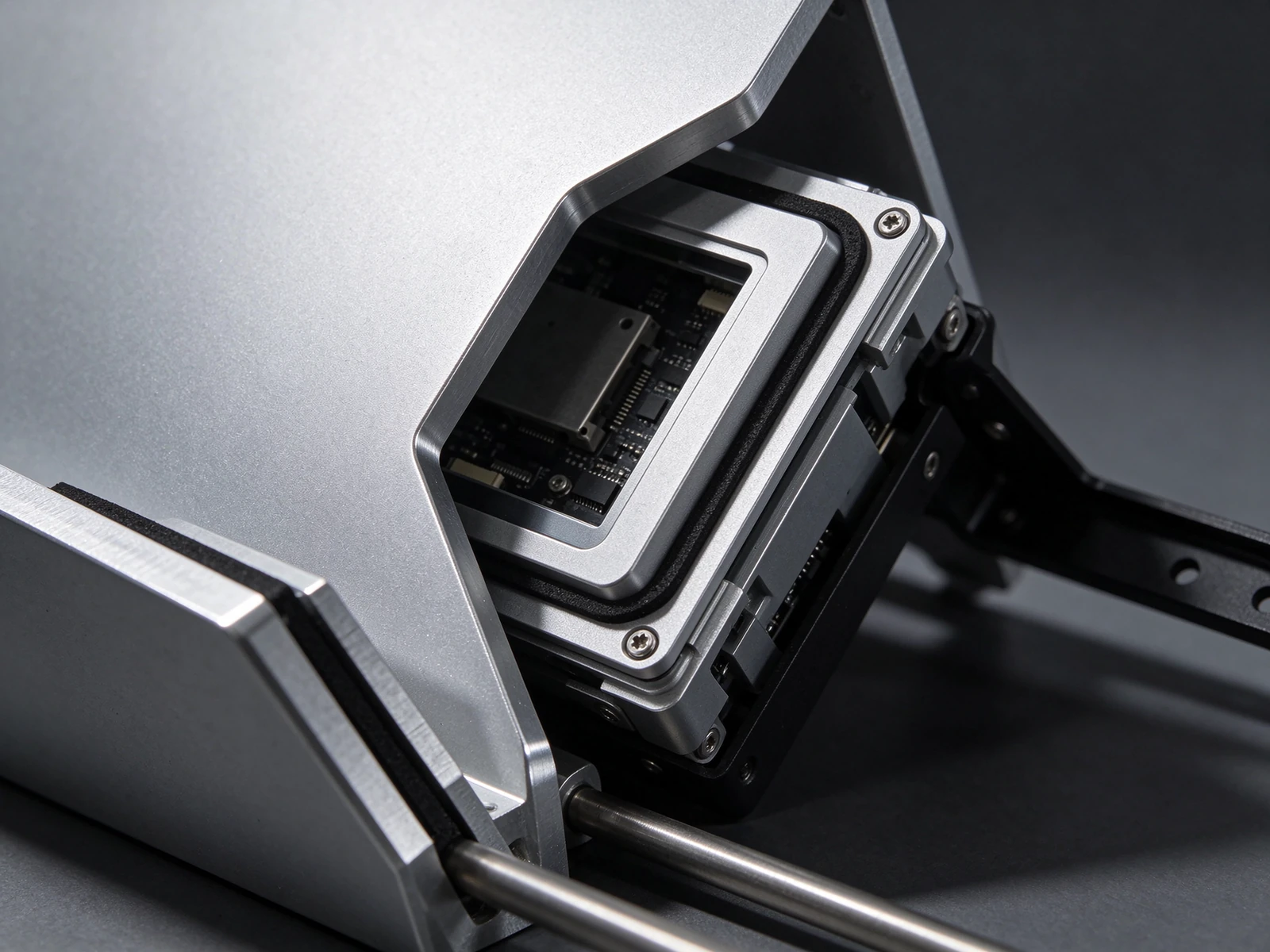
Front mount in section: the bezel passes through the opening, the gasket compresses against the front face, and the flange plus screws sit behind the panel. Opening size, flange width and gasket thickness are the three numbers that decide whether this joint seals.
Once the mechanical envelope is agreed, the customization conversation moves to three variables: the operating system, the interface layout, and the thermal budget. Of those, the interface layout is the one buyers most often leave on the table — and the one that most often forces a second sample.
| Платформа | Licensing | Boot and update model | Fit | Watch out for |
|---|---|---|---|---|
| Android 9 / 11 / 14 / 16 | No per-unit OS licence | Fast boot, OTA or factory-provisioned image | Kiosk apps, content playback, remote-managed fleets, touch-first UI | Long-term image control; plan the update path before shipping 500 units |
| Окна | Per-unit licence | Slower cold boot, managed via image deployment | Machine software, instrumentation GUIs, ActiveX-era industrial apps | Licence cost inside BOM; thermal headroom for sustained CPU load |
| Linux | No licence cost | Full control over image and services | Deterministic control tasks, long-life deployments, custom stacks | Driver availability for niche peripherals; in-house maintenance capability |
A port is not a spec-sheet line; it is a hole in your cabinet and a cable that has to reach somewhere. On an open frame touch panel pc the connectors can be placed on the bottom edge, the right edge or the rear plane, and unused ports can be deleted entirely — which reduces cost, removes dust ingress points and shortens the internal harness. For machine builders, a bottom exit keeps the cable bundle out of the operator's line of sight and lets the cabinet door close against a flat rear plate. For kiosk builders, a rear-plane layout with a cable channel usually suits better, because the service technician reaches in from behind.
Be explicit about the list you need, not the list you can live with: USB host and OTG, HDMI in or out, RJ45, RS232 or RS485 for a PLC, GPIO for a lamp tower or a relay, audio, and a DC input range that matches your existing PSU. Then add the operating characteristic: how often the port is plugged and unplugged, whether the cable carries data or only power, and whether the connector must survive a washdown. That description, plus a rear-view photo of your cabinet interior, is enough for us to propose a layout you can approve before tooling.
Fanless is not the same as heat-free. Passive cooling moves energy from the panel and the SoC into the surrounding air, and inside a sealed metal cabinet that air has nowhere to go. Two consequences follow. The unit's own surface becomes part of the cabinet's thermal path, so mounting it against a large metal face helps and mounting it in an insulated pocket hurts. And the cabinet needs a defined exchange path — a vented plenum, a rear heat sink, or a filtered fan on the enclosure — sized for the combined load of the display, the compute module and whatever else you have inside.
Our validated envelope for the panel PC platform is −10 °C to 60 °C ambient at the unit, not at the room. If your cabinet runs 15 °C hotter than the factory floor — which is common in summer — that figure is the one to design against. Where the arithmetic does not close, the options are a lower-power CPU SKU, a reduced brightness grade, or a change to the enclosure's cooling rather than a larger heatsink on the display.
Размер8.4" to 55", matched to your opening
СенсорныйPCAP, infrared or resistive; glass thickness and coating
ComputeAndroid or x86, RAM and storage, preloaded image
Ввод/выводPort selection, side, orientation, deleted ports
MechanicalBezel colour and material, side bracket, cable exit
БрендингLaser-etched mark, boot logo, packaging
Hole patternMounting coordinates stay across panel generations
Tolerance rulesCut-out specification and measurement method
Thermal baseHeatsink and airflow architecture validated as tested
БезопасностьClearances and insulation paths in the power section
Customizing the envelope is cheap before your sheet metal is cut and extremely expensive afterwards. Keeping the hole pattern standard is what lets a panel source change, a compute upgrade or a touch-stack revision ship as a drop-in rather than a redesign.
A factory that will move the mounting holes for free is usually a factory that has not thought about your second order.
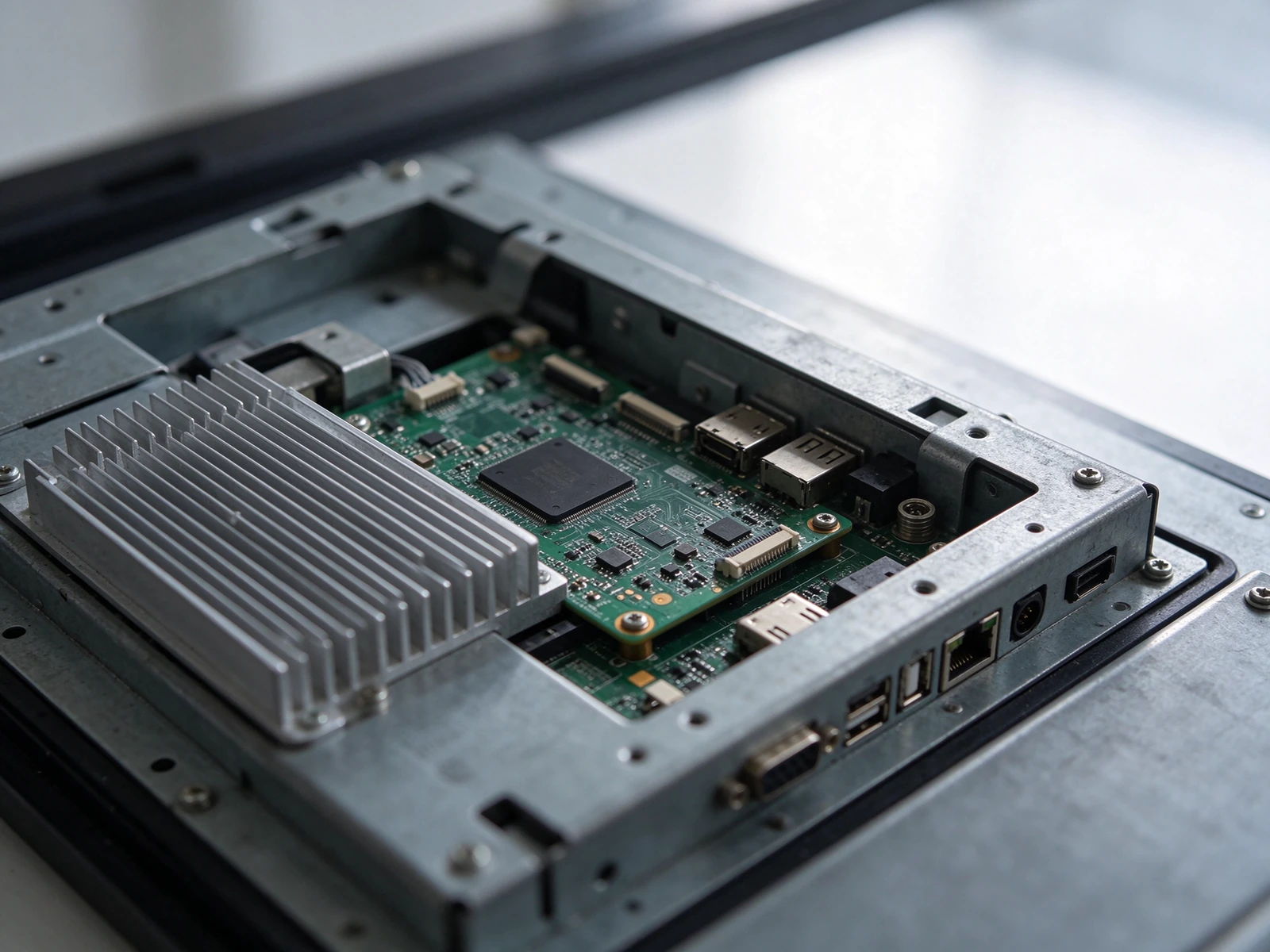
Rear view of an open frame touch panel PC: mainboard, interface cluster, and the aluminium heatsink that has to sit inside your cabinet's depth allowance. Connector swing radius, not board thickness, is usually what breaks a shallow design.
The same 21.5 inch panel can be the right choice for a control room and the wrong one for a kiosk beside a window, because what changes is not the resolution but the light, the temperature and the hand. Use the matrix below as a starting position, then confirm the specifics against the actual site.
| Требование | Indoor kiosk / retail | Medical or laboratory equipment | Factory floor and line-side HMI |
|---|---|---|---|
| Яркость | 250–350 cd/m², matte surface | 250–350 cd/m², low reflectance for close viewing | 350–700 cd/m², high ambient and glare from windows |
| Operating ambient | 0–40 °C inside a conditioned space | 15–30 °C, but with strict surface temperature limits | −10 to 60 °C at the unit, plus cabinet rise |
| Сенсорный | PCAP, 10-point, anti-fingerprint | PCAP with gloved or bare-hand support, sealed front | PCAP tuned for work gloves; IR where a heavy stylus or wet surface is normal |
| Optical treatment | Anti-glare etch, optional optical bonding | Anti-glare plus low-haze bonding; cleanable surface | Anti-glare, high hardness cover glass, impact resistance |
| Проникновение | Front IP54 to IP65 | Front IP65 with wipe-down cleaning agents | Front IP65, oil mist and metal dust present |
| Duty cycle | 12–16 h, occasional 24/7 | Continuous during shift operation | 24/7, continuous for years |
| Compliance focus | Electrical safety, EMC | System-level IEC 60601 submission, leakage current, biocompatible cleaning | EMC in a cabinet with VFDs and contactors, vibration |
Для industrial open frame touch screen monitor projects the two specifications that generate the most post-installation tickets are duty cycle and touch tuning, not brightness. A panel that was never qualified for continuous operation shows image retention on a static HMI screen within months; a touch controller tuned in a lab behaves unpredictably once a glove, a water film or a cleaning agent is in the way. Both are answerable before you order — ask for the continuous-operation rating in writing and for a touch demonstration under your actual operating conditions.
Medical housings add a constraint that rarely appears on a display datasheet: the screen is part of a system that will be submitted for certification as a whole. The display's own component-level EMC, ESD and safety test data has to be available to support that submission, and the front assembly has to tolerate the cleaning agents your protocol actually uses — not the ones in a generic compatibility table. Qtenboard supplies component test documentation for this purpose and reviews the front-surface materials against the customer's cleaning list; the system-level submission remains with the equipment manufacturer, which is how the responsibility is correctly divided.
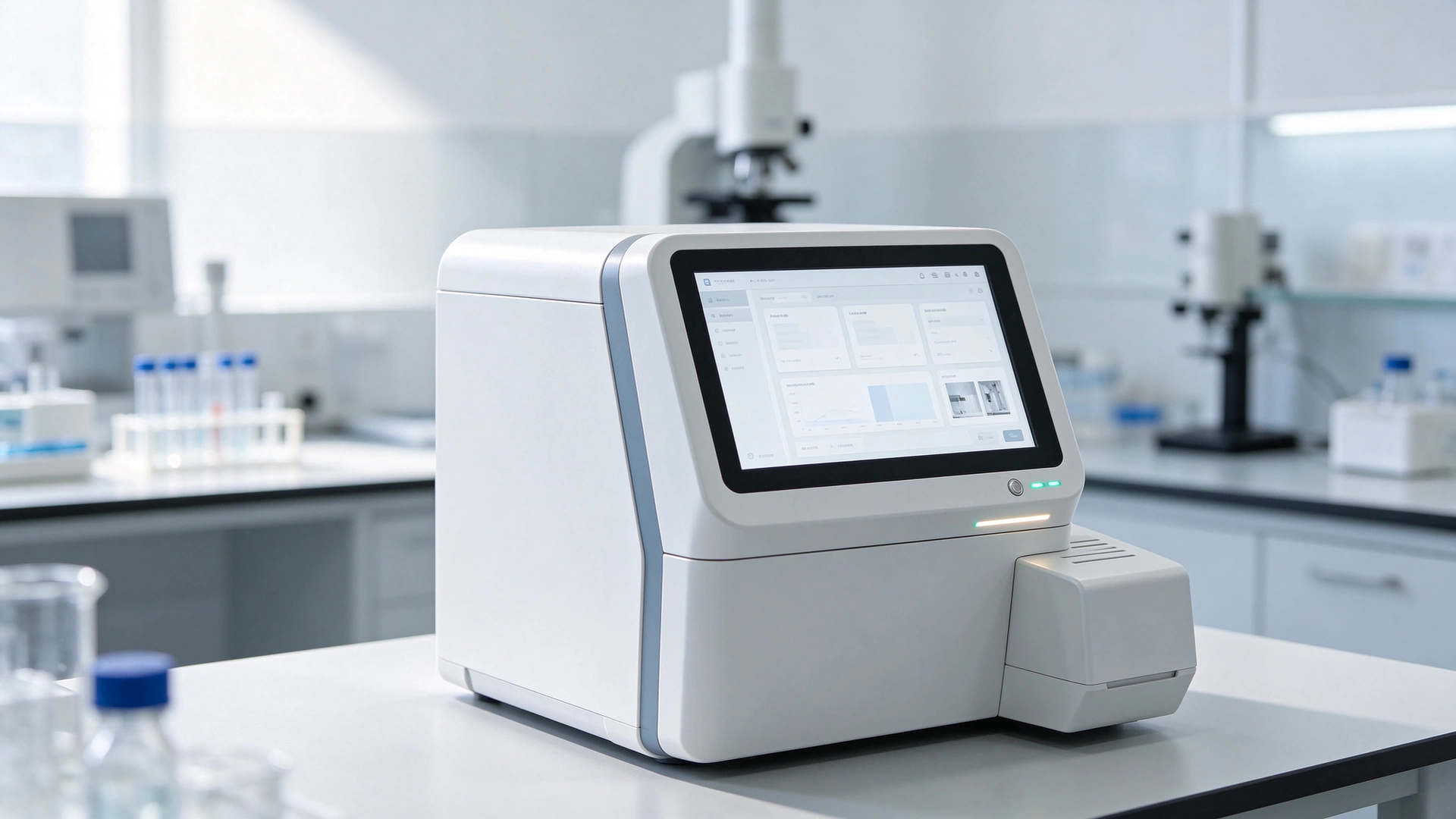
A 10.1 inch open frame touch panel PC flush-mounted into a laboratory analyser. The front bezel matches the housing, the cable exits at the bottom, and the compute board sits inside the dry compartment behind the sealed front.

Line-side HMI in a control cabinet: 21.5 inch wide-temperature panel PC, glove-compatible capacitive touch, RS232 and GPIO to the PLC. Continuous duty, oil mist, and a cabinet that runs warmer than the hall.
Most of the schedule risk in an open frame project sits in the first two weeks, before anything is manufactured. Publishing a realistic sequence up front is more useful to a procurement team than a discount.
| Сцена | Duration | What you receive | What it prevents |
|---|---|---|---|
| Drawing review | 48 hours from a complete file set | Cut-out drawing with tolerances, mounting hole diagram, depth stack, interface layout, feasibility note | Sheet metal cut to the wrong opening; a sample that arrives after the fixture is built |
| Sample build | 7-10 рабочих дней | 1–3 units, configured to the approved drawing | Discovering a clash between connector swing and cabinet wall in production |
| Fit validation | 5–10 days, at your site | Assembly SOP, recommended screw torque, cable routing notes | Assembly-line improvisation, inconsistent units on the same line |
| Pilot batch | 15–20 working days | 20–50 units with batch test record | Scaling a design that only worked as a hand-built sample |
| Массовое производство | 15–20 working days per run | Burn-in tested units, per-unit functional record, export packing | Field failures in the first month of a rollout |
Three commitments sit behind that table. The mounting geometry stays fixed when the panel source changes, so your cabinet, moulds and fixtures keep working. End-of-life components trigger advance notice with a proposed drop-in alternative rather than a surprise in the next purchase order. And batch consistency is verified rather than assumed: every unit is burned in and function-tested, with the record kept against the serial number, because the second hundred units have to assemble exactly like the first three.
Volume expectations are set per project rather than per catalogue line. Pilot quantities are accepted deliberately, since the purpose of a pilot is to prove the fixture, the SOP and the yield before capital is committed. If your rollout is staged across several sites, tell us the sequence at the quotation stage — it changes how we stage the panel and mainboard supply, and it is usually worth more than a price negotiation.
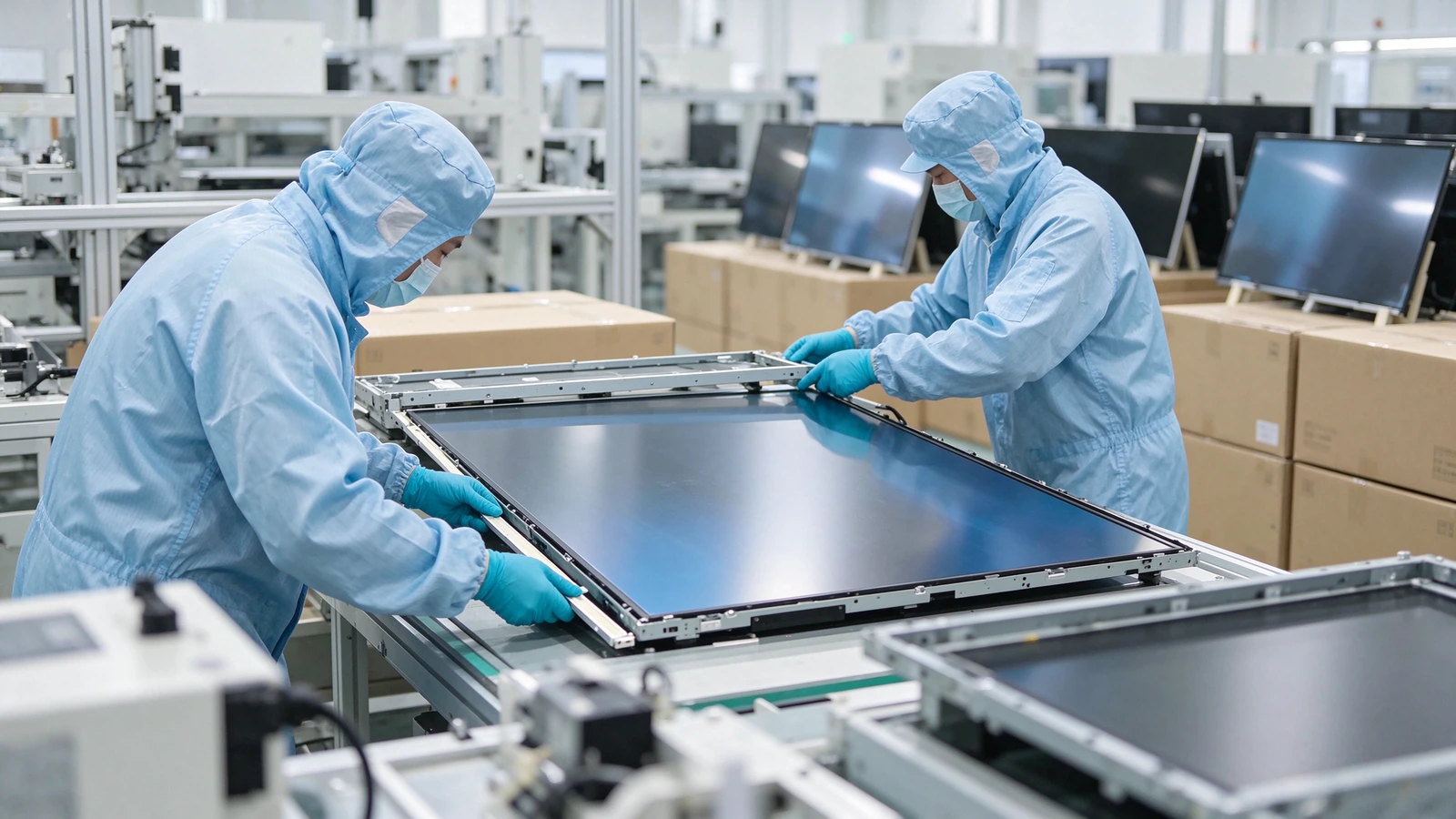
Assembly and sampling at the Qtenboard plant: 16 production lines across the Shenzhen and Guangzhou sites, with the mechanical build, bonding and burn-in handled in-house rather than subcontracted.
The cases below are composites drawn from shipped OEM programs, with customer names withheld. Each one is included because the constraint, not the product, decided the specification.
ConstraintA finished stainless kiosk already in production, 62 mm of usable depth, and a food environment where the screen is wiped down every hour.
РешениеOpen frame touch monitor with an anti-glare, anti-fingerprint bonded front and a front-mount flange matched to the existing opening; infrared rejected in favour of PCAP after a grease-film test.
РезультатFirst sample fitted the existing sheet metal without modification, and the assembly step dropped from a separate bracket-and-gasket routine to a direct flange mount.
ConstraintHousing already tooled, a reagent bay directly behind the display, and a requirement that the front surface resist the lab's own cleaning protocol.
РешениеFanless open frame touch panel PC with all connectors moved to the bottom edge and one unused port deleted; bezel colour matched to the housing; Windows image preloaded and locked.
РезультатOne sample iteration to correct the connector exit, then a pilot batch accepted; component EMC and safety documentation handed over for the system-level submission.
ConstraintUnheated hall in winter, a cabinet that reaches 52 °C in summer, operators in heavy gloves, and RS232 plus GPIO into an existing PLC.
Решение21.5 inch panel PC rated −10 to 60 °C, PCAP retuned for gloved operation, GPIO and serial on the bottom edge, and a cabinet venting plan supplied alongside the drawing.
РезультатTouch response held through a full shift with gloves on, and the thermal margin was verified in the customer's own cabinet rather than assumed from the datasheet.
A price for an open frame monitor factory build without these six inputs is a number, not a plan. With them, the reply can be a cut-out drawing and a feasibility note in two days.
A standard monitor brings its own plastic housing, stand, OSD buttons and consumer power brick, none of which survive the trip into an industrial enclosure. An open frame unit is the panel, backlight, driver board and a metal chassis with mounting flanges — nothing to strip off, nothing to hide, and a depth profile shallow enough to fit behind a 3 mm sheet-metal front. The difference that matters commercially is that the open frame unit is designed to be mounted by someone other than the person who built it, so its drawings and tolerances are published rather than implied.
Yes, when the panel is specified for continuous operation and the thermal design accounts for it. A consumer-grade panel driven continuously at high brightness will show image retention and accelerated backlight ageing, particularly with a static interface. For 24/7 duty, ask for the continuous-operation rating in writing, keep brightness at a level the backlight can sustain, and design a defined heat path out of the cabinet. Factory automation and control-room deployments routinely run for years on units specified this way.
Sampling is deliberate rather than discouraged: 7–10 working days for 1–3 units built to an approved drawing after a 48-hour review. Minimum order quantities are set per project and depend on how much of the mechanical envelope changes — a configuration that keeps the standard hole pattern and bezel needs far less commitment than one that introduces a new opening size or a new chassis. Tell us the rollout plan and the pilot quantity, and the MOQ follows from it rather than from a fixed table.
Usually, yes. Port side, orientation and population are the most frequently customized items on a panel PC build, and they live on the mainboard and the rear plate rather than in the hole pattern. Moving an interface cluster typically costs a revised rear-plate drawing and a sample confirmation, not new tooling for your cabinet. Deleting unused ports is easier still, and reduces both unit cost and the number of places dust and moisture can enter.
Choose the panel PC when depth and assembly time dominate: one power lead, no internal video run, no second enclosure, one serial number in the field. Choose the monitor-plus-host architecture when the compute is refreshed independently, when a discrete GPU or expansion cards are required, or when your service model needs the controller accessible without opening the front of the machine. A useful test: if you would replace the computer more than once during the life of the cabinet, keep them separate.
No, and this is the most common misunderstanding in embedded display projects. A front IP65 rating applies to the sealed front face — the touch surface and the gasket joint — against dust ingress and directed water jets. The rear plate, mainboard, connectors and power section carry no such protection, and must sit in a dry zone inside the cabinet. If your washdown procedure reaches behind the front face, the enclosure around the display has to provide that protection, not the display itself.
One file set — cut-out dimensions, available depth, environment and interface list — is enough for a feasibility review, a proposed configuration and a sample date. The review is free, and it happens before tooling, which is the only point at which a change is still cheap.

CEO | Интерактивный дисплей & Сотрудничество Решение Эксперт
Я являюсь основателем Qtenboard, привнеся более 17 лет практического опыта в индустрию сенсорных дисплеев. Опираясь на перспективы глобального управления, полученные в ходе моих исследований EMBA в Университете Шэньчжэня, я возглавляю свою команду по оптимизации каждого этапа нашей деятельности-от определения продукта до высокоэффективного управления цепочками поставок-гарантируя, что наши производственные возможности остаются на переднем крае отрасли.
Как руководитель Qtenboard, я специализируюсь на предоставлении адаптированных OEM/ODM-решений для интерактивных досок, ЖК-видеостен, цифровых вывесок и сенсорных терминалов промышленного уровня. Опираясь на наш современный промышленный парк площадью 330 000 м² в Шэньчжэне, мы поддерживаем полный контроль жизненного цикла промышленного дизайна, точного производства и тщательного тестирования производительности.
Обладая почти двадцатилетним опытом работы в проектах, решения Qtenboard в настоящее время развернуты в более чем 120 странах и регионах, заслужив доверие более 15 000 корпоративных клиентов по всему миру. Если вы ищете отзывчивого партнера с глубоким учредлением производства для ваших подгонянных проектов дисплея касания, то моя команда и я готовы поддержать ваше зрение с профессиональным передовым опытом.

 ru
 EN
 spa
 pt
 vie
 th
 est
 lav
 aze
 ukr
 bel